Summary: ◀▼
You can use Amazon Connect and the AWS Console to manage call handling, contact flows, routing, permissions, and cloud settings for Contact Center, and you can check the stack version to see whether a feature needs a stack upgrade.
Location: Contact Center > Overview
Contact Center relies on Amazon
Connect and other AWS resources for call handling and integrations. Admins might need to
access these resources to manage configuration or investigate issues. Checking the stack
version helps determine whether a feature requires an update.This article contains the following topics:
Related article:
Accessing Amazon Connect and the AWS console
Access the AWS services you need to manage telephony, contact flows, and infrastructure.
To access Amazon Connect or the AWS Console
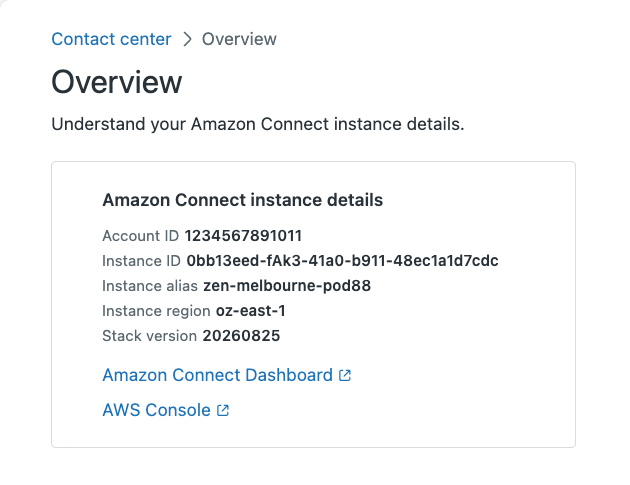
- In Contact Center, click Overview.
- Click Amazon Connect Dashboard or AWS Console:
- Amazon Connect Dashboard: View real-time metrics, manage contact center operations, configure routing profiles, and build contact flows.
- AWS Console: Manage cloud infrastructure, user permissions, and other technical configuration settings.
Note: If you can't access Amazon Connect or the AWS Console, contact your Amazon
services admin.
Checking the Contact Center stack version
The Contact Center CloudFormation stack is a collection of AWS resources that connects Contact Center with Amazon Connect. Knowing its version is useful because some features require stack upgrades.
To check the Contact Center stack version
- In Contact Center, click Overview.
- Under Amazon Connect instance details, check the Stack version
value.