Summary: ◀▼
Use the Reviewer QA dashboard to track reviewer accuracy, evaluation history, and coaching trends with unbiased, randomized QA assignments. You can monitor scores, evaluations, pass rates, category insights, and cross-team performance, then drill into conversation data or download reports to spot training needs and improve calibration quality.
The Reviewer QA dashboard provides teams with automated, consistent insights into reviewers’ accuracy and alignment through randomized evaluation assignments. It supports continuous improvement in review quality by enabling QA leads and managers to monitor, analyze, and act on reviewer performance trends.
Evaluated reviewers can view their own Reviewer QA scores and evaluation history. They can’t see who the evaluator was.
Leads can view their own evaluations in the dashboard as well as all other evaluations conducted within their workspaces.
Managers can oversee organizational calibration quality within their workspaces, connect reviewer performance with coaching, and analyze cross-team trends.
This article covers the following topics:
Related articles
Accessing the Reviewer QA dashboard
The Reviewer QA dashboard lists all your workspaces containing at least one reviewer QA assignment.
To access and filter the Reviewer QA dashboard
- In Quality assurance, click
 Dashboards in the sidebar.
- From the list of dashboards, select Reviewer QA.
- Select any filters you want to apply. See Understanding dashboard filters.
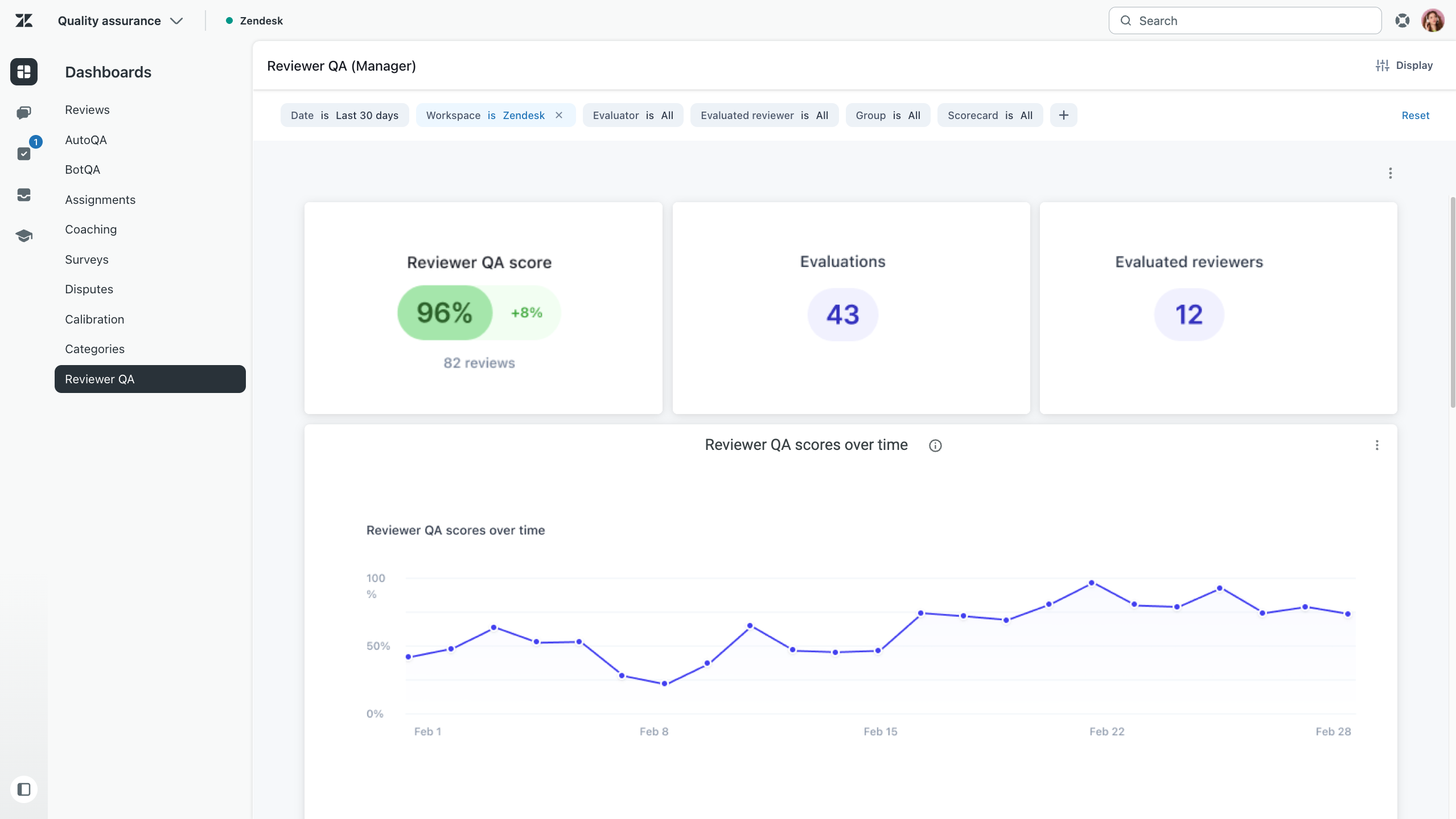
Understanding Reviewer QA dashboard data
The Reviewer QA dashboard includes cards and charts that help you analyze coaching activity and performance.
You can click values in the cards to view goal completion data per conversation. See Accessing additional data points. You can also download dashboard data. See Downloading dashboard data.
The Reviewer QA dashboard includes these cards:
| Card | Description |
| Reviewer QA score | Change in average score percentage (Sum of individual
evaluation scores matching the filter ÷ number of evaluations ) compared
with the same previous period. You can also view the number of reviews evaluated to
understand trend reliability. |
| Evaluations | Total number of Reviewer QA evaluations submitted within the selected time period. |
| Evaluated reviewers | Number of unique reviewers who received at least one Reviewer QA evaluation within the selected time period. |
| Reviewer QA scores over time | Reviewer QA score and evaluation count trends over the selected time period, grouped by date granularity. |
| Evaluated reviewer performance | Performance breakdown by evaluated reviewer, including Reviewer QA score, score growth, total evaluations, unseen evaluations, failed ratings, and pass rate. |
| Category insights | Average rating scores and failed rating counts by scorecard category used in reviewer evaluations. These insights can help you identify which categories receive the highest and lowest quality scores and determine whether specific categories need training sessions. |
| Reason for rating | Total number of root causes and categories used in reviewer evaluations. |