Summary: ◀▼
Connect your voice AI agent to a voice line so it can answer customers as the first responder. You must have a voice plan, and you can turn the agent on for a phone or digital line, choose the agent, and save your changes. This setup helps you automate call routing and start using voice AI agents on supported plans.
If you created a voice AI agent without activating it, you must connect it to a Zendesk voice line before it can interact with customers. These instructions assume that you have already created a voice AI agent and added a phone line or digital line for voice.
To connect an AI agent to Zendesk voice
- In Admin Center, click
 Channels in the sidebar, then select Talk and email > Talk.
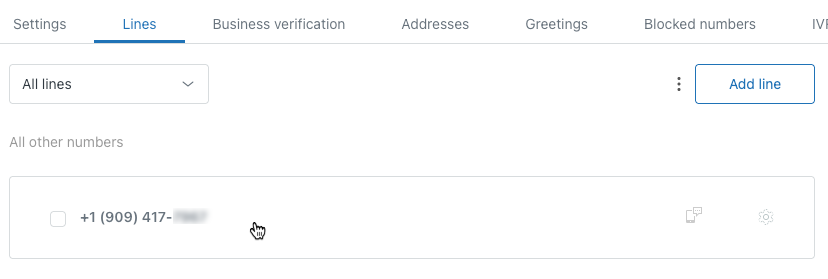
- Select the Lines tab.
- Click your phone line.
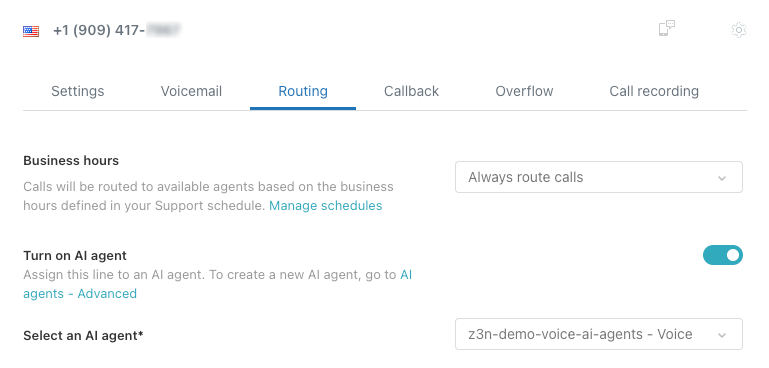
- Select the Routing tab.
- Select Turn on AI agent.
- In Select an AI agent, select the AI agent you created.
- Click Save changes.
Your voice AI agent is now the first responder on the selected voice line.
Related articles: