Summary: ◀▼
You can update an Amazon Connect routing profile to control which queues agents handle, set queue priority and delay, and limit concurrent contacts. This helps you manage agent capacity and set the default outbound queue for agent-initiated calls. If you turn on outbound queue selection, agents can choose an outbound queue for calls.
A routing profile in Amazon Connect defines the queues that agents can handle, the priority and delay for each queue, and the maximum number of simultaneous contacts. It also sets the default outbound queue for agent-initiated calls.
Each agent has one routing profile. To let agents choose an outbound queue, turn on outbound queue selection in Contact Center. For more information, see Configuring outbound queue selection in Contact Center.
For more information about creating routing profiles and linking queues to agents, see Create a routing profile in Amazon Connect to link queues to agents in the AWS documentation.
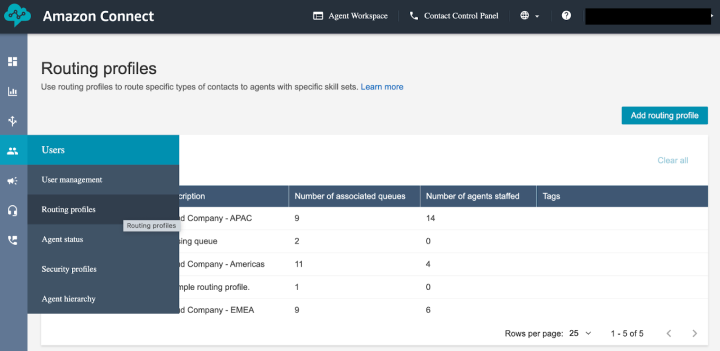
To update a routing profile
- In Amazon Connect, click Users > Routing profiles.
- Click the routing profile you want to edit.
- Update the channels, queues, and concurrency settings as needed.
- Click Save.