Verified AI summary ◀▼
Contact Center dashboards provide insights into your call center activity. The Realtime snapshot dashboard offers near real-time metrics on queues, agent capacity, and status, while the Recent performance dashboard reviews the last 24 hours. Customize these dashboards to monitor specific metrics like average handle time, occupancy, and service level, helping you manage and optimize your support operations effectively.
Contact Center dashboards give you insights into your call center activity:
- Realtime snapshot dashboard shows metrics in nearly real-time.
- Recent performance dashboard shows activity from the last 24 hours.
You can customize the dashboards to your specific monitoring needs.
This article contains the following topics:
About the Realtime snapshot dashboard
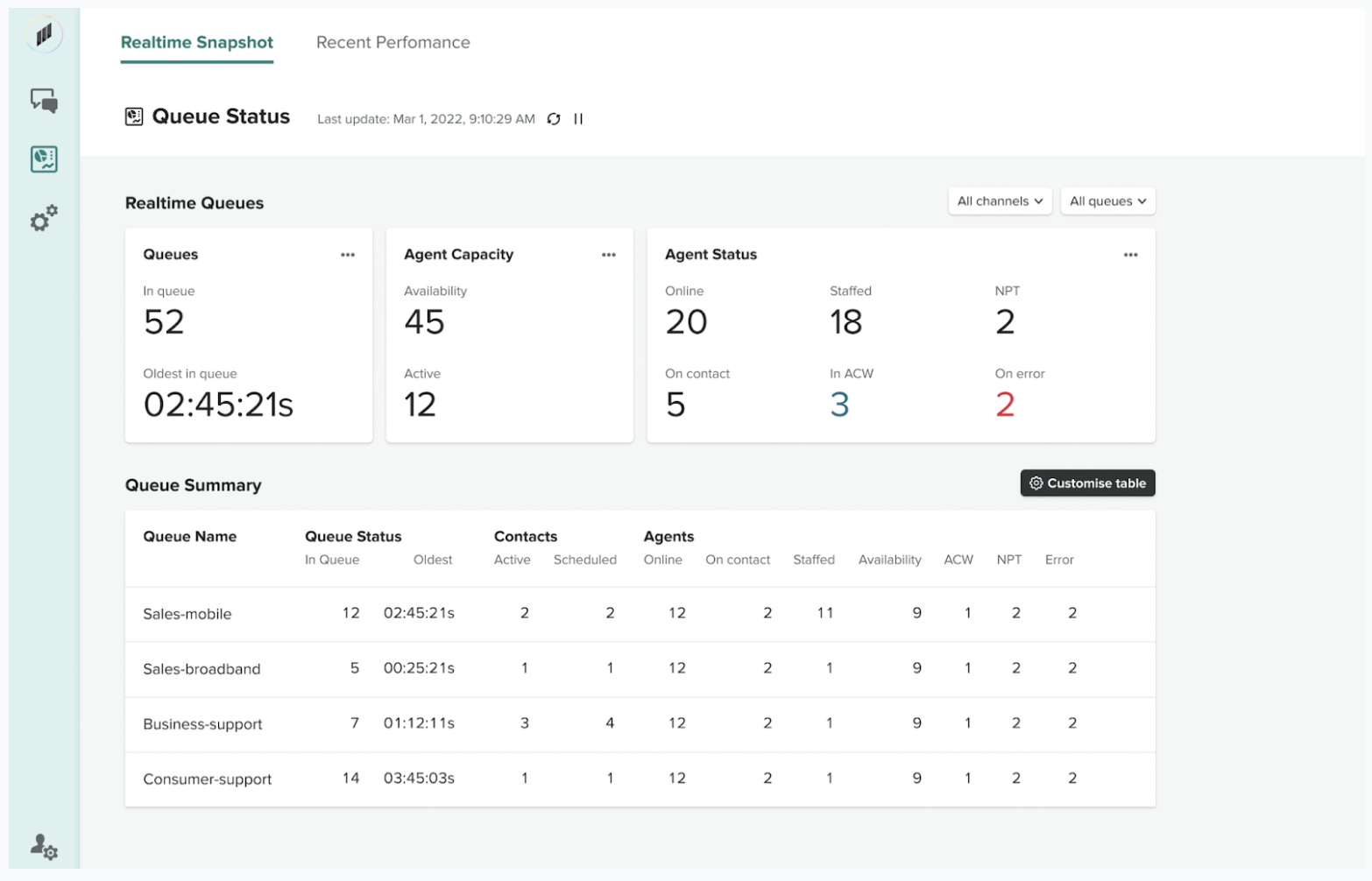
The Realtime snapshot dashboard shows near real-time metrics about activity in your contact center, including details about your queues, agent capacity, and agent status. Only queues that contain data are shown in the queue summary table.
You can filter the dashboard by channel and queue. You can customize the queue summary table by adding and removing metrics.
About the Recent performance dashboard
The Recent performance dashboard provides an overview of your contact center activity over the last 24 hours.
You can filter the dashboard by time range, channel, or queues.
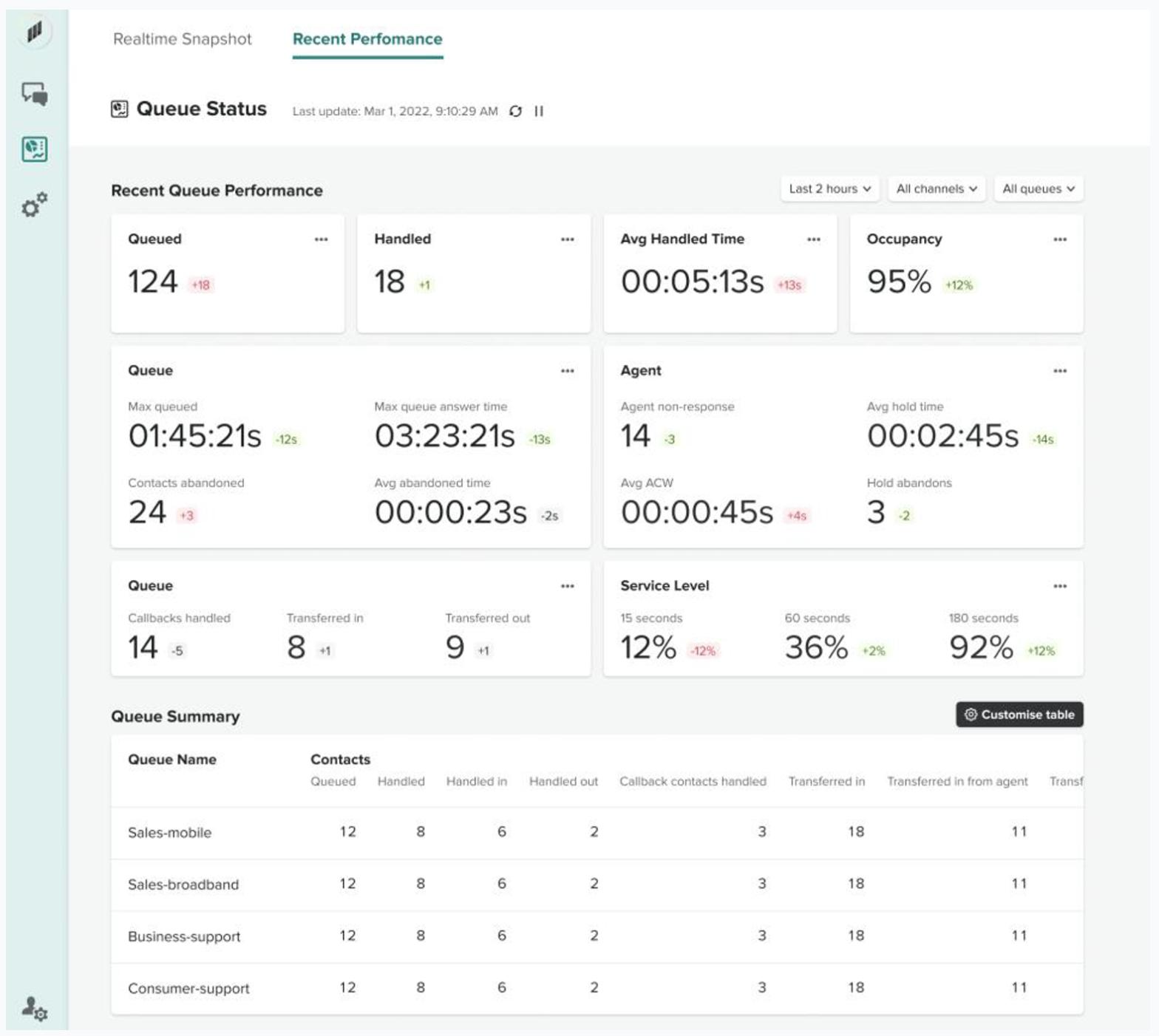
The recent performance dashboard displays the following metrics:
- Change compared to previous period: Change compared to the previous period, indicated by a green, red, or neutral gray arrow.
- Queued: Number of contacts added to the queue during the specified time range.
- Handled: Number of contacts added to the queue that were answered by an agent.
- Handled in: Number of incoming contacts that were handled by an agent, including inbound contacts and transferred contacts.
- Handled out: Number of outbound contacts that were handled by an agent, including contacts that were initiated by an agent using the contact center.
- AHT (average handle time): Average time, from start to finish, that a contact was connected with an agent, including talk time, hold time, and after contact work (ACW) time.
- Occupancy: Percentage of time that an agent was active on contacts.
- Max queued: Longest time that a contact spent waiting in the queue, including all contacts added to the queue, even if they were not connected with an agent, such as abandoned contacts.
- Max queue answer time: Longest time that a contact was in the queue before being answered by an agent.
- Contacts abandoned: Number of contacts disconnected by the customer while in the queue during the specified time range. Contacts queued for callback are not counted as abandoned.
- Average abandoned time: Average time, in seconds, that contacts were in the queue before being abandoned.
- Agent non-responsive: Number of contacts routed to an agent but not answered by the agent, including contacts abandoned by the customer.
- Average hold time: Average time that customers spent on hold while connected to an agent.
- Average ACW: Average time that an agent spent doing after contact work (ACW) for contacts.
- Hold abandons: Number of contacts that disconnected while the customer was on hold.
- Callbacks handled: Number of contacts handled by an agent that were queued callbacks.
- Transferred in: Number of contacts transferred into the queue during the specified time range.
- Transferred out: Number of contacts transferred out of the queue to another queue during a customer queue flow.
- Service level: Percentage of contacts removed from the queue. A contact is removed from a queue when an agent answers the contact, the customer abandons the contact, or the customer requests a call back.