Verified AI summary ◀▼
Quick connects let you transfer calls to a queue, agent, or external number with fewer steps. You can set up multiple quick connects in routing profiles, giving agents flexible transfer options. When creating a quick connect, specify the type, destination, description, and phone type, ensuring the use of E.164 format for external numbers. This streamlines call handling and enhances customer interactions.
Quick connects in Amazon Connect are shortcuts for transferring contacts to a queue, a specific agent, or an external number. They help agents efficiently handle contacts by reducing the steps required for a transfer.
Quick connects are available to agents in routing profiles. You can assign multiple quick connects to a routing profile, providing agents with various transfer options based on the current contact or situation.
To create a quick connect
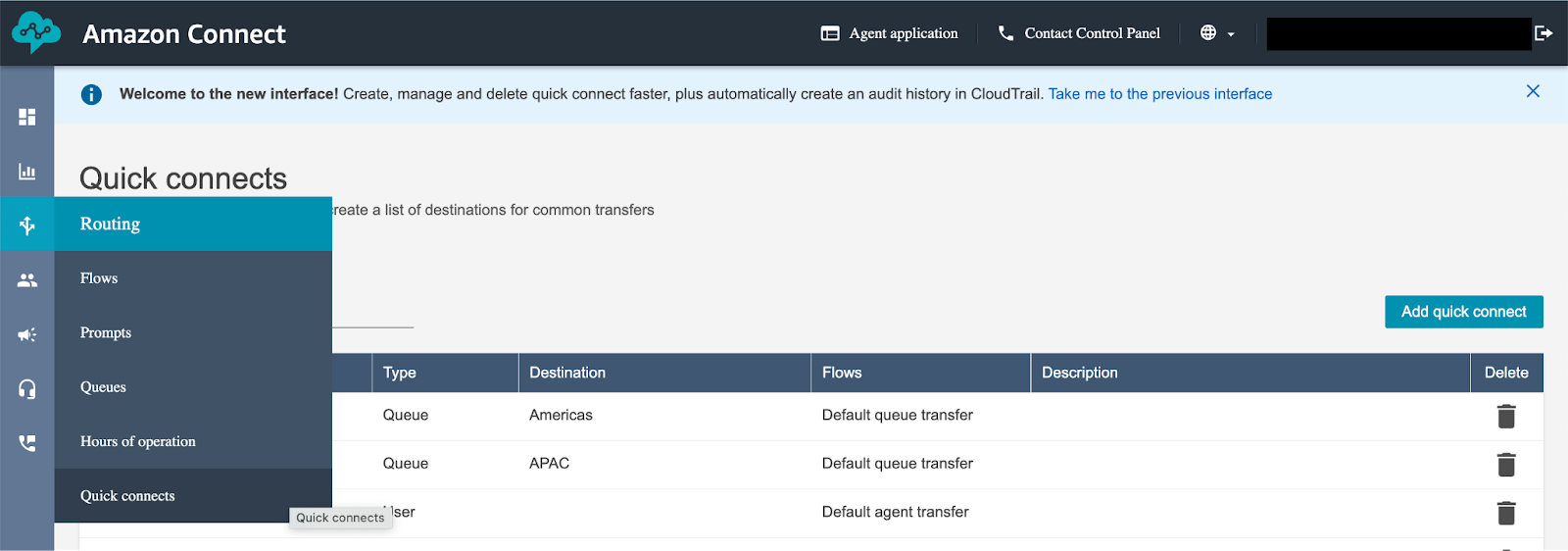
- In the Amazon Connect Dashboard, select Routing > Quick connects.
- Click Add quick connect.
- Complete the following:
- Type determines where the contact can be transferred. It could be a queue, a user, or an external number.
- Destination indicates the specific queue, user, or number where the contact will be transferred.
- Description is a short note to describe the purpose of the quick connect.
- Phone type is either a soft phone or a desk phone. For external numbers, you also specify whether it's a Direct Inward Dial number (DID) or a toll-free number. For quick connects to external phone numbers, E.164 format is required.
- Click Save.