In generative procedures, you can add context that gives your AI agent guidance on how to execute the procedure.
This article contains the following topics:
- About context in generative procedures
- Adding context to a generative procedure
- Common reasons to add context to generative procedures
- Best practices for adding context to generative procedures
Related articles:
About context in generative procedures
Additional context lets you provide supplementary guidance to a messaging AI agent about how to execute specific parts of a generative procedure. You write this context as instructions or notes in natural language, and the system transforms them into information the AI uses to make better decisions.
For example, you might write:
- "Use the customer's VIP status when deciding how to respond."
- "Don't escalate even if the customer asks."
- "Search for orders from the past 30 days only."
- "Use a friendly tone when delivering this message."
You can add context to a procedure at three levels, from broadest to most specific. Context follows a hierarchical model, meaning broader context automatically applies to more specific levels.
| Level | Applies to | Example |
| Procedure | Everything in the procedure | “Refund policy is 30 days for unopened items, or store credit for opened items within 14 days. No refunds on clearance. If the customer asks an off-topic question, politely redirect them to the refund issue.” |
| Step | That step and all blocks within it | “Use 'purchase_date' and 'order_status' session variables. Calculate if purchase is within 30 days.” |
| Block | Only that specific block | “Include refund amount, processing time (5-7 business days), and method (original payment method). Use a friendly, reassuring tone.” |
Block-level context is available only for the following block types:
- Generate answer: Use context to reference session parameters, provide knowledge context, and guide tone.
- Ask question: Use context to provide validation rules and clarification guidance. Ask question blocks cannot directly access session variables. Instead, use session variables in Generate answer or Check condition blocks.
- Check condition: Use context to guide how conditions are interpreted. This applies only to the condition evaluation, not blocks inside the resulting paths. Blocks inside condition paths receive procedure-level and step-level context, but not the Check condition block's own context.
The system may also automatically add context based on the content supplied by an admin or agent when creating or editing the procedure. You can edit or remove this generated context as needed.
Keep in mind that context added to a generative procedure cannot:
- Create, remove, or reorder steps and blocks. To do that, edit the procedure.
- Guarantee exact AI behavior. It merely provides guidance that the AI interprets.
- Control navigation or flow decisions. Instead, use Check condition blocks.
Adding context to a generative procedure
You can add or edit context in a generative procedure at any time. Note that there might already be text in the context fields added by the system.
To add context to a procedure
- Open a generative procedure.
- Select a location to add context.
Your options are:
-
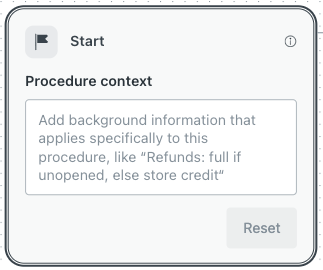
Procedure: Select the Start block and add context in
Procedure context.
-
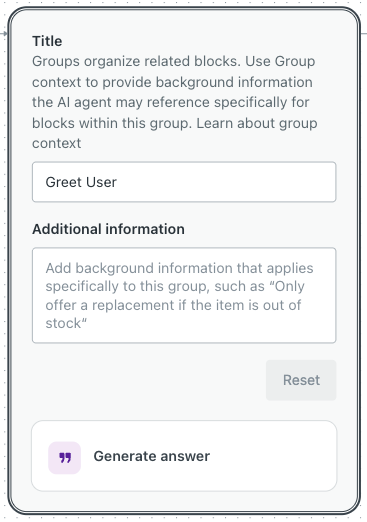
Step: Select the shaded area around a subset of blocks and add
context in Additional information.
You can also update the Title of the step. This information does not appear to customers, but is helpful for admins or agents maintaining the procedure.
-
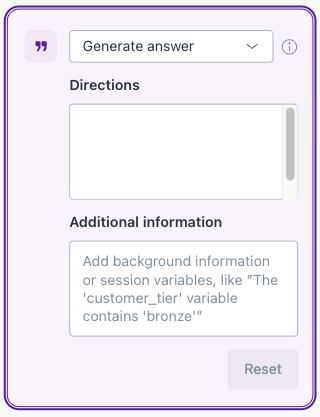
Block: Select a specific block and add context in Additional
information.
-
Procedure: Select the Start block and add context in
Procedure context.
- Click Save version.
- If you want to make your edits live to customers, click Publish
procedure.
If you want to discard your edits, restore a previous version of the procedure.
Common reasons to add context to generative procedures
The following are common reasons to add context to a generative procedure:
Reference session variables
- Level: Block (Generate answer)
- Objective: Tell the AI agent which session variables to use and how.
- Example: "The 'order_total' session variable contains the order value. Use this when explaining the refund amount."
Provide policy context
- Level: Block (Any supported block type)
- Objective: Give background information that helps the AI agent answer questions or make decisions.
- Example: "Standard shipping: 5-7 days. Express: 2-3 days. International: up to 14 days."
Add validation rules
- Level: Block (Ask question)
- Objective: Specify what constitutes a valid answer when asking questions.
- Example: "Order numbers are 8 digits starting with 'ORD'. If invalid, ask the customer to check their confirmation email."
Handle edge cases
- Level: Procedure or step
- Objective: Guide the AI agent on unexpected responses or objections.
- Example: "If the customer asks to speak to a human, politely explain you can help resolve most issues quickly. Escalate only if they insist twice."
Control tone
- Level: Block (Generate answer)
- Objective: Tell the AI agent how to communicate in specific situations.
- Example: "Use an empathetic, apologetic tone. Acknowledge the inconvenience and offer alternatives."
Guide search queries
- Level: Block (Search for knowledge)
- Objective: Tell the AI how to formulate searches.
- Example: “Always use {{variableName}} in search query.”
Help with conditions
- Level: Block (Check condition)
- Objective: Clarify how to interpret complex conditions.
- Example: "Consider: purchase date (within 30 days), product condition (unopened), and account status (good standing)."
Best practices for adding context to generative procedures
Keep the following best practices in mind as you add context to a generative procedure:
- Keep an appropriate scope: Procedure context should apply broadly, while step or block context should be specific to that step or block's purpose.
- Be specific: Include specific details about how the AI agent should respond. For example, “If the customer mentions 'broken', ask for photos and purchase date.”
- Reference session variables clearly: Use the actual name of session variables. For example, “The 'customer_tier' variable contains 'bronze', 'silver', or 'gold'.”
- Be consistent: Use similar language across context fields.
- Provide information and guidance: Help the AI agent understand nuances, but don’t attempt to control the procedure structure using context.
- Start small: Keep context concise, add context incrementally, and test after each addition.
- Test and monitor performance: Always test your procedures thoroughly after adding context to ensure they behave as expected. Review conversation logs and refine unclear guidance.
- Document your work: Keep notes on what context you added and why.
- Don’t include sensitive data: Never add API keys, passwords, or internal system details in context.