Summary: ◀▼
URL filters let you narrow a web crawler sync by including or excluding specific pages with exact URLs, prefix matches, and wildcard patterns. You can avoid syncing admin or employee-only content, control which paths are crawled, and reduce manual setup. The article explains how include and exclude rules work, plus common pattern examples like single-level, multi-level, and subdomain matches.
When you set up a web crawler, you can choose to configure advanced settings that let you fine-tune your sync by adding URL filters. URL filters let you use wildcard patterns to define specific paths that narrow the scope of a website sync.
Instead of syncing everything under a broad starting point, you can define which URLs should be included and which should be excluded. You can use exact URLs, prefix matches, and wildcard patterns to narrow the sync scope, which helps reduce manual setup and avoid syncing irrelevant pages such as admin or employee-only sections.
- Exclude filters are evaluated first. If a URL matches an exclude filter, it will be rejected, even if it matches an include filter.
- Include filters act as an allowlist when specified
- If no filters are configured, all URLs are allowed.
Understanding URL filter patterns
When you set up a web crawler, you can use the optional URL discovery tab in the set up flow to define URL filters that use wildcards to specify the exact pages you want to sync. When using URL discovery, you can choose to either include or exclude pages that match the paths and patterns you specify.
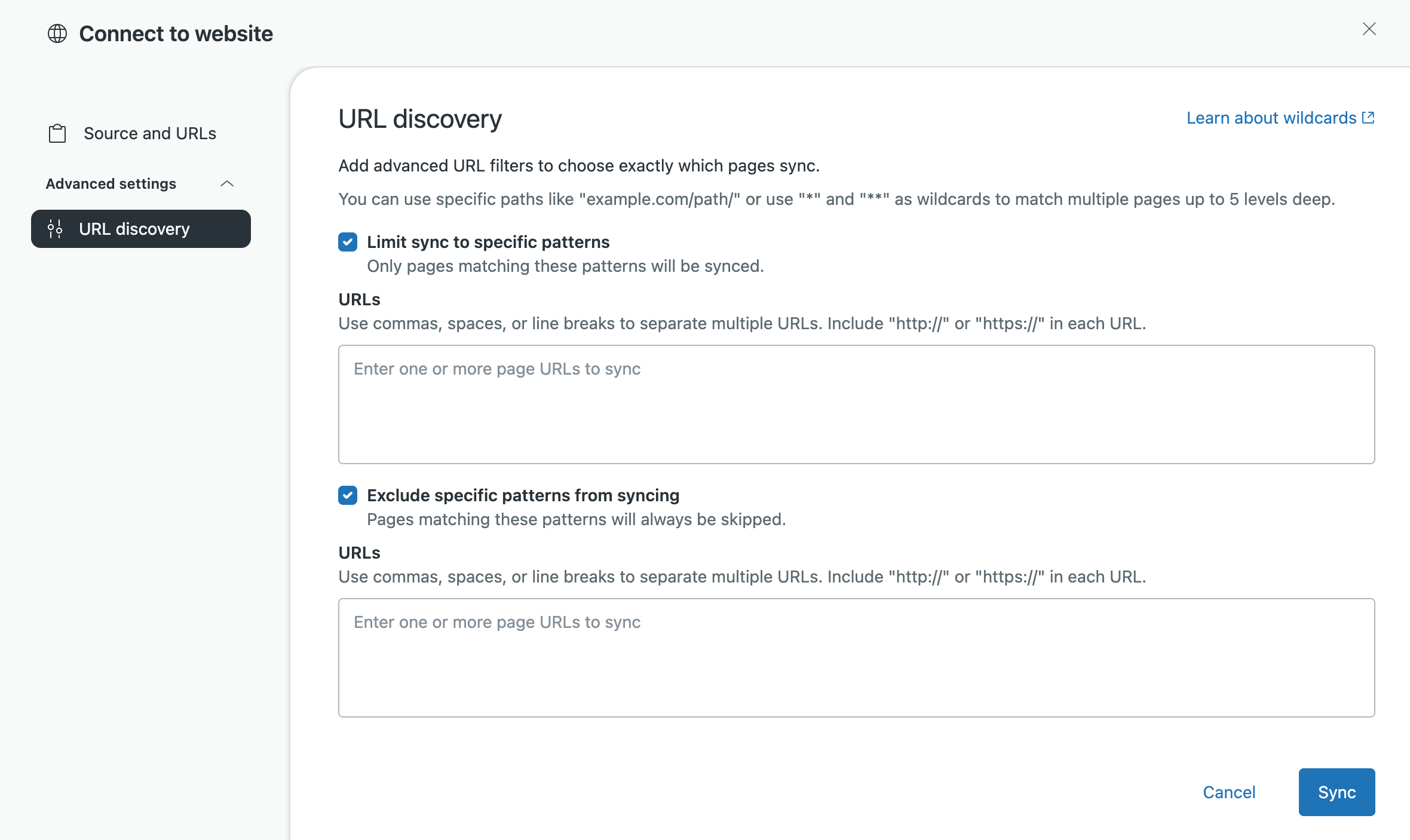
URL filters support exact matches, prefix matches, and wildcard patterns. The pattern you enter determines whether the sync includes or excludes a single URL, one level of a path, or multiple levels of a site structure. The following image shows the URL discovery page in the web crawler setup flow where you can configure URL filters that will include or exclude specific web pages.
The same pattern can behave differently depending on whether you use it as
an inclusion or exclusion filter. For example, if you use
https://example.com/solutions/* as an inclusion filter, pages
one level below /solutions/ are included, but deeper paths are not.
If you use the same pattern as an exclusion filter, those one-level pages are
excluded, but deeper paths are not excluded.
If you exclude an exact URL or path, all URLs under that excluded URL are also excluded from the sync.
Use the following guidelines when creating URL filters:
- An exact URL with no wildcard and no trailing slash matches only that specific URL.
- A trailing slash with no wildcard acts as a prefix match for content under that directory.
-
*matches characters within a single path or domain segment and does not cross/. -
**matches across path segments, including/. - Wildcard patterns can be used in both inclusion and exclusion filters.
- In patterns such as
/path/**/docs,**requires at least one intermediate segment, so/path/docsdoes not match.
- The code strips whitespace from URLs before processing
- Non-percent-encoded unicode URLs are marked as malformed
- URL filters are applied before robots.txt rules
- Off-domain URLs are silently dropped before filter evaluation
- Pattern (glob) matching is case-sensitive
Common URL filter patterns
The following table illustrates common URL filter patterns and their matches.
| Pattern | Meaning | Matches | Does not match |
|---|---|---|---|
| https://example.com/solutions | Exact URL match only | https://example.com/solutions | https://example.com/solutions/page1 |
| https://example.com/solutions/ | Prefix match for anything under that directory | https://example.com/solutions/, https://example.com/solutions/page1 | https://example.com/solutions |
| https://example.com/solutions/* | Matches one level below /solutions/ | https://example.com/solutions/page1, https://example.com/solutions/education | https://example.com/solutions/education/podcasting |
| https://example.com/solutions/** | Matches all levels below /solutions/ | https://example.com/solutions/page1, https://example.com/solutions/education/podcasting | https://example.com/solutions |
| https://example.com/*.html | Matches .html files in the root path only | https://example.com/page.html, https://example.com/index.html | https://example.com/docs/page.html |
| https://example.com/**/*.html | Matches .html files below the root at any depth | https://example.com/docs/page.html, https://example.com/a/b/c/index.html | https://example.com/page.html |
| ttps://example.com/path/**/docs | Matches /docs at any depth under /path/ | https://example.com/path/foo/docs, https://example.com/path/foo/bar/docs | https://example.com/path/docs |
| https://*.example.com/** | Matches any subdomain of example.com | https://blog.example.com/page, https://shop.example.com/products/item | https://example.com/page |
| https://*.com/** | Matches any .com domain | https://example.com/page, https://other.com/docs/guide, https://sub.example.com/page | https://example.org/page |