| Announced on | Rollout starts | Rollout ends |
| July 29, 2026 | July 29, 2026 | August 4, 2026 |
Zendesk is introducing task events, a new event history experience for task lists that gives teams greater visibility into task list activity over time.
This article includes the following sections:
What's changing?
With this release, users can see key task list and task-level actions, including when a task list was added, completed, or reopened, and when individual tasks were marked complete or incomplete. Where applicable, task events will also show who performed the action.
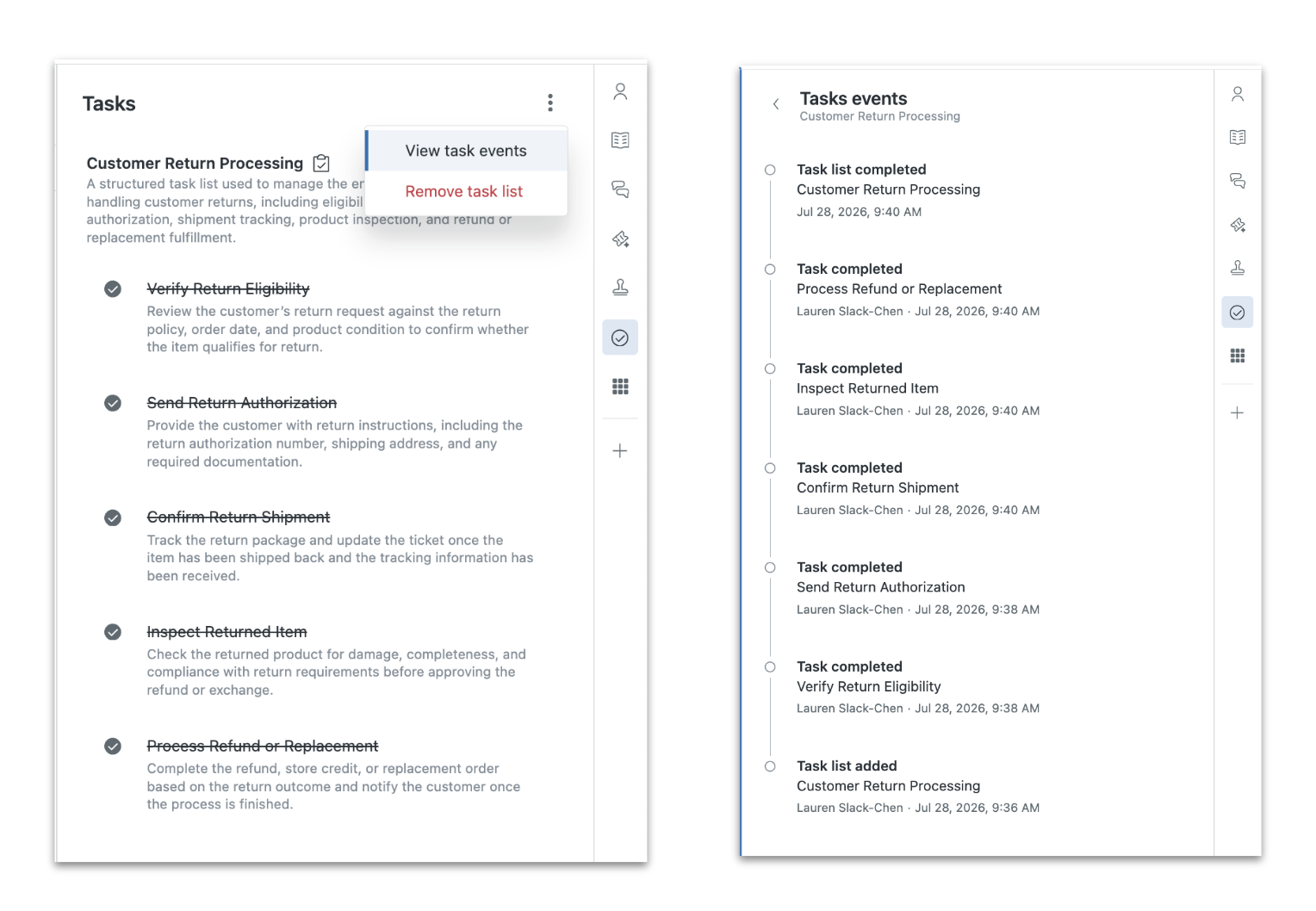
This gives teams a clearer audit trail for task management, making it easier to understand what happened, when it happened, and who or what initiated the change. For customers who are required to provide audit logs for task management in order to maintain strict standards of process compliance, this release provides stronger visibility and traceability directly within Zendesk.
Key capabilities include:
- View key task list lifecycle events, including when a task list was added, completed, or reopened.
- View individual task state changes, including when tasks were marked complete or incomplete.
- See who performed an action where applicable, including user-driven activity.
- Access task event history from the task list experience.
- Improve transparency for compliance, auditing, troubleshooting, and operational review.
For more information, see Using task lists within tickets.
Why is Zendesk making this change?
Zendesk recognizes that task lists are often used to support structured, operationally important workflows where process adherence matters. Teams rely on task lists to ensure required steps are completed, coordinate handoffs, and maintain consistency across ticket work.
Until now, customers had limited visibility into task list activity after changes occurred. This made it difficult to answer important questions like when a task was completed, whether it was reopened, or who made a specific update. For teams operating in compliance-sensitive environments, that lack of visibility could create challenges when reviewing process execution or providing evidence that required work was completed.
Task events help address these gaps by giving teams a clearer record of task list activity. This improves accountability, supports audit readiness, and strengthens task lists as a reliable system of record for process-driven workflows.
What do I need to do?
- Review workflows where task lists are used to support required procedures, compliance processes, or operational handoffs.
- Use task events to inspect key task list and task-level activity directly within the task list experience.
- Train admins, team leads, and agents on where to find task event history when reviewing ticket work.
- Consider how task events can support internal audit, compliance review, or process troubleshooting needs.
- Note that event history will be available for supported task list activity moving forward; some older task lists may not have historical event data available.
For more information on the value of tasks, how they are used, and how to implement them, see A closer look at Zendesk task lists.
Your input is invaluable to us. We encourage you to share your experiences, questions, or suggestions in our Zendesk community forum, where you can connect with peers and product experts. For direct assistance with getting started or troubleshooting, contact Zendesk Customer Support.