Analyst copilot features a prebuilt dashboard that provides a comprehensive, at-a-glance view of your organization’s overall AI agent performance.
This article contains the following topics:
Accessing the AI agents dashboard
To access the AI agents dashboard
- In Analytics, click the analyst copilot
icon (
 ).
). - On the analyst copilot home page, search for, then click the AI agents
dashboard.
The dashboard opens on the Conversations tab.
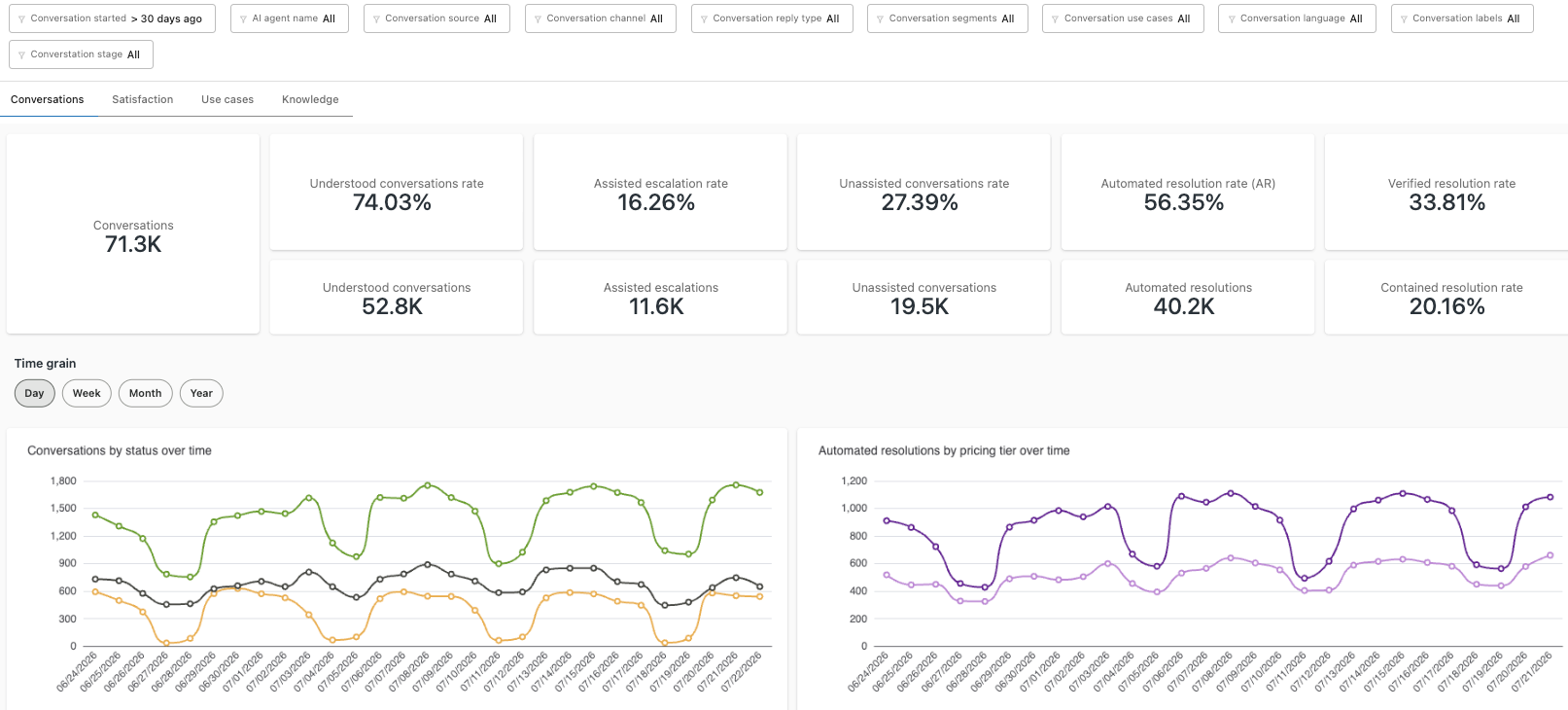
Understanding the AI agents dashboard reports
- Conversations: General information about AI agent conversations in your account.
- Satisfaction: Information about requested and submitted customer satisfaction surveys.
- Use cases: Information about conversations that referenced use cases.
- Knowledge: Information about how your AI agents interacted with articles in your help center and with other external sources.
All reports can be filtered by conversation start date, AI agent name, conversation source, conversation channel, conversation reply type, conversation segments, conversation use cases, conversation language, conversation labels, and conversation stage.

Understanding the Conversations tab
The conversations tab contains general information about AI agent conversations in your account.
Conversations tab headline metrics
The conversations tab contains the following headline metrics (KPIs):
- Conversations: The total volume of conversations.
- Understood conversations rate: The percentage of conversations where the AI agent was able to correctly interpret the customer’s intent and follow the correct workflow, whether it resulted in a resolution or an escalation.
- Understood conversations: The number of conversations where the AI agent was able to correctly interpret the customer’s intent and follow the correct workflow, whether it resulted in a resolution or an escalation.
- Assisted escalation rate: The percentage of conversations where the AI agent helped, then escalated to a human agent.
- Assisted escalations: The number of conversations where the AI agent helps, then escalates to a human agent.
- Unassisted conversations rate: The percentage of conversations where the AI agent only triggered system replies (such as greetings or small talk), and did not perform any meaningful automation, generative replies, or knowledge-based answers.
- Unassisted conversations: The number of conversations where the AI agent only triggered system replies (such as greetings or small talk), and did not perform any meaningful automation, generative replies, or knowledge-based answers.
- Automated resolution rate (AR): The percentage of customer issues that were fully resolved by an AI agent, without any human agent intervention.
- Automated resolutions: The number of customer issues that were fully resolved by an AI agent, without any human agent intervention.
- Verified resolution rate: The percentage of customer issues that were fully resolved by an AI agent, and where the resolution was confirmed by Zendesk’s verification process.
- Contained resolution rate: The percentage of conversations where the AI agent resolved the conversation without follow-up from the customer.

Conversations tab reports
The conversations tab contains the following reports:
-
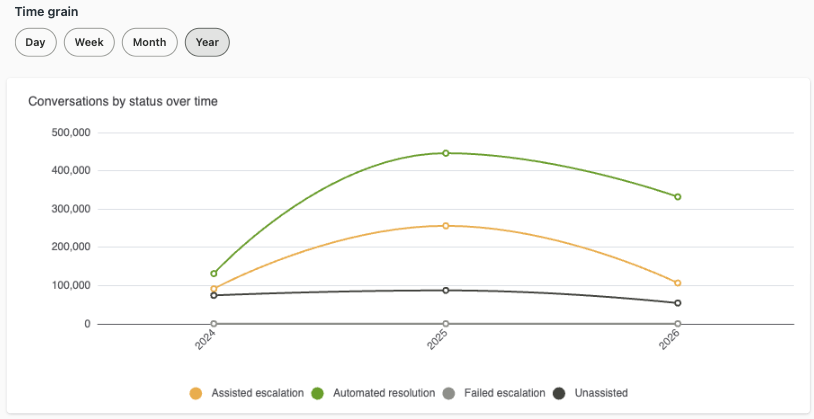
Conversations by status over time: Displays the number of
conversations over time and their status. You can select a Time grain
setting to control the date range displayed.
-
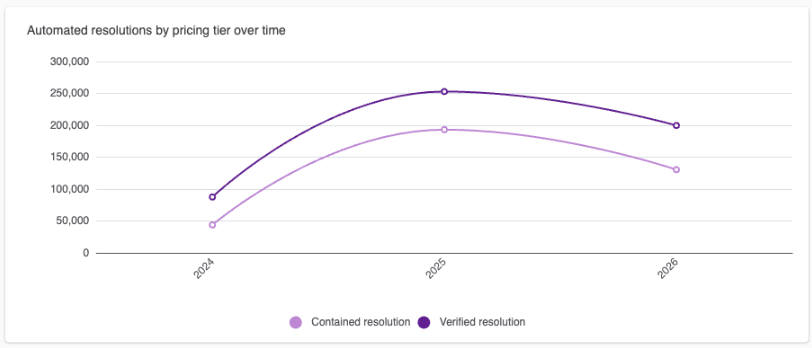
Automated resolutions by pricing tier over time: Displays the number
of contained and verified resolutions over time. You can select a Time
grain setting to control the date range displayed.
-
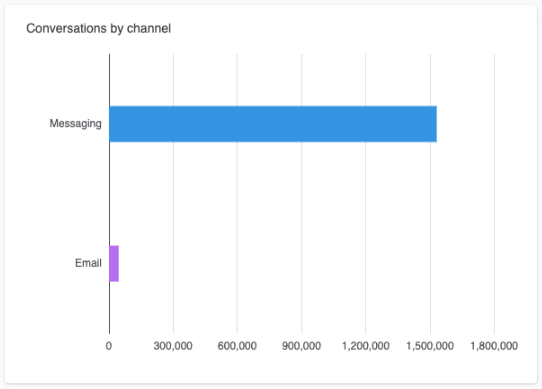
Conversations by channel: Displays the total number of conversations
for each of your channels.
-
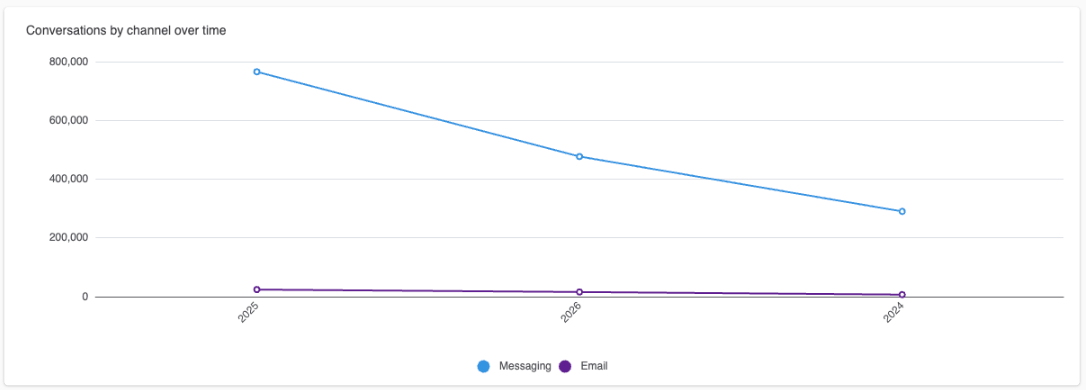
Conversations by channel over time: Displays the total number of
conversations for each of your channels over the time period
selected.
Understanding the Satisfaction tab
The satisfaction tab contains information about requested and submitted customer satisfaction surveys.
Satisfaction tab headline metrics
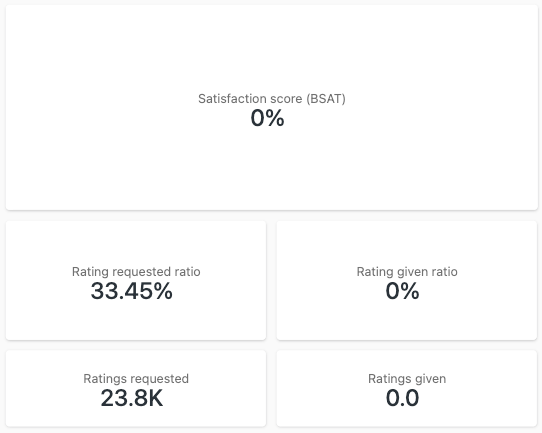
The satisfaction tab contains the following headline metrics (KPIs):
- Satisfaction score (BSAT): The percentage of conversations that were rated with a BSAT (bot satisfaction) score by customers.
- Rating requested ratio: The percentage of conversations for which the customer was asked to provide a satisfaction rating (BSAT), and a rating was submitted by the customer.
- Ratings requested: The number of conversations where a rating was requested from the customer.
- Rating given ratio: The percentage of conversations for which a rating was given by the customer.
- Ratings given: The number of conversations for which a customer submitted a rating.
Satisfaction tab reports
The satisfaction tab contains the following reports:
-
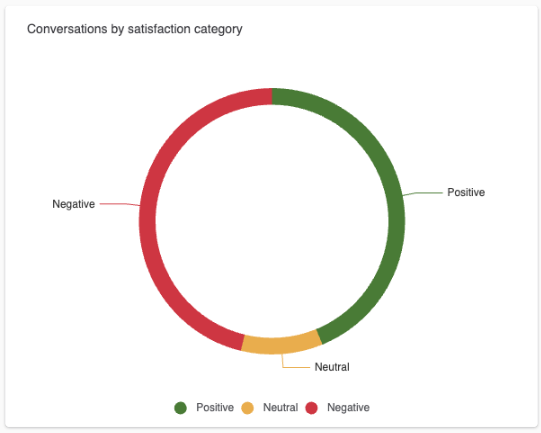
Conversations by satisfaction category: Displays customer survey
results, either positive, negative, or neutral.
-
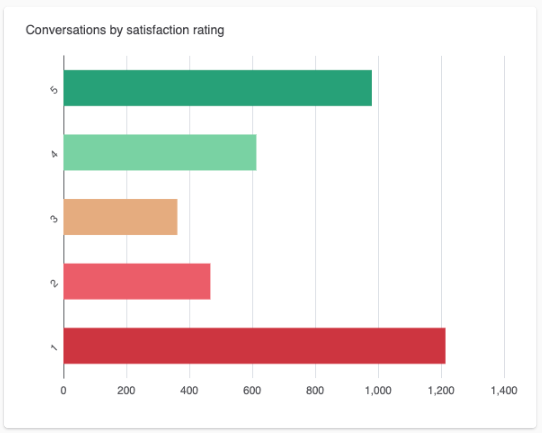
Conversations by satisfaction rating: Displays your conversations
sorted by rating (1-5).
-
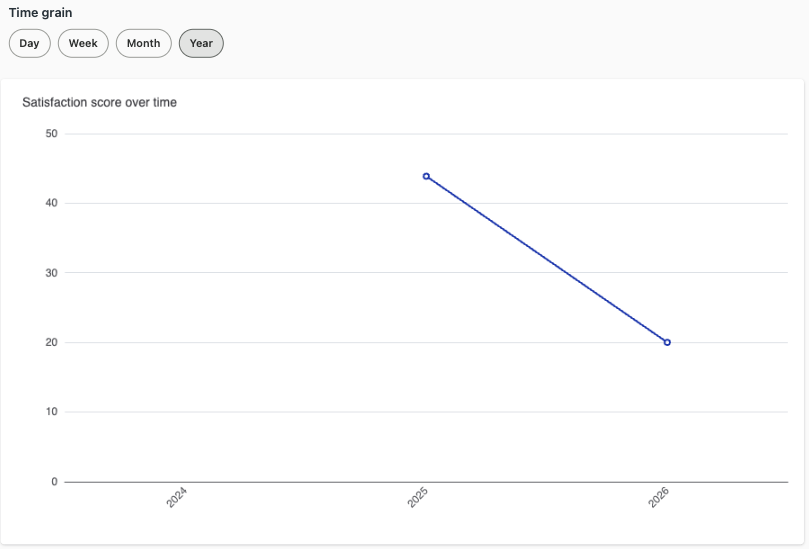
Satisfaction score over time: Displays the percentage of rated
conversations over time. You can select a Time grain setting to
control the date range displayed.
-
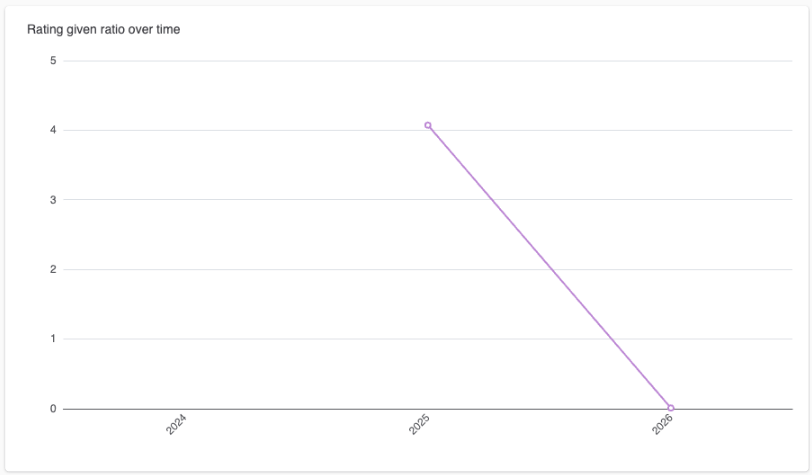
Rating given ration over time: Displays the percentage of ratings
given over time. You can select a Time grain setting to control the
date range displayed.
Understanding the Use cases tab
The use cases tab contains information about conversations that referenced use cases. A use case represents a distinct topic customers may need help with, such as “order returns,” “refund requests,” or “technical troubleshooting.”
Use cases tab headline metrics
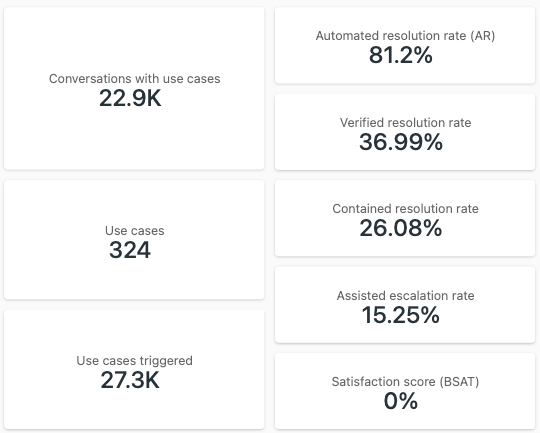
The use cases tab contains the following headline metrics (KPIs):
- Conversations with use cases: The number of conversations where the AI agent is able to recognize the specific topic or reason for contact and take an appropriate automated action or route the conversation accordingly.
- Use cases: The number of use cases defined in your account.
- Use cases triggered: The number of conversations where a use case was triggered.
- Automated resolution rate (AR): The percentage of customer issues that were fully resolved by an AI agent, without any human agent intervention.
- Verified resolution rate: The percentage of customer issues that were fully resolved by an AI agent, and where the resolution was confirmed by Zendesk’s verification process.
- Contained resolution rate: The percentage of conversations where the AI agent resolved the conversation without follow-up from the customer.
- Assisted escalation rate: The percentage of conversations where the AI agent helped, then escalated to a human agent.
- Satisfaction score (BSAT): The percentage of conversations that were rated with a BSAT (bot satisfaction) score by customers.
Use cases tab reports
The use cases tab contains the following reports:
-
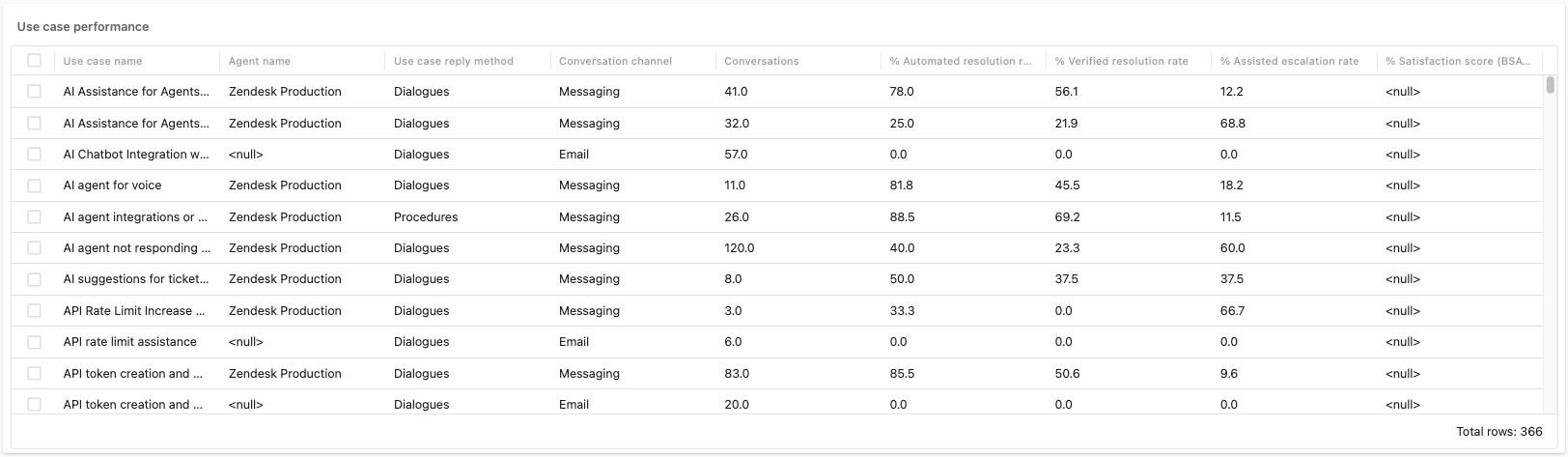
Use case performance: Displays information about the use cases in
your account and their usage. For each use case, information about
resolutions, escalations, and satisfaction is shown.
-
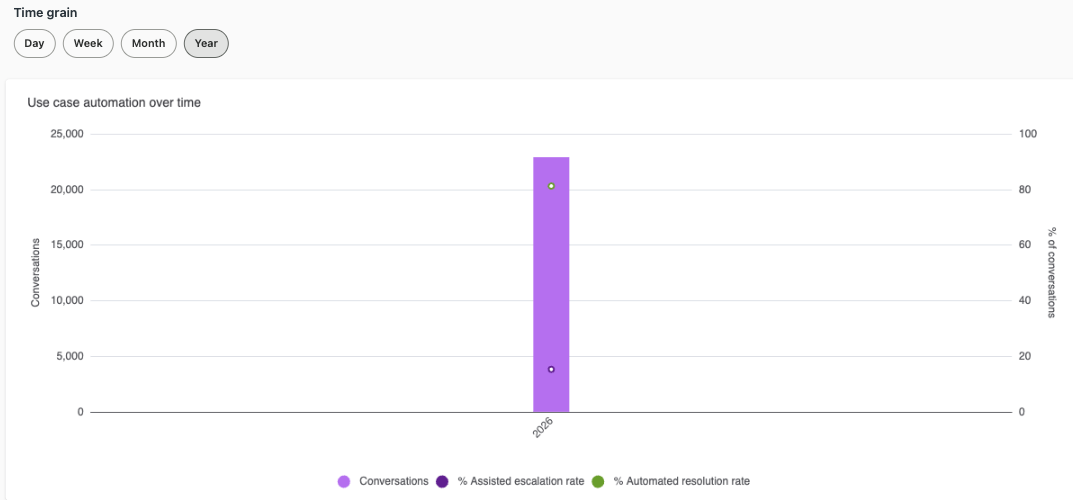
Use case automation over time: Displays information about
conversations, escalation rates, and resolution rates over time.
Understanding the Knowledge tab
The knowledge tab contains information about how your AI agents interacted with articles in your help center and with other external sources.
Knowledge tab headline metrics
The knowledge tab contains the following headline metrics (KPIs):
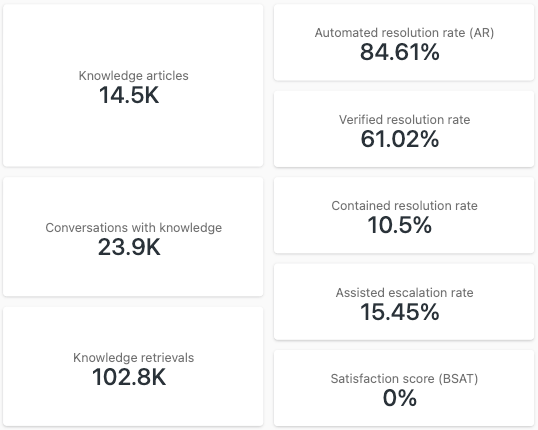
- Knowledge articles: The total number of articles in your account.
- Conversations with knowledge: The number of conversations where the AI agent resolves or addresses a customer’s question by providing answers generated directly from connected knowledge sources.
- Knowledge retrievals: The number of times that the AI agent finds and surfaces relevant articles from your connected help center content or from external sources. This is generally used for customer or agent questions that don’t have a clear, predefined intent or workflow.
- Automated resolution rate (AR): The percentage of customer issues that were fully resolved by an AI agent, without any human agent intervention.
- Verified resolution rate: The percentage of customer issues that were fully resolved by an AI agent, and where the resolution was confirmed by Zendesk’s verification process.
- Contained resolution rate: The percentage of conversations where the AI agent resolved the conversation without follow-up from the customer.
- % Assisted escalation rate: The percentage of conversations where the AI agent helped, then escalated to a human agent.
- Satisfaction score (BSAT): The percentage of conversations that were rated with a BSAT (bot satisfaction) score by customers.
Knowledge tab reports
The knowledge tab contains the following reports:
-
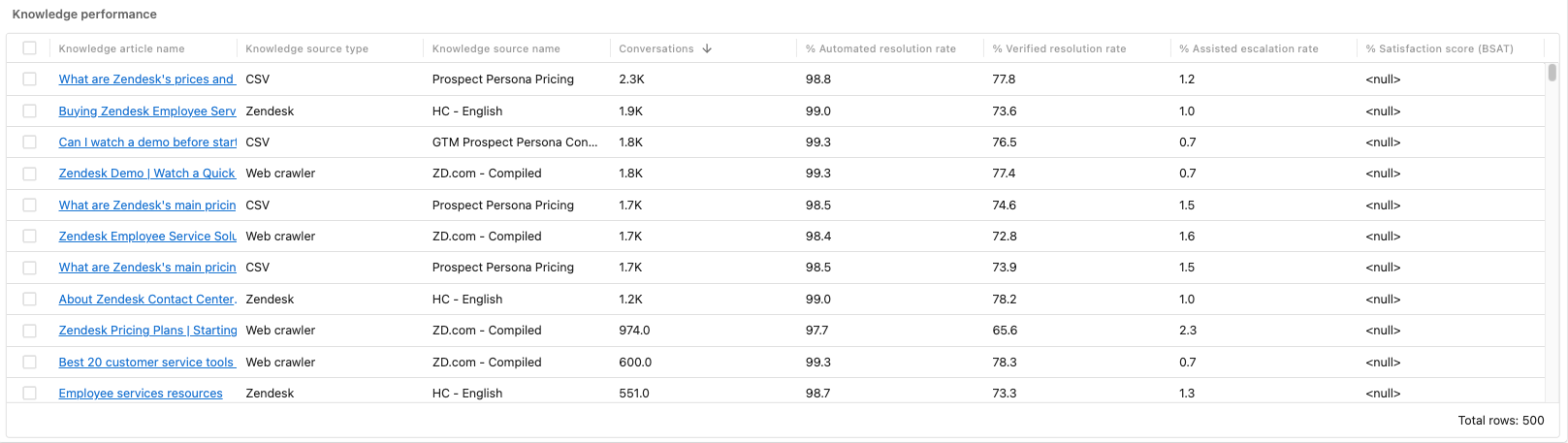
Knowledge performance: Displays information about your articles that
were used by an AI agent to provide answers. For each article, information
about resolutions, escalations, and satisfaction is shown.
-
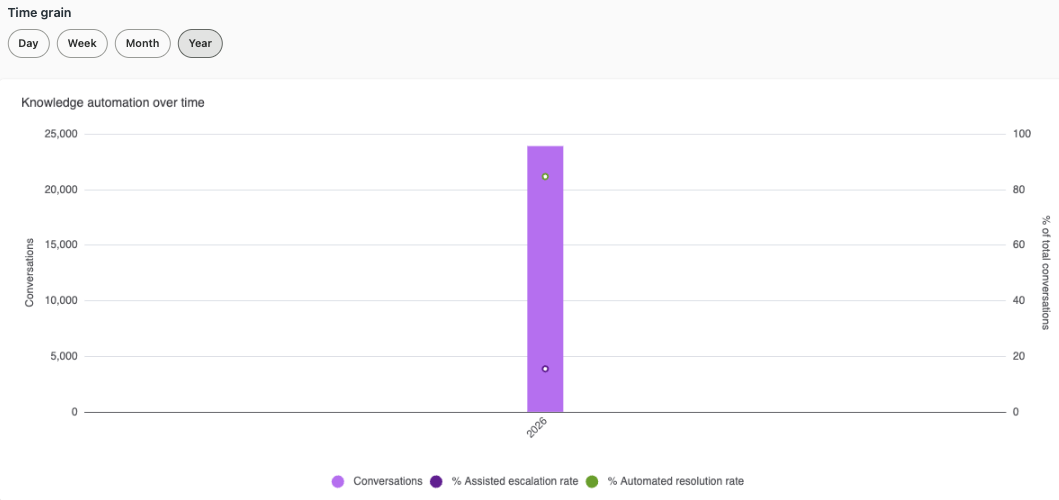
Knowledge automation over time: Displays information about
conversations, assisted resolutions, and the automated resolution rate. You
can select a Time grain setting to control the date range
displayed.