| Announced on | Rollout starts | Rollout ends |
| August 6, 2026 | August 10, 2026 | August 11, 2026 |
We're introducing more granular OAuth scopes and the ability to configure allowed scopes for OAuth clients in Admin Center. Together, these enhancements give you more control over the access applications can request and help you apply the principle of least privilege.
This article includes the following sections:
What's changing?
Starting August 10, 2026, admins can configure allowed scopes when creating or editing an OAuth client in Admin Center > Apps and integrations > APIs > OAuth clients. Allowed scopes define which scopes an OAuth client is permitted to request during the OAuth flow, giving you more control over the permissions granted to applications that integrate with your account.
To configure allowed scopes, create a new OAuth client or edit an existing one in Admin Center > Apps and integrations > APIs > OAuth clients. Select the scopes the client is allowed to request. Learn about using OAuth with your application and OAuth scopes.
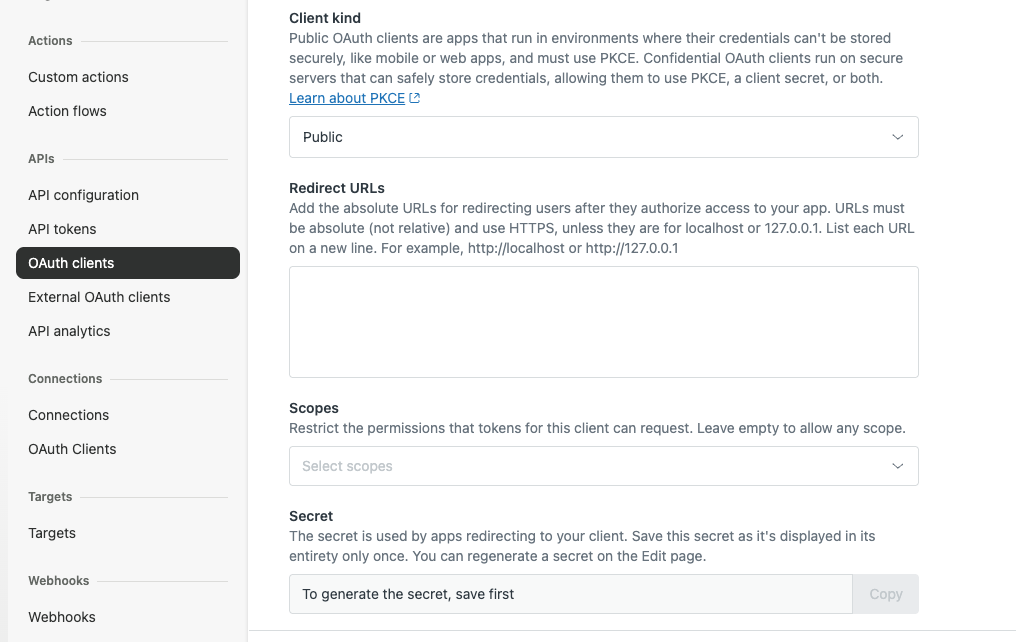
When allowed scopes are configured, an OAuth client can request only those scopes during the OAuth flow. If a client requests a scope that isn't included in its configured allowed scopes, the request fails with a 400 Bad Request response and an invalid_scope error.
Available OAuth scopes
We've expanded the available OAuth scopes to provide more granular control over access. The following scopes are now available:
| Scope | Description |
|---|---|
| read | Read all data |
| write | Write all data |
| tickets:read |
View tickets Includes ticket contents, comments and conversation history, tags, forms and fields, audits, events, and metrics. |
| tickets:write |
Create, edit, and delete tickets Includes adding comments, adding and removing tags, merging tickets, marking tickets as spam, attaching uploaded files, managing ticket forms and custom statuses, and permanently deleting tickets. |
| users:read |
View users Includes their identities, active sessions, group, organization, and brand memberships, roles, and settings. |
| users:write |
Create, edit, and delete users and manage their access Includes resetting passwords, ending active sessions, adding and verifying identities, changing group, organization, and brand memberships, and managing custom roles. |
| organizations:read |
View organizations and their details Includes organization memberships, subscriptions, and merge history. |
| organizations:write |
Create, edit, and delete organizations and manage their memberships includes adding and removing users from organizations, managing subscriptions, and merging organizations. |
| auditlogs:read |
View audit logs Includes the account-wide record of changes: who changed what and when. |
| hc:read |
View help center content Includes articles, sections, categories, community posts and comments. |
| hc:write |
Create, edit, and delete help center content Includes articles, sections, categories, community posts and comments. |
| apps:read |
View installed apps and their settings Includes which apps are installed in the account and each app’s settings. |
| apps:write |
Install, configure, and remove apps Includes installing and uninstalling apps, changing app settings, and uploading custom app packages. |
| automations:read |
View automations Includes viewing automations and their details. |
| automations:write |
Create, edit, and delete automations Includes creating, updating, and deleting automations. |
| targets:read |
View targets and their delivery failures Includes viewing targets and any failures when notifications were sent. |
| targets:write |
Create, edit, and delete targets Includes creating, updating, and deleting targets. |
| triggers:read |
View triggers Includes viewing triggers, trigger categories, and their revision history. |
| triggers:write |
Create, edit, and delete triggers Includes creating, updating, reordering, and deleting triggers and trigger categories. |
| macros:read |
View macros Includes viewing macros, their categories, and their attachments. |
| macros:write |
Create, edit, and delete macros Includes creating, updating, and deleting macros and their attachments. |
| requests:read |
View support requests Includes submitted requests and their comments. |
| requests:write |
Submit and edit support requests Includes creating new requests and adding to existing ones. |
| satisfaction_ratings:read |
View satisfaction ratings Includes ratings, their scores and reasons. |
| satisfaction_ratings:write |
Submit satisfaction ratings Includes rating a ticket good or bad with an optional reason. |
| dynamic_content:read |
View dynamic content Includes content items and their language variants. |
| dynamic_content:write |
Create, edit, and delete dynamic content Includes content items and their language variants. |
| themes:read |
View Guide themes Includes the help center's themes and their files. |
| themes:write |
Create, edit, and delete Guide themes Includes importing, updating, publishing, exporting, and deleting help center themes. |
| zis:read |
View private integrations Includes integration configurations, connections, and inbound webhooks. |
| zis:write |
Create, edit, and delete private integrations Includes integration configurations, connections, and inbound webhooks. |
| webhooks:read |
View webhooks Includes webhook configurations and their activity history. |
| webhooks:write |
Create, edit, and delete webhooks Includes creating, updating, testing, and deleting webhooks. |
| security:read (read only) |
View security and sign-in settings Includes password policy, session timeouts, IP restrictions, and single sign-on configuration. |
| any_channel:write (write only) |
Push messages from an external channel into Zendesk Includes creating tickets, comments, and users from an integrated channel's conversations. |
| web_widget:write (write only) |
Edit Web Widget settings Includes updating the configuration of the embedded Web Widget. |
| account_settings:read |
View account settings Includes account configuration, ticket and user fields, and workspaces |
| account_settings:write |
Create, edit, and delete account settings Includes creating, updating, and deleting account configuration, ticket and user fields, and workspaces |
| brands:read |
View brands Includes viewing brands and their agent assignments |
| brands:write |
Create, edit, and delete brands Includes creating, updating, and deleting brands and their agent assignments |
| custom_objects:read |
View custom objects Includes custom object definitions and record attachments |
| custom_objects:write |
Create, edit, and delete custom objects Includes custom object definitions and record attachments |
| deletion_schedules:read |
View deletion schedules Includes viewing data retention policies that automatically delete tickets, users, and other data |
| deletion_schedules:write |
Delete deletion schedules Includes deleting data retention policies, which stops the scheduled deletion of tickets, users, and other data |
| groups:read |
View groups Includes viewing groups and their memberships |
| groups:write |
Create, edit, and delete groups Includes creating, updating, and deleting groups and their memberships |
| sla_policies:read |
View SLA policies Includes viewing SLA and group SLA policies |
| sla_policies:write |
Create, edit, and delete SLA policies Includes creating, updating, reordering, and deleting SLA and group SLA policies |
| ticket_attachments:read |
View ticket attachments Includes viewing files attached to tickets |
| ticket_attachments:write |
Upload, edit, and delete ticket attachments Includes uploading files, updating and deleting attachments, and redacting them |
| ticket_views:read |
View ticket views Includes viewing views and the tickets they return |
| ticket_views:write |
Create, edit, and delete ticket views Includes creating, updating, and deleting views |
Why is Zendesk making this change?
OAuth scopes help define the level of access an application can request. Previously, the available scopes were broader, which could result in applications requesting more access than they required.
By introducing more granular OAuth scopes and allowing you to configure which scopes an OAuth client can request, you can better align application access with your organization's security requirements. These enhancements support the principle of least privilege by helping ensure applications request only the access they need, while giving administrators greater control over OAuth client access.
Together, these changes make it easier to manage OAuth clients, reduce unnecessary access, and strengthen the security of integrations with your Zendesk account.
What do I need to do?
Existing OAuth clients continue to work as they do today. Clients without configured allowed scopes continue requesting scopes during the OAuth authorization flow as before. You can configure allowed scopes for existing clients whenever you're ready to apply scope restrictions.
If you have feedback or questions related to this announcement, visit our community forum where we collect and manage customer product feedback. For general assistance with your Zendesk products, contact Zendesk Customer Support.