| Announced on | Rollout on |
| January 14, 2026 | January 14, 2026 |
We’re introducing native search functionality to the AI agents - Advanced dialogue builder.
This announcement includes the following topics:
What's changing?
We are introducing native search in the dialogue builder, a faster way to navigate even complex conversation flows.
Quickly find exactly what you need across your entire dialogue, with support for case-sensitive and whole-word matching. Search spans all block input fields, including drop-down selections and attached actions, so nothing gets missed.
Spend less time searching and more time building conversations.
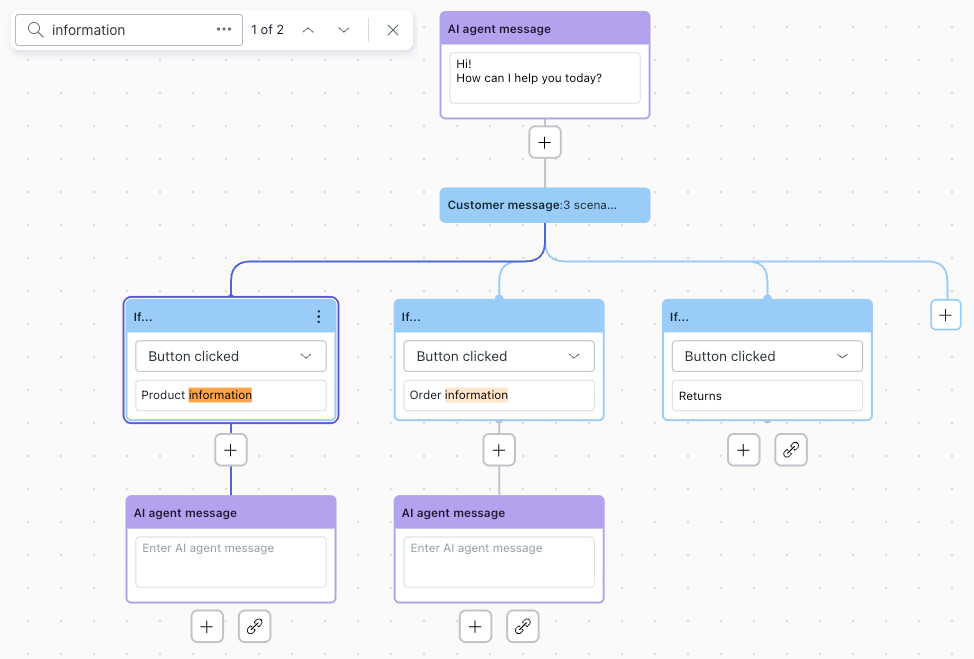
For more information, see Searching for content within a dialogue.
Why is Zendesk making this change?
Native browser search misses matches in truncated content and doesn’t support meaningful navigation. When you zoom out to find highlighted results, the flow becomes hard to read and difficult to work with.
The new native search is designed to help you quickly locate and navigate to exactly what you need, without disrupting your workflow.
What do I need to do?
No action is required. Once the feature is released, your usual search keyboard shortcut will automatically open the native search experience.
If you have feedback or questions related to this announcement, visit our community forum where we collect and manage customer product feedback. For general assistance with your Zendesk products, contact Zendesk customer support.