Summary: ◀▼
Resolution allowance pricing replaces automated resolution pricing, offering detailed insights into ticket automation levels and usage. You can manage allowances, view financial and operational dashboards, and track resolution types in tickets and AI conversations. The upgrade includes new pricing models, reporting tools, and self-service options for purchasing additional resolutions, helping you better understand and control automated ticket handling and costs.
Zendesk has refined the pricing and packaging for automated resolutions to provide you with increased visibility into how tickets are resolved. Resolution pricing is now measured in a series of resolution tiers that are funded by a resolution allowance. Your resolution allowance is a flexible currency pool used to pay for the cost of automated resolutions. The resolution allowance pricing model replaces the former automated resolutions pricing model and provides admins with more details about the level of automation required to solve tickets. See About resolution tiers for more information.
Read this article to familiarize yourself with how resolution allowances, resolution tiers, and related Zendesk interface changes impact your account.
This article contains the following sections:
About the upgrade
To help you manage resolution tiers, Zendesk provides you with the following;
- For most plans, a default amount of resolutions in your plan based on Zendesk plan type and agent seats. See Plan defaults.
- Detailed service orders and invoices with resolution tiers. See Example service orders and invoices.
- For financial reporting, billing admins have a Resolution allowance dashboard in Admin Center where they can view a financial breakdown of resolution tiers by spend, expressed in currency. They can use this page to manage their resolution allowance and view resolution trends. See Managing resolution allowances.
- For operational reporting, admins have a Resolutions usage dashboard in Admin Center where they can audit and verify their resolution usage and forecast upcoming usage. They can track usage down to the ticket level. See Managing resource usage.
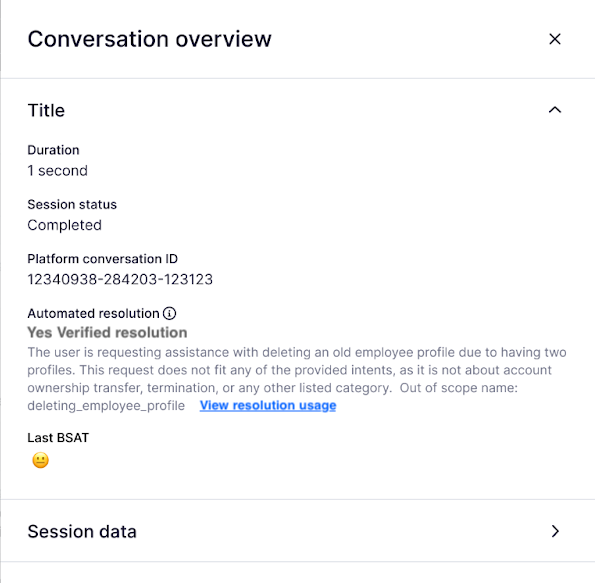
- In Support, ticket events show the resolution types and assigned tiers. In AI agents, the conversation overview shows which tier a conversation was assigned and rationale as to why. See Examples of ticket events and conversation overview.
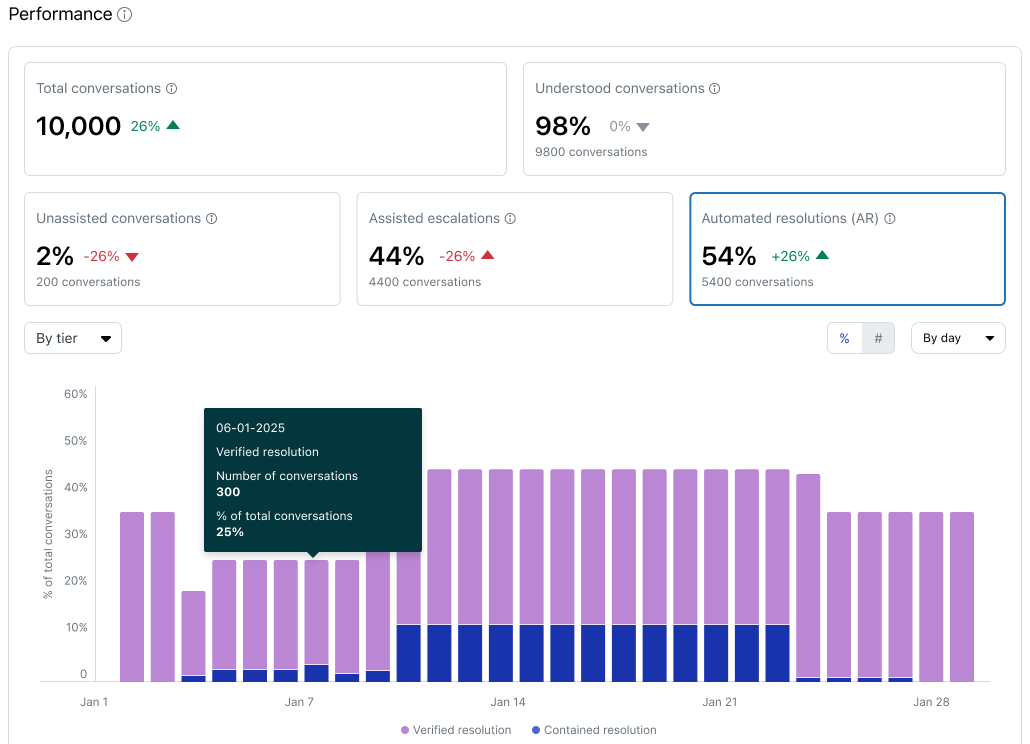
- The AI agent reporting dashboard includes tiers as a data point to report. See the AI agent reporting dashboard for more information.
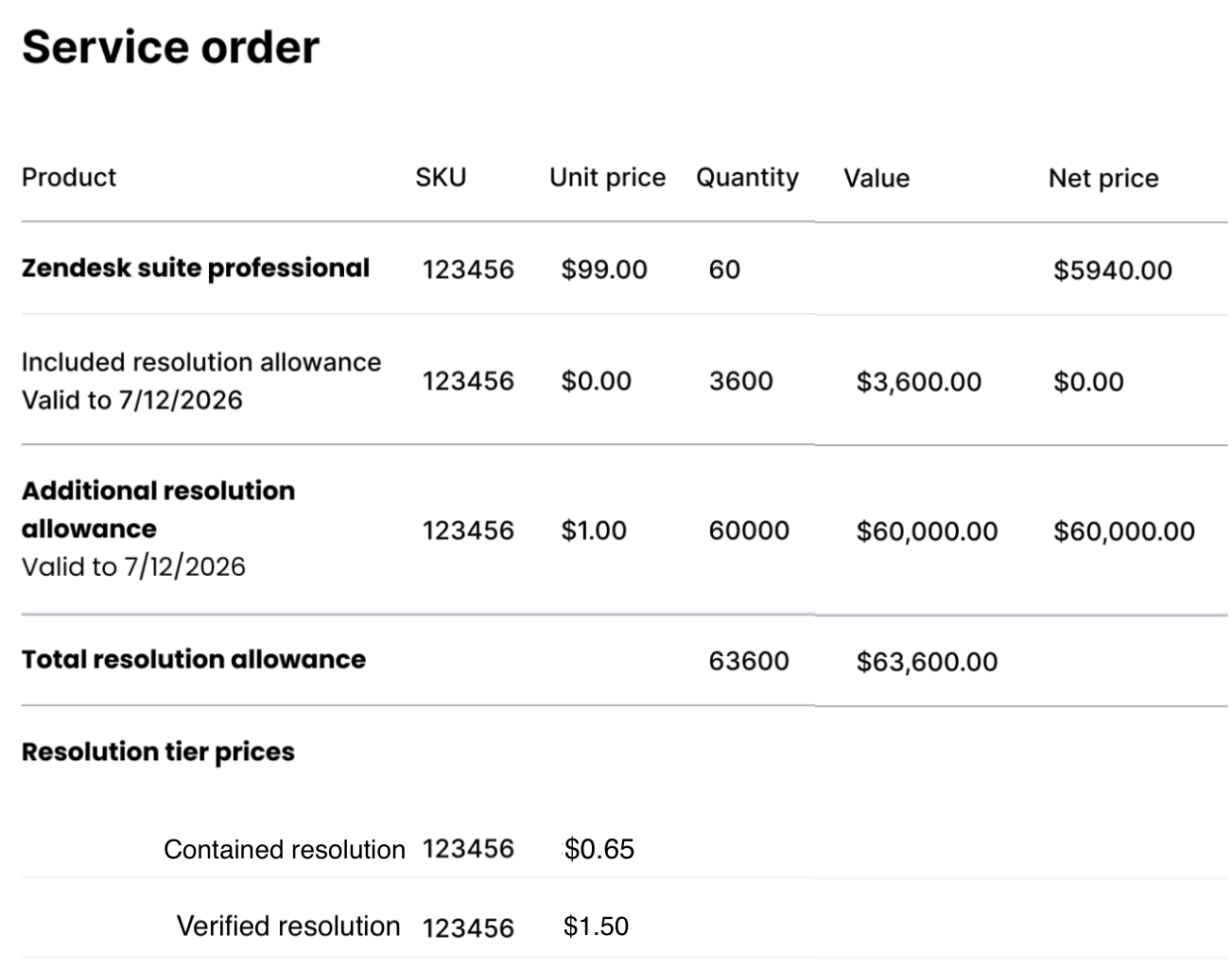
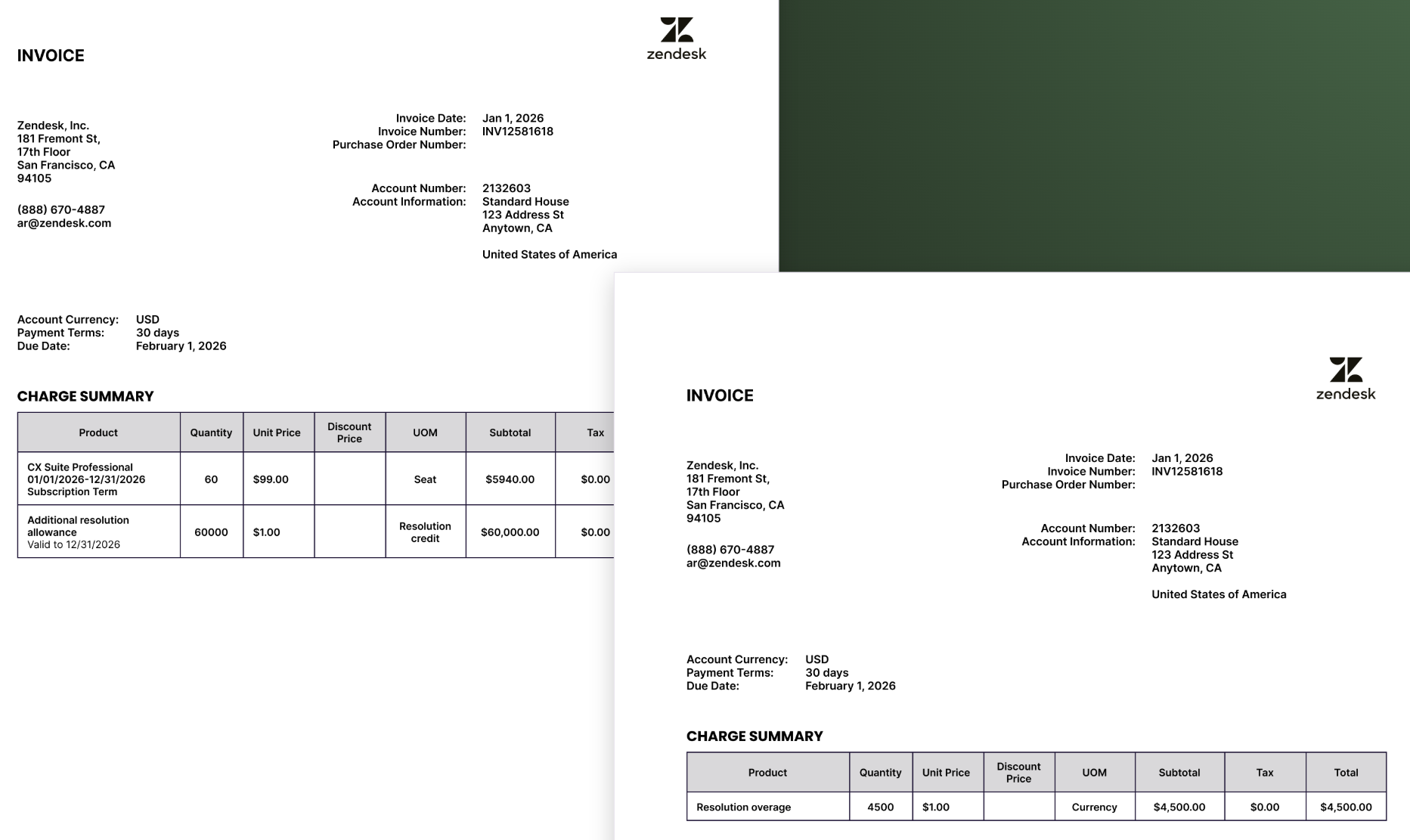
Example service order and invoice
- The service order shows the plan, the included
resolution allowance for the number of seats on that
plan and any additional resolution allowance in
currency.
- The invoice Includes the plan and number of seats
purchased and the subscription term. It will also
include any additional resolution allowance in
currency.
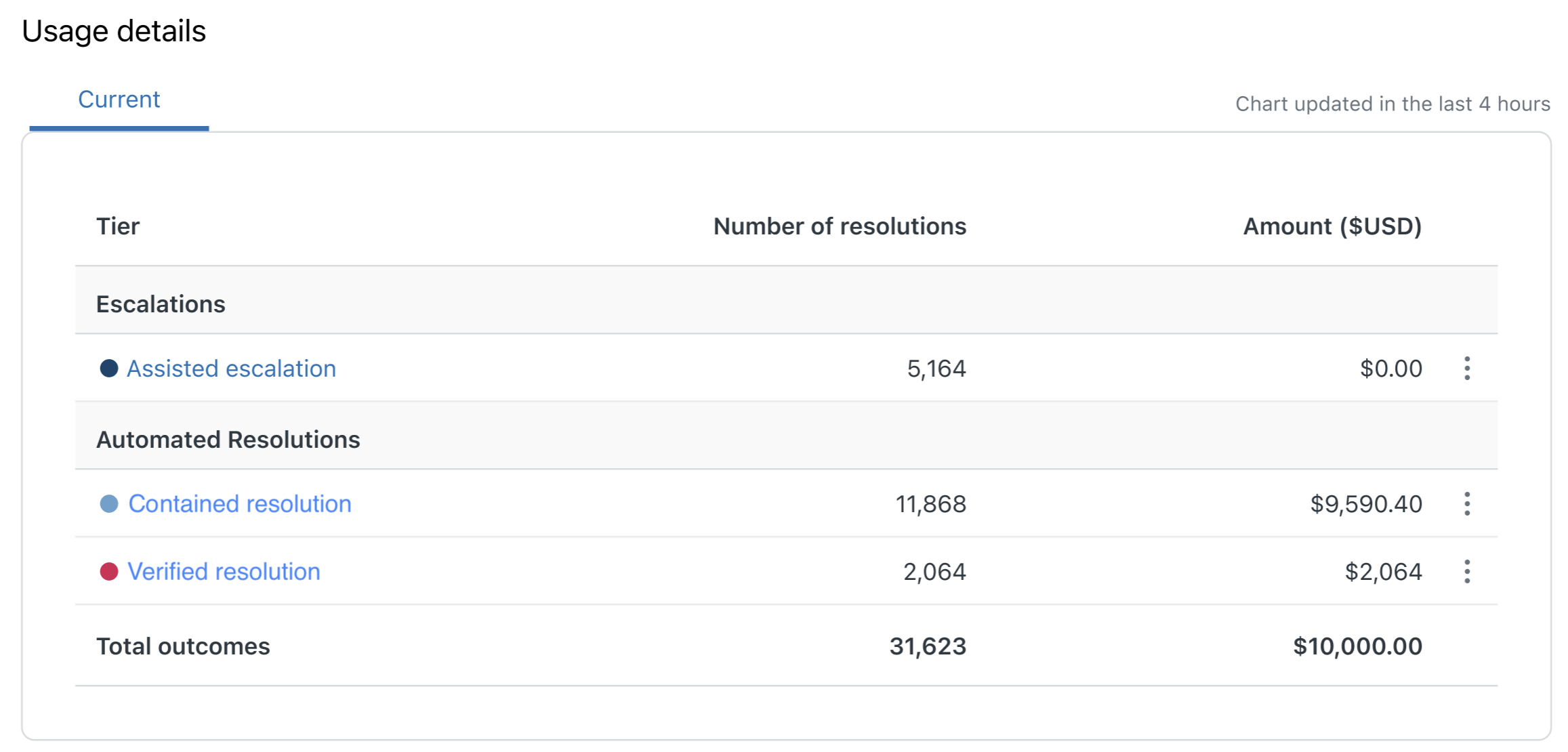
Example resolution allowance dashboard
For financial reporting, the resolution allowance dashboard shows a financial breakdown of resolution tiers by spend. It does not show cost per ticket but rather an aggregate spend by tier.
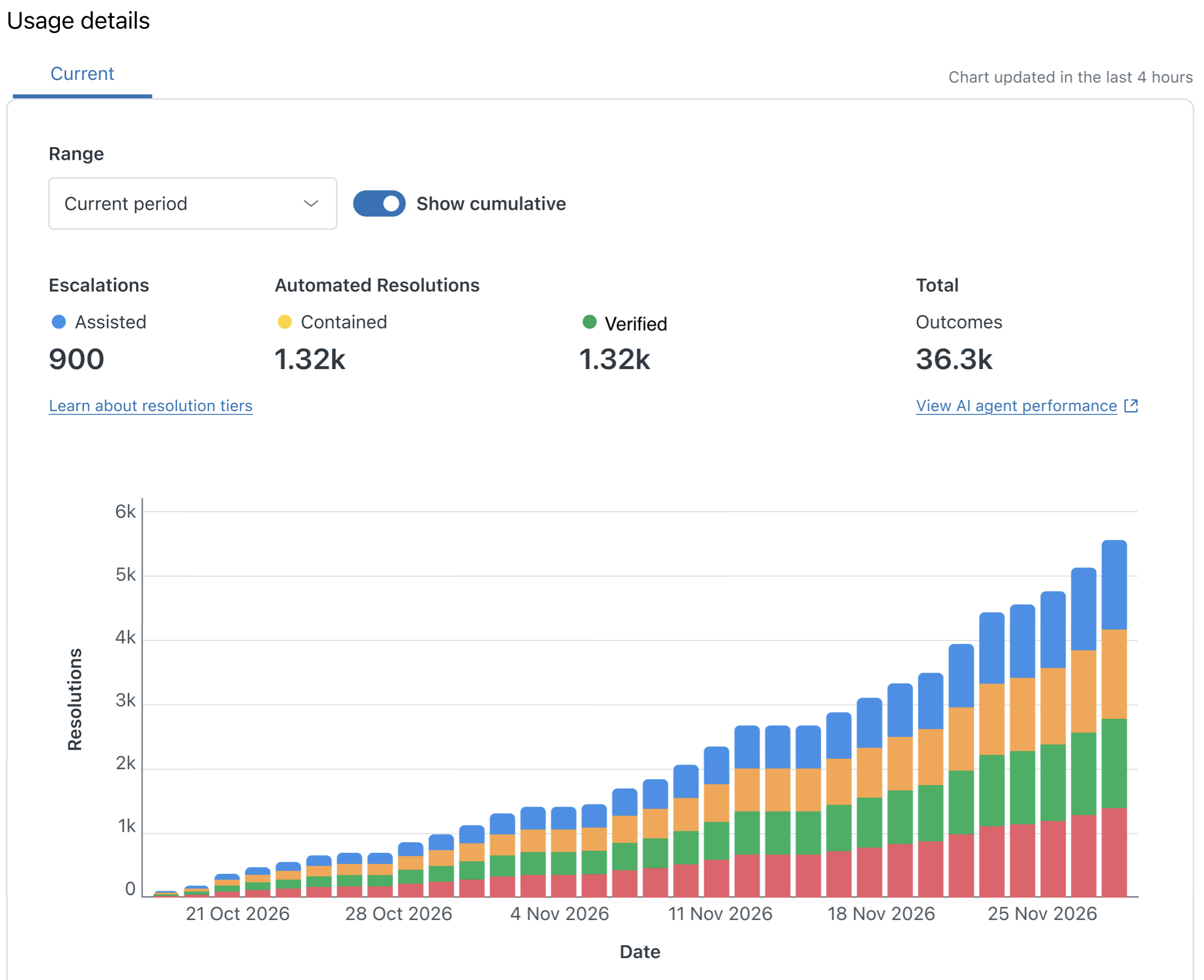
Example resolution usage dashboard
For operational reporting, the resolution usage dashboard shows allowance usage as a percentage only. It does not display any pricing. It itemizes each resolution and gives a pathway to dig deeper into each ticket resolution. It gives you visibility into how tickets are resolved and provides background information to help admins further automate ticket handling.
Examples to ticket events, conversation overviews, and AI agent reporting
For monitoring purposes and to help verify resolution usage:
-
Tickets
events show the resolution type and
assigned tier used to solve each ticket.
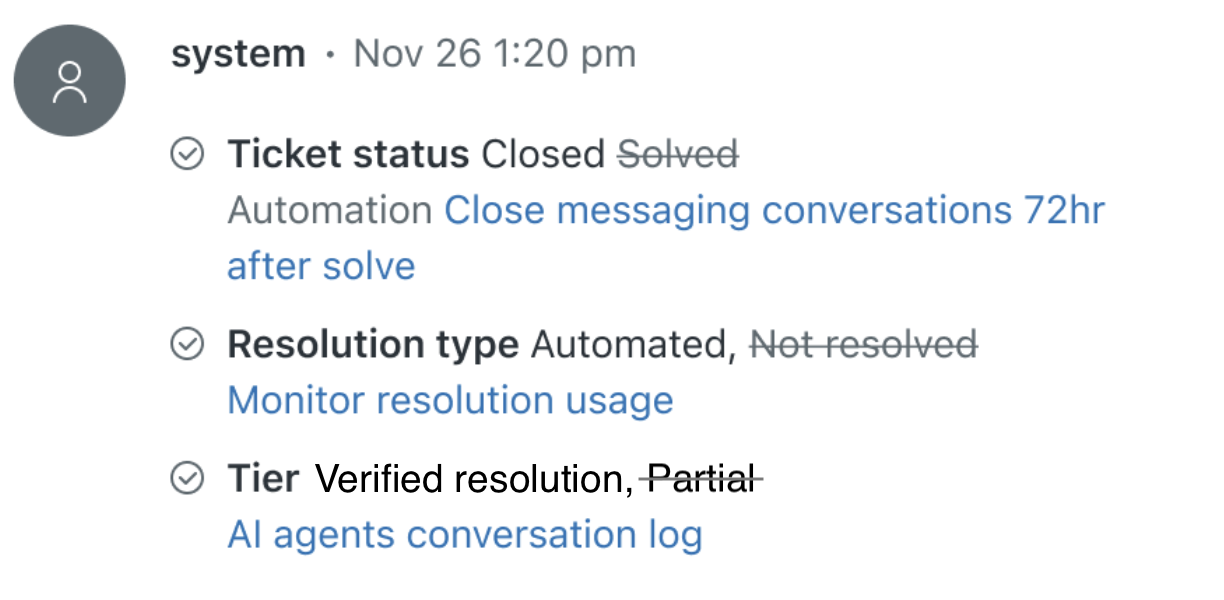
- For admins to review and improve AI performance, the AI
agents conversation overview includes which tier a
conversation was assigned and reason why.
- The AI agent reporting
dashboard will also include information
about resolution tiers.
Additional changes to your existing automated resolutions
For existing customers who use automated resolutions, the following additional interface changes occur in your account:
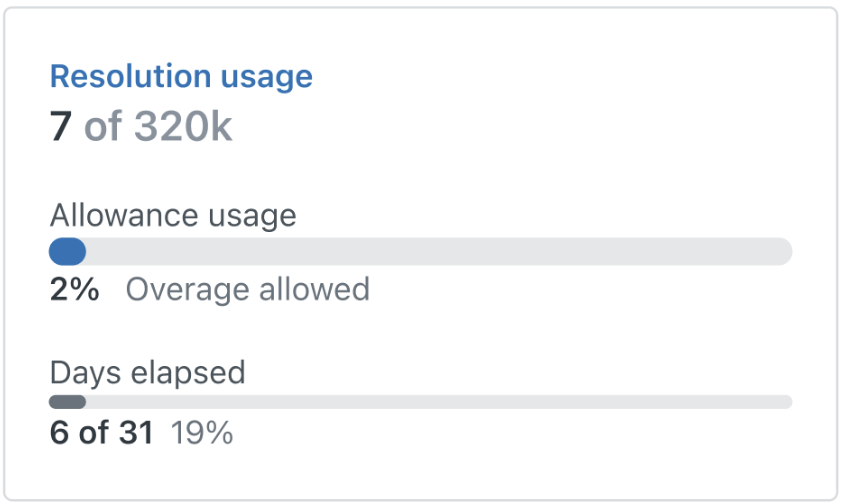
- The legacy Usage summary page in Admin Center
is updated to show the new summary for your
resolution allowance.
Before: Usage summary for automated resolutions After: Usage summary for resolutions 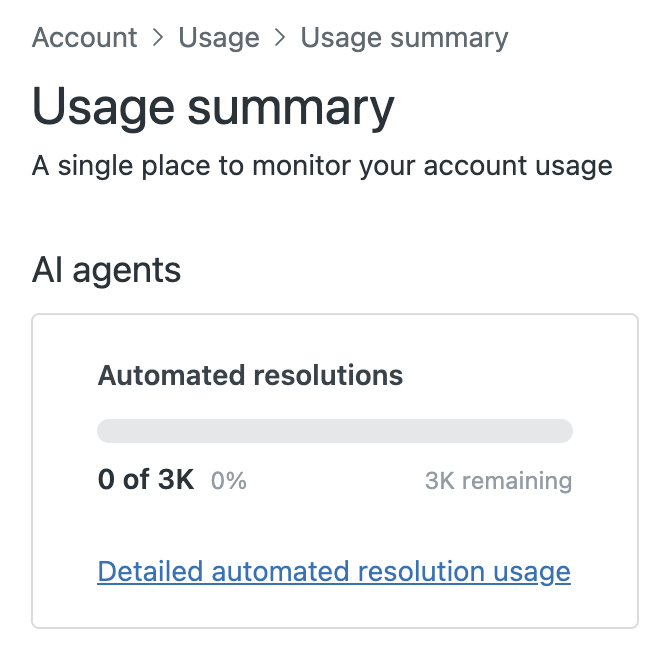
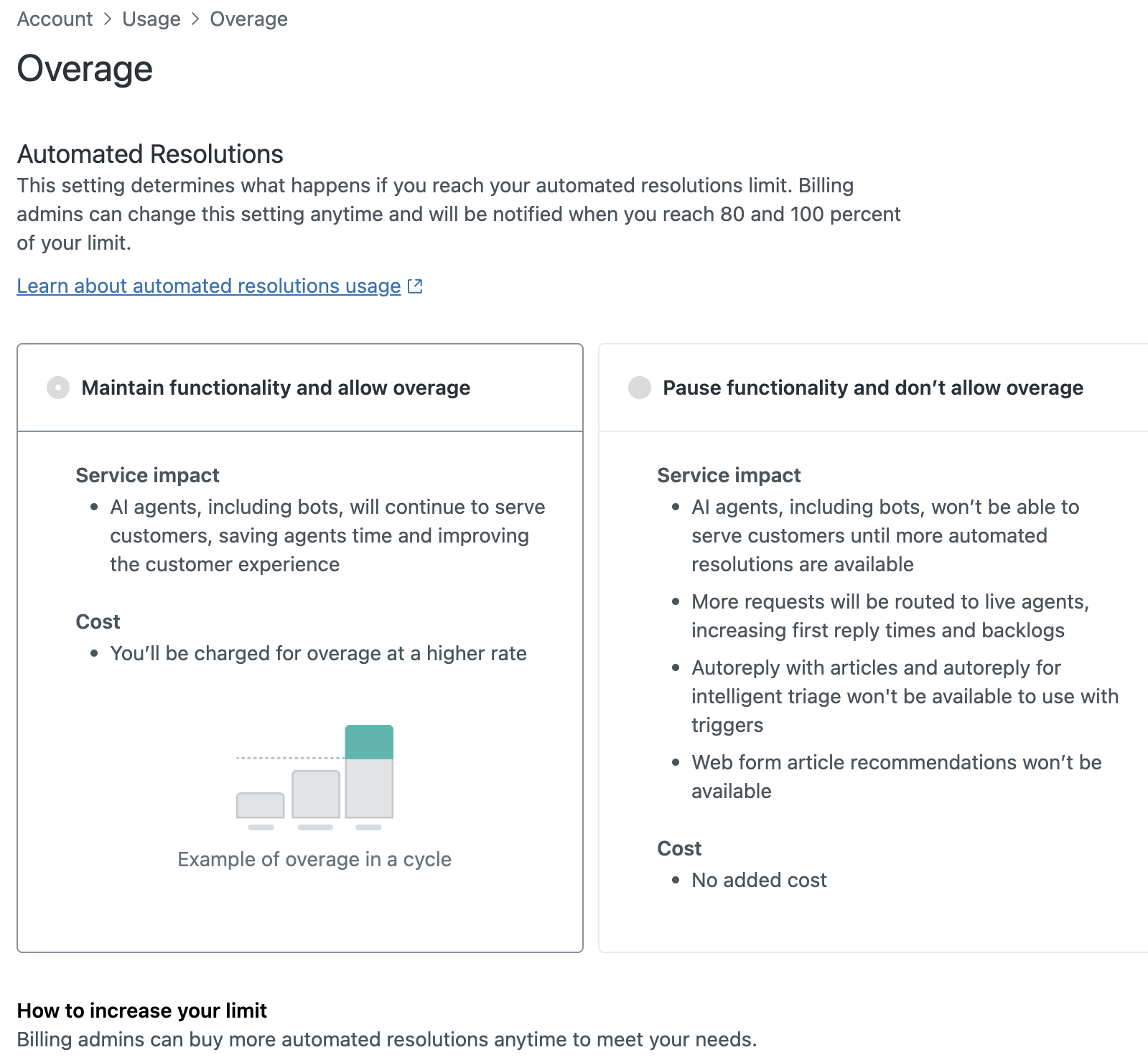
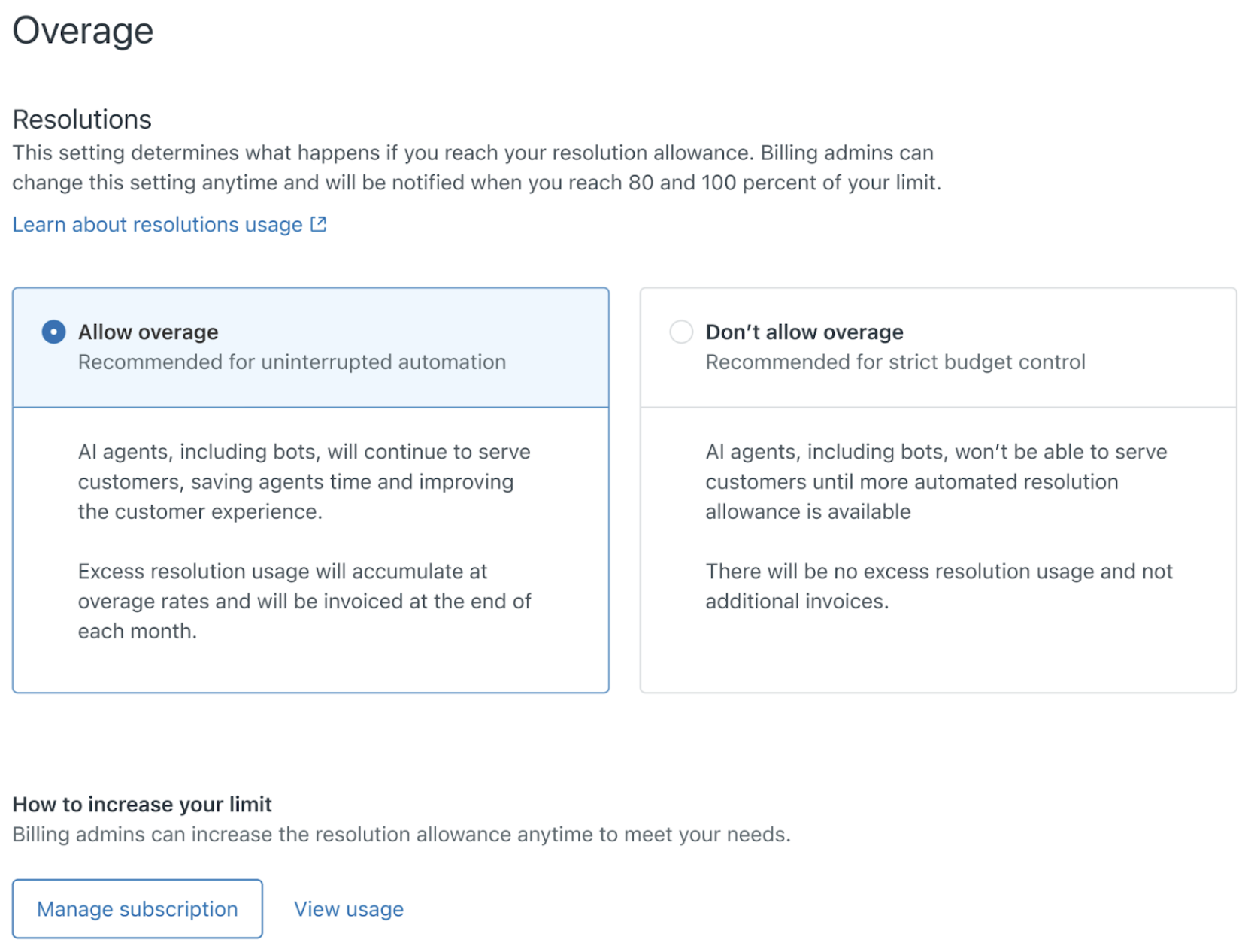
- The Overage page is updated to apply to overage for
resolution tiers. You can still use this page to
allow or disallow overages. The same rules you have
configured for your account apply to the new
resolution tiers.
Before: Overage page for automated resolutions
After: Overage page for resolution tiers
Upgrade plans
Zendesk is planning a transition period to upgrade customers to the new resolution tiers and pricing. Zendesk will provide a 30 day notice with the planned upgrade date.
Upgrade plans include:
-
Existing accounts that don’t use automated
resolutions
You will not be impacted. You will have full access to the new resolution tiers and tier pricing if you decide to use AI agents.
-
Existing accounts that use automation
resolutions
You will see the new resolution tiers in the Zendesk interface. Your tier pricing will not increase during the transition. Contact Zendesk Sales for details. Zendesk will provide a 30 day notice before we upgrade your account to the new resolution tiers pricing.
-
New Zendesk accounts created during the transition
period
You will see the new resolution tiers. Tier pricing during the transition period will be negotiated. Contact Zendesk Sales for details. Zendesk provides a 30 day notice before we upgrade your account to the new resolution tiers pricing.
-
New Zendesk accounts created after the transition
period ends
Your new account will automatically include resolution tiers with the new tier pricing.
Upgrading your automated resolution allowance
Your automated resolution allowance includes a number of automated resolutions (recurring) per month. Your automated resolution balance will be upgraded and applied to the new resolution tiers and new plan defaults, based on a fixed pricing model. Contact Zendesk Sales for details.
When you reach your automated resolution limits, the same rules you have configured for your account will apply to the new resolution tiers. You can choose to automatically pause features that require automated resolutions, or to pay for overages as you go.
Automated resolutions don’t roll over to the next usage period. When you renew your subscription, the new resolution tiers pricing will apply.
For more information
Here’s where to look for more information about resolution tiers and pricing:
-
Managing resolution
allowances. Shows billing admins how to:
- Manage the resolution allowance and costs
- Plan for resolution allowances and costs
- Increase the resolution allowance
-
Managing resolution
usage. Shows admins how to:
- View resolution usage
- Drill down into resolution events for each ticket
Frequently asked questions (FAQ)
-
What are the resolution tiers? How do these compare
with my current automated resolutions?
Think of resolution tiers as a refined, more-granular definition of automated resolutions. Resolution tiers provide admins with more details about the level of automation used to solve tickets. The tiers take into account both partially automated and fully automated ticket resolutions. See About resolution tiers for more information.
Resolution tiers are a new reporting and pricing model but they don’t impact how your current automated resolutions behave.
-
Why is Zendesk making this change?
In our current automation resolutions model, our usage reports didn’t take into account resolutions that were partially automated. We only reported the results for fully automated resolutions. By reporting on partially automated resolutions, you have better visibility into how your tickets are being handled and how you can further automate ticket management.
-
Do I need to change my configuration for this
update?
No. You don’t need to make any configuration changes. Your account will be updated automatically to show the new resolution details in your invoices, usage dashboard, ticket events, and so on. See About the upgrade for more information.
-
How does the new tiered pricing work with the unified AI
agents release?
With unified AI agents as a standard part of your plan, you don’t need to purchase the AI agent - Advanced add-on anymore to use all the AI agent features.
-
When will I see the new resolutions tiers in my
account?
You will see the account changes immediately at the beginning of the transition period. Additional features will be added to the usage dashboard periodically.
-
When will my subscription price increase?
Subscription prices won't change during the transition period. After the transition period, Zendesk provides a 30 day notice before we upgrade your account to the new resolution tiers pricing.
-
Who should I contact if I have questions?
Contact your Zendesk account representative or Zendesk Customer Support for more information.