| Announced on | Rollout starts | Rollout ends |
| April 16, 2026 | May 05, 2026 | May 06, 2026 |
Starting May 05, capped usage of the Copilot AI ticket summary feature is being introduced to Suite, Support, and Employee Service Professional plans and above at no additional cost. This feature instantly transforms long, complex ticket histories into clear, actionable overviews.
Designed to boost agent productivity from day one with zero setup required,
we’ve
included a monthly allowance in your account so your team can experience
the
immediate time savings and ROI of Copilot at no extra cost.
Copilot ticket summaries demo (0:44)
This rollout expands your access to Copilot functionality and builds on the generative AI writing tools introduced in February 2026. By pairing text refinement with ticket summarization, we’re providing a more comprehensive toolkit that helps agents communicate better and understand complex issues faster.This announcement includes the following topics:
What is changing?
We’re excited to introduce ticket summary, a powerful AI-driven tool designed to give your team back their most valuable asset: time. Instead of spending hours scrolling through endless conversation histories, your agents can now generate a clear, actionable overview of any customer issue in seconds. This means faster handoffs, more accurate resolutions, and a significant boost in productivity from day one—all delivered directly within the Agent Workspace with zero configuration required.
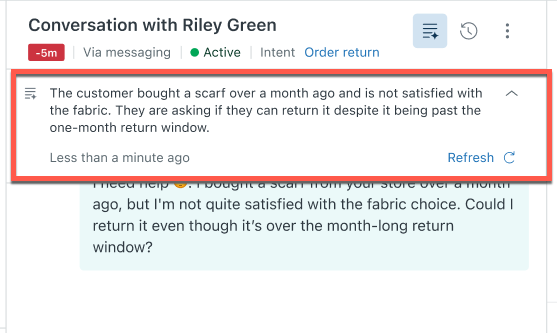
To help you see the impact of AI-powered support firsthand, we’ve included a monthly allowance of ticket summaries as a standard part of your account. By providing you with the ability to experience Copilot in a frictionless way, can help build confidence in these AI-powered tools and scale as your needs evolve.
For Copilot AI writing tools and ticket summaries, you'll receive a combined total of five AI tool uses per agent, per month at no additional cost:
- Usage is pooled across all agents in your instance, so team members can share the monthly allowance as needed.
- The allowance is calculated as the number of agents multiplied by 5 uses per agent, per month. For example, if you have 10 agents, your team will have 50 uses available each month. However, your account has a maximum limit of 500 uses per month, even if your team has more than 100 agents.
- A use is counted when an agent uses a writing tool or manually generates a ticket summary.
- When the monthly limit is reached, access to Copilot AI features is paused until the next billing cycle. You aren't billed for the use of Copilot AI features, even after reaching your limit.
To keep the benefits flowing without interruption, you can upgrade anytime to the full Copilot add-on. - As we continue to add more capped Copilot capabilities throughout 2026, we’ll regularly review allowance usage to make sure it delivers meaningful value to your team, and we’ll keep you updated along the way.
Why is Zendesk making this change?
At Zendesk, we are evolving our approach to ensure that the transformative power of AI is accessible and impactful for every customer from day one. We recognize that traditional barriers—such as complex configurations and unguided trials—can often hinder teams from realizing the immediate benefits of new technology.
By embedding AI-powered features like ticket summary directly into your account through a capped monthly allowance, we are prioritizing a "value-first" experience. This change allows your team to experience tangible productivity gains and organically scale as your needs evolve.
What do I need to do?
You don’t need to do anything. Ticket summaries are designed to be frictionless and will be ready for your team as it rolls out between May 05 through May 06. While we recommend experiencing the time-savings firsthand, you can request to turn off the feature for your account by submitting this form.
To learn more, see Turning on and configuring AI-generated ticket summaries and Managing your Copilot AI feature usage.
If you have feedback or questions related to this announcement, visit our community forum where we collect and manage customer product feedback. For general assistance with your Zendesk products, contact Zendesk Customer Support.