Agents can send and receive audio comments in email and messaging tickets.
An audio player embedded in the Agent Workspace allows agents to listen to customer-submitted audio comments, and an embedded audio recorder allows them to record, review, and send audio comments directly from the composer.
This article includes the following topics:
Related articles:
Receiving and playing back audio comments
When an end user sends an audio comment through an email or messaging channel, agents can listen to those responses using the audio player in the the Agent Workspace conversation log.
The audio comment is added to the conversation log as a regular comment with an audio player. After the audio response loads, agents can play it back using the audio player, or download the audio file to listen to outside of the Agent Workspace.
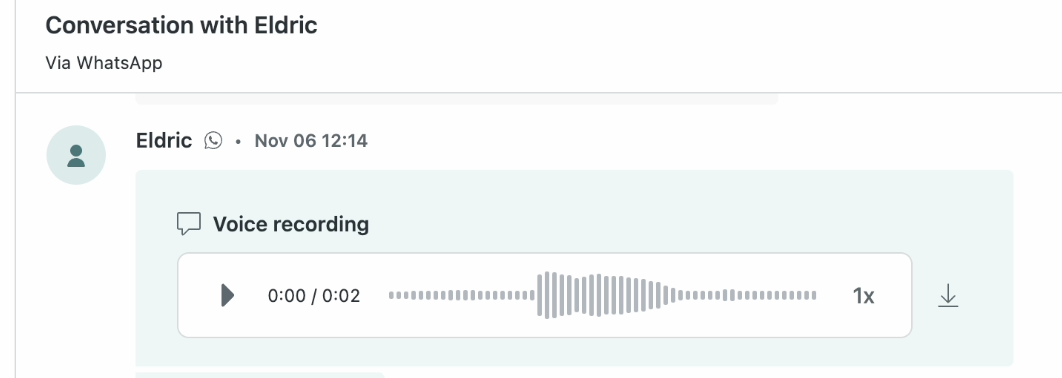
To play back an audio comment in the Agent Workspace
-
In the audio player, click the Play
button (
 ),
and click Pause as
needed.
),
and click Pause as
needed.
-
Click the Playback speed
(
 by
default) to select a new speed
for the audio playback.
by
default) to select a new speed
for the audio playback.
To download an audio response from the Agent Workspace
-
Click Download (
 )
and select where you want to
save the audio file.
)
and select where you want to
save the audio file.
Recording, reviewing, and sending audio comments
If allowed by admins, agents can record, review, and add audio comments to their email or messaging tickets using the audio recorder embedded in the the ticket composer.
Consider the following when sending audio comments:
- In email tickets, Web Widget conversations, and most social messaging channels, customers receive audio comments as file links.
- In WhatsApp and Facebook Messenger, customers can play audio comments in the channel interface.
- Audio comments can be up to five minutes long.
- Audio comments must be completed in one take. You can’t pause a recording.
To record, review, and send an audio comment
-
In the the ticket composer, click the
voice recording icon
(
 )
to begin recording. If prompted, allow
your browser to use your microphone.
)
to begin recording. If prompted, allow
your browser to use your microphone.
- Record your comment. Audio comments can be up to five minutes long.
-
Click the
voice recording icon
()
again when you finish recording.
-
(Optional) Review the audio comment by clicking
Play().
-
To record a new comment, click Delete
(
 )
then repeat steps 1-3.
)
then repeat steps 1-3.
- Click Send.