| Announced on | Rollout starts | Rollout ends |
| May 12, 2026 | May 11, 2026 | May 15, 2026 |
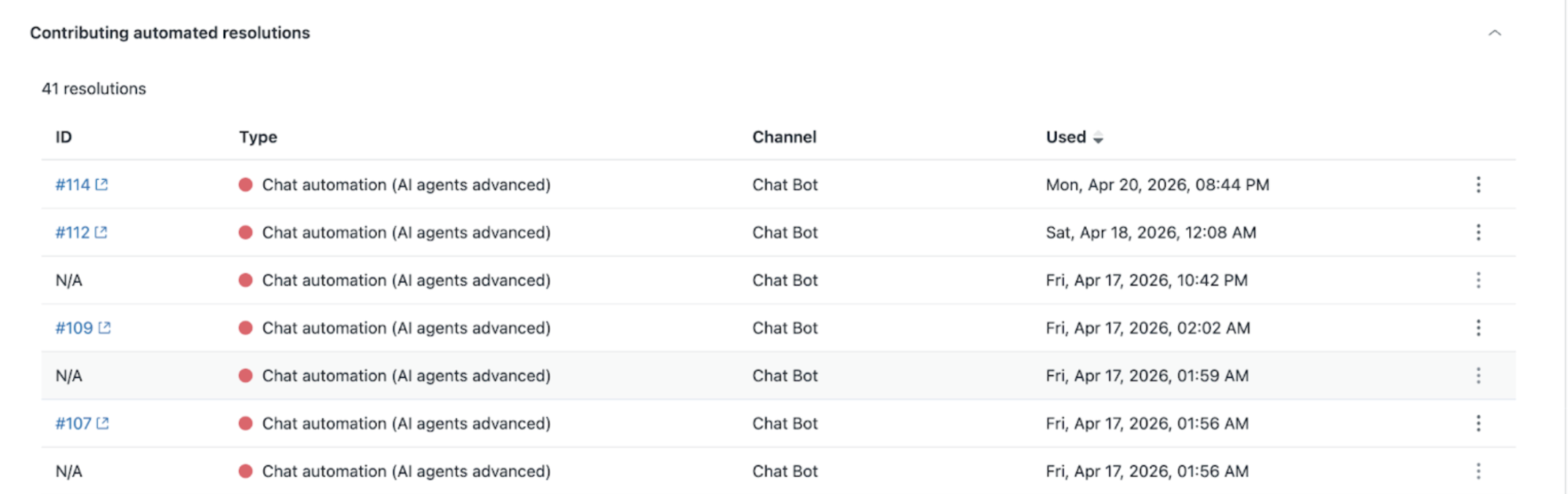
We’re introducing the Contributing resolutions table in the Automated resolution usage dashboard in Admin Center to give you greater insight into the individual resolutions that make up your usage. With this update, you can better understand:
- Which tickets are being counted as automated resolutions (ARs)
- The type of automation used for each resolution
- When each automated resolution was used
This article includes these topics:
- What is changing?
- Why is Zendesk making this change?
- What do I need to do?
What is changing?
We’ve added a new Contributing Resolutions section to the Automated resolution usage dashboard.
This section includes a detailed table of automated resolutions with the following information:
- Ticket ID associated with each resolution (displays N/A if no ticket exists)
- Type of automation (such as conversation, chat automation, autoreply)
- Date and time the resolution was used.
Additional updates include:
- The table dynamically updates based on the date range selected in the dashboard
- Data is available starting from March 4, 2026, when the feature was released
- If a ticket has been deleted, clicking on the ticket ID will indicate that the ticket is no longer available
- If AI agent tickets are turned off, some resolutions may not have associated ticket IDs
To create and view tickets for AI agent conversations, the AI agent tickets feature must be turned on.
Why is Zendesk making this change?
Automated resolutions are part of a usage-based model, and understanding what drives usage is critical for effective management. Customers have told us they want more transparency into:
- What counts toward their usage
- Which tickets are classified as automated resolutions (ARs)
- How different automations contribute to resolution volume
- Where and when automated resolutions occur
This update provides a more detailed, audit-friendly view of your usage, helping you better analyze trends and make informed decisions. Contributing resolution data is retained for up to 2 years, so you can review historical usage over time.
What do I need to do?
No action is required. The Contributing automated resolutions table will automatically appear in your Automated resolution usage dashboard in the Admin Center.
To get the most value from this feature:
- Use date filters to analyze usage over specific periods
- Review resolution types to optimize automation strategies
- Enable AI agent tickets if you want ticket-level visibility for AI agent conversations
For more information, see Monitoring automated resolution usage.
If you have feedback or questions related to this announcement, visit our Community forum where we collect and manage customer product feedback. For general assistance with your Zendesk products, contact Zendesk Customer Support.