Summary: ◀▼
Use the Coaching dashboard to track coaching sessions, review feedback, and monitor performance improvements for coaches and agents. It provides metrics like total sessions, coaching threads, session status, and performance trends. You can filter data by date, coaches, and coachees, and download detailed reports to analyze coaching impact and manage overdue or upcoming sessions effectively across workspaces.
The Zendesk QA Coaching dashboard provides an overview of both the coach’s and coachee’s performance, as well as the reviews received and viewed. Coaches can assess the impact on their coached agents’ performance.
You can track when coaching sessions occurred and whether agents have reviewed the feedback they received.
You can also see how coaching sessions affect your Internal Quality Score (IQS).
This article covers the following topics:
Related articles
Accessing the Coaching dashboard
Use the Coaching dashboard to review coaching activity across your account.
You can filter the data by date, coaches, and coachees.
To access the Coaching dashboard
- In Quality assurance, click
 Dashboards in the sidebar.
 - From the list of dashboards, select Coaching.
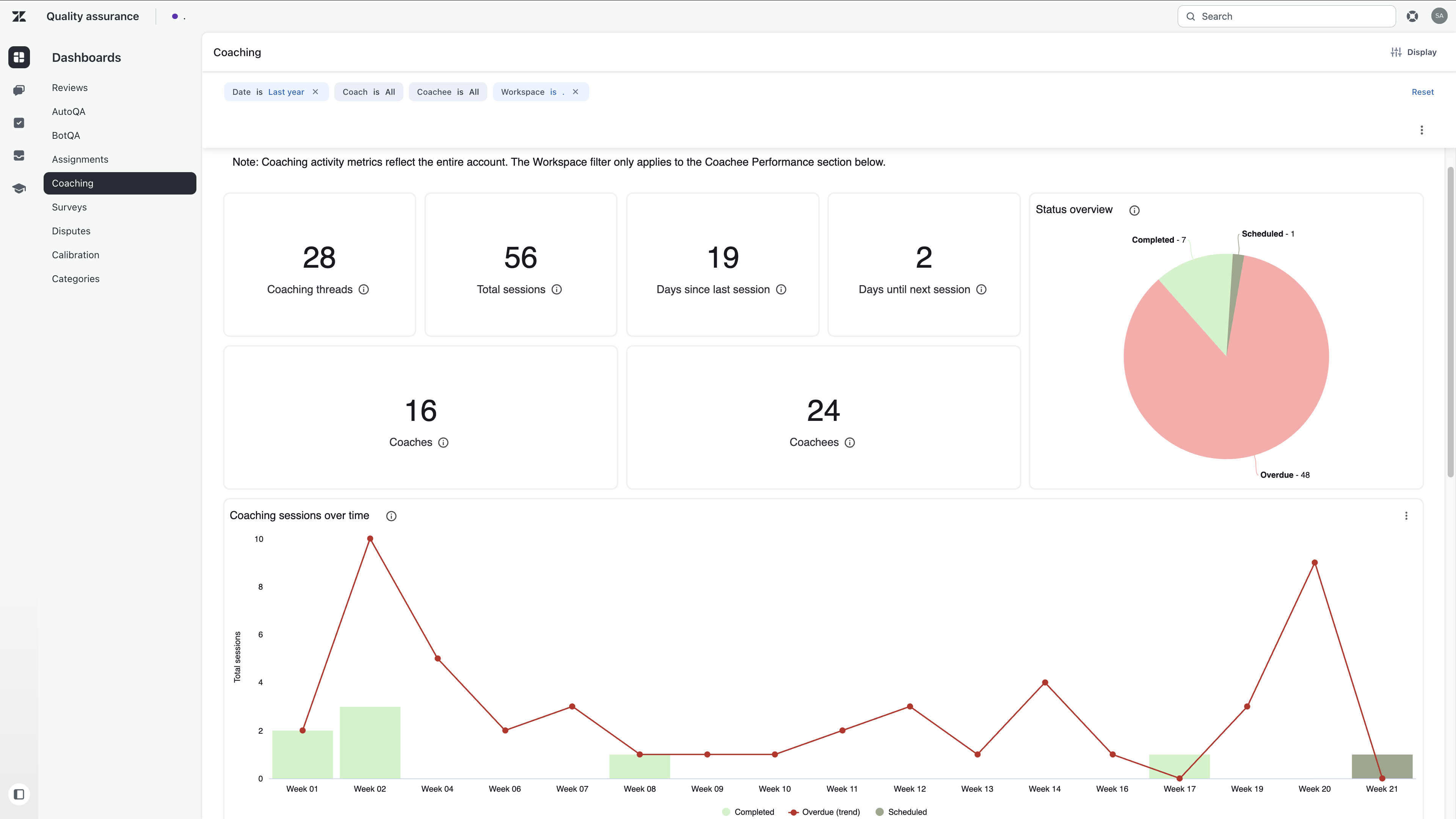
- Filter the dashboard by date, coaches and coachees.
- Review the dashboard cards and charts.
Understanding Coaching dashboard data
The Coaching dashboard includes cards and charts that help you analyze coaching activity and performance.
You can click values in the cards to drill into goal completion data per conversation. See Accessing additional data points. You can also download dashboard data. See Downloading dashboard data.
The dashboard includes these cards:
| Card | Description |
| Coaching threads | The total number of unique, ongoing coaching engagements, or tracks, established between a coach and an agent. |
| Total sessions | The total number of individual coaching meetings and events recorded. |
| Days since last session | The number of days since the most recent coaching activity. |
| Days until next session | The number of days until the next scheduled session. If no future sessions are scheduled, this field is blank. |
| Status overview |
The status of a coaching session:
|
| Coaches | The number of unique people providing coaching. |
| Coachees | The number of unique people receiving coaching. |
| Coaching sessions over time | Coaching session volume over time by session status. The chart uses stacked bars and a trend line to highlight the overdue backlog separately from other session counts. |
| Overdue sessions | Sessions that are past due and need follow-up. |
| Performance overview |
A summary of how coachees are performing across selected workspaces. |