| Announced on | Rolllout starts | Rollout ends |
| July 2, 2026 | July 2, 2026 | July 10, 2026 |
Zendesk is introducing new messaging notification improvements to help agents stay aware of important ticket updates, even when they are working outside the Zendesk browser tab.
This article contains these sections:
What is changing?
To improve the agent notification experience and prevent agents from missing important updates, we have introduced:
-
Sound notifications and dynamic favicons: Agents will see a visual cue in the browser tab, a blue dot and exclamation point (!) next to the Zendesk favicon, and receive an audio alert when there are new incoming ticket notifications. This helps agents stay aware of new activity without needing to keep every ticket tab open. It also helps them to notice unread updates when they are working in another browser tab or with other applications.

-
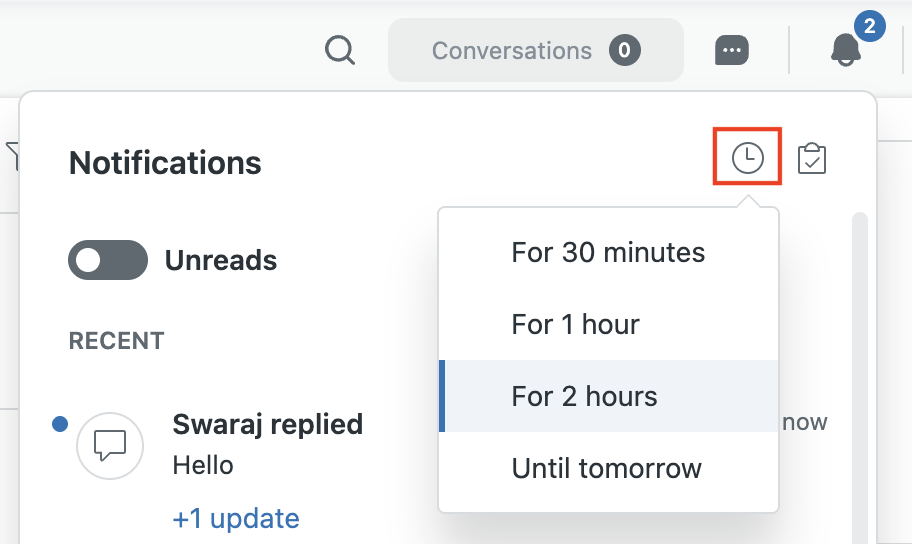
Mute notifications: Agents can mute notifications for a set period of time when they need focused, uninterrupted work sessions.
- Reduced notification list clutter: The notification list will only show updates for unsolved tickets, helping agents focus on active work and reducing the number of updates they need to review. When a ticket is solved or closed, the list is automatically updated.
For more information on messaging notifications and the notification list, see Using the notification list to manage conversations.
Why is Zendesk making this change?
These updates build on the redesigned notifications experience and are designed to make notifications more noticeable, easier to manage, and less cluttered, so agents can focus on the conversations that need their attention.
Previously, agents only received sound notifications for ticket updates when the related ticket tab was open. This meant agents could miss important customer replies or ticket updates when they were working in another browser tab, away from their workstation, or focused on other work.
At the same time, frequent notification growls and a long list of updates in the notification list could make it harder for agents to quickly identify which updates required attention.
These improvements are designed to help agents:
- Notice important ticket updates more reliably
- Reduce missed customer replies
- Manage notifications with fewer interruptions
- Focus on active, unsolved tickets that need follow-up
What do I need to do?
No action is required. These updates will be rolled out automatically to all accounts over the coming week.
If you have feedback or questions related to this announcement, visit our community forum where we collect and manage customer product feedback. For general assistance with your Zendesk products, contact Zendesk Customer Support.