Verified AI summary ◀▼
Admins can permanently delete a workspace and its data, including members and connections, from the general settings. Note that default workspaces require a new default selection before deletion. Deleting a workspace removes all comments, internal tags, and filters, and removes users from the workspace. This action is irreversible, so ensure you understand the consequences before proceeding.
Admins can delete all data related to a workspace, including workspace members and connections, in the workspace general settings. This action cannot be undone.
The default workspace can't be deleted. To delete the default workspace, select another default workspace.
Deleting a workspace has the following consequences:
- All comments, highlighted statuses on conversations, internal tags, and filters are deleted.
- Any users in the workspace are removed from it.
To delete a workspace
- In Quality assurance, click your profile icon in the top-right corner, then select Users, bots, and workspaces.
- Under Workspaces, click the name of the workspace you want to edit, then
click General.

- At the bottom of the page, click Delete workspace.
- In the confirmation dialog, enter delete workspace and select the
checkbox to confirm you understand all data related to the workspace will be deleted
and that the action cannot be undone.
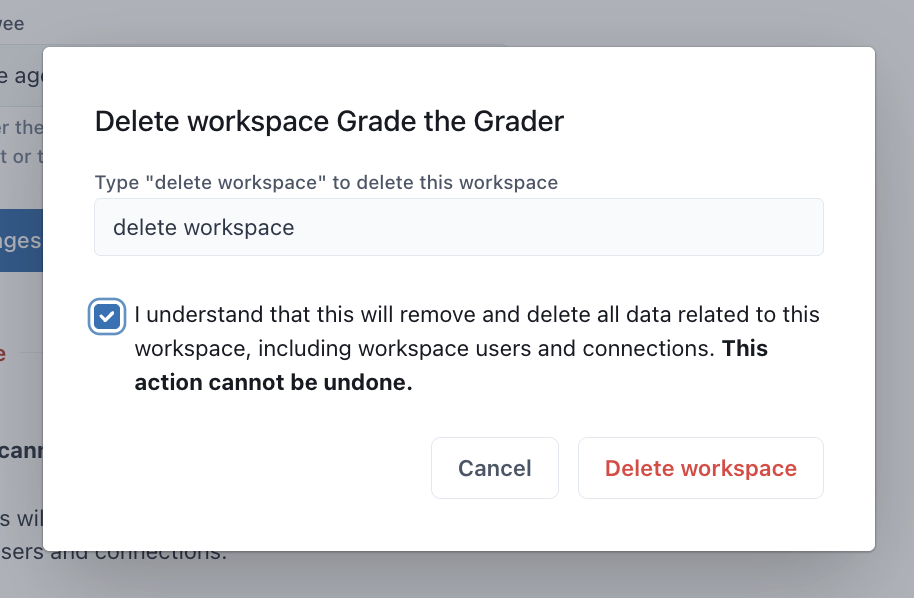
- Click Delete workspace to confirm the deletion.