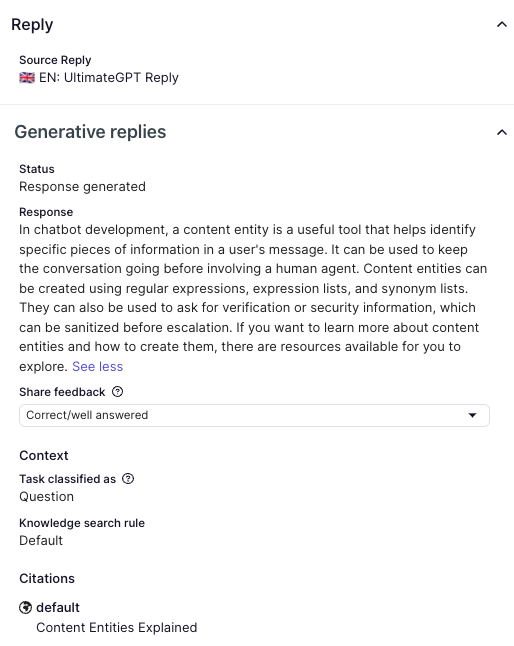
When an AI agent sends a generative reply during a conversation with a customer, the response is captured in the conversation logs. As part of ensuring a good customer experience, you can analyze whether the AI agent correctly interpreted the customer's question and provided an accurate response.
You can then share any feedback with us, which our AI researchers use to improve generative replies functionality.
To share feedback about generative replies
- In the AI agents workspace, select the AI agent you want to work with.
- Click
 Conversation logs in the sidebar.
 - Filter the list of conversations by Generative replies and select Generative replies used and Feedback not shared.
- Select a conversation to analyze.
- For any Generative replies entry, click Share feedback.
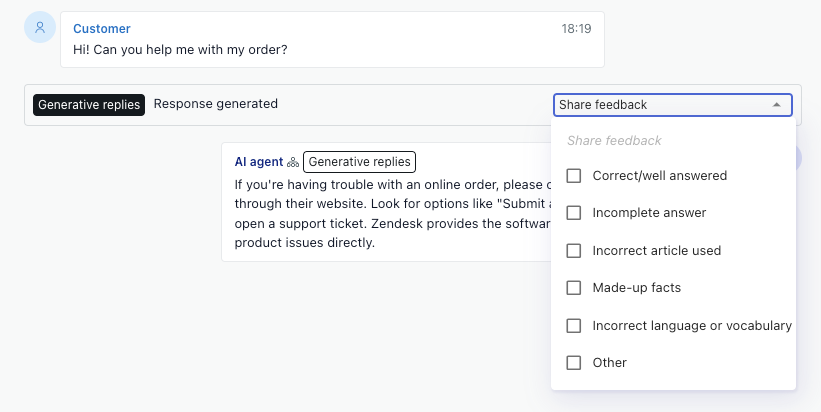
- Select one or more of the feedback options.
The available feedback options depend on the response status of the generative reply:
Response status Feedback options Response generated - Correct/well answered
- Incomplete answer
- Incorrect article used
- Made-up facts
- Incorrect language or vocabulary
- Other
Escalation required - Expected escalation
- Unexpected escalation
Not understood - Question out of scope
- Missing article
- Article not used
- Other
Error occurred - Error logged
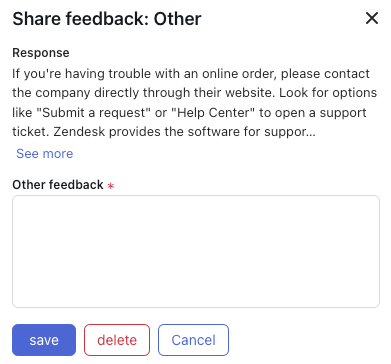
- If you selected Other as one of your feedback options, enter your free-text
feedback in the Other feedback field and click Save.
- (Optional) Click the Generative replies entry to open the Reply details
panel, where you can view more information about the reply, including its
status, the actual content of the response, any feedback shared, the context
(task classification and knowledge search rule), active instructions, and any
citations.