Summary: ◀▼
Prompt-based AI insights let you create or customize AI prompts to analyze customer conversations and score or flag them based on your criteria. This helps you identify performance trends, emerging issues, and improve quality assurance. The system protects sensitive data by redacting PII and PCI information. You can manage up to 10 active AI prompt categories and spotlights, ensuring insights align with your business needs.
Zendesk QA prompt-based AI insights empower teams to craft highly specific AI prompts, tailored to their unique business needs and quality standards.
This article includes the following topics:
Understanding what prompt-based AI insights are
Zendesk QA prompt-based AI insights represent a powerful evolution in our AI-driven quality assurance suite, beyond the established capabilities for automated scoring and risk identification.
By using or modifying our ready-to-use AI prompts or crafting new ones, you can ask targeted questions about conversations using natural language and automatically score or flag them based on your criteria. AI Prompt category criteria define agent behavior, while Spotlight criteria are more flexible and can apply to either agent or customer behavior.
This flexibility allows for an infinite expansion of the insights that can be extracted from customer conversations, enabling deeper analysis of performance metrics, identification of emerging issues, and proactive intervention.
Ultimately, these customizable insights drive more strategic quality assurance, directly contributing to the achievement of critical business objectives and fostering exceptional customer experiences.
Understanding how prompt-based AI insights work
Leveraging the latest AI models, prompt-based AI insights empower teams to craft highly specific AI prompts, tailored to their unique business needs and quality standards.
You can select prompts from our ready-to-use AI prompt templates, customize them, or create new AI-powered prompts using only natural language. Rating categories grade agents, while spotlight insights flag tickets.
Before sending data to any AI large language model (LLM), Zendesk QA automatically redacts personally identifiable information (PII) and payment card industry (PCI) data from call recording transcriptions and summaries for all Insight prompts.
Admins and account managers can have up to 10 active AI prompt-based rating categories and AI prompt-based spotlight insights per account. When you reach this limit, you must either mark one as inactive or delete it before you can create or activate more.
 ). You must update your prompt to gather
relevant insights before marking it as active again.
). You must update your prompt to gather
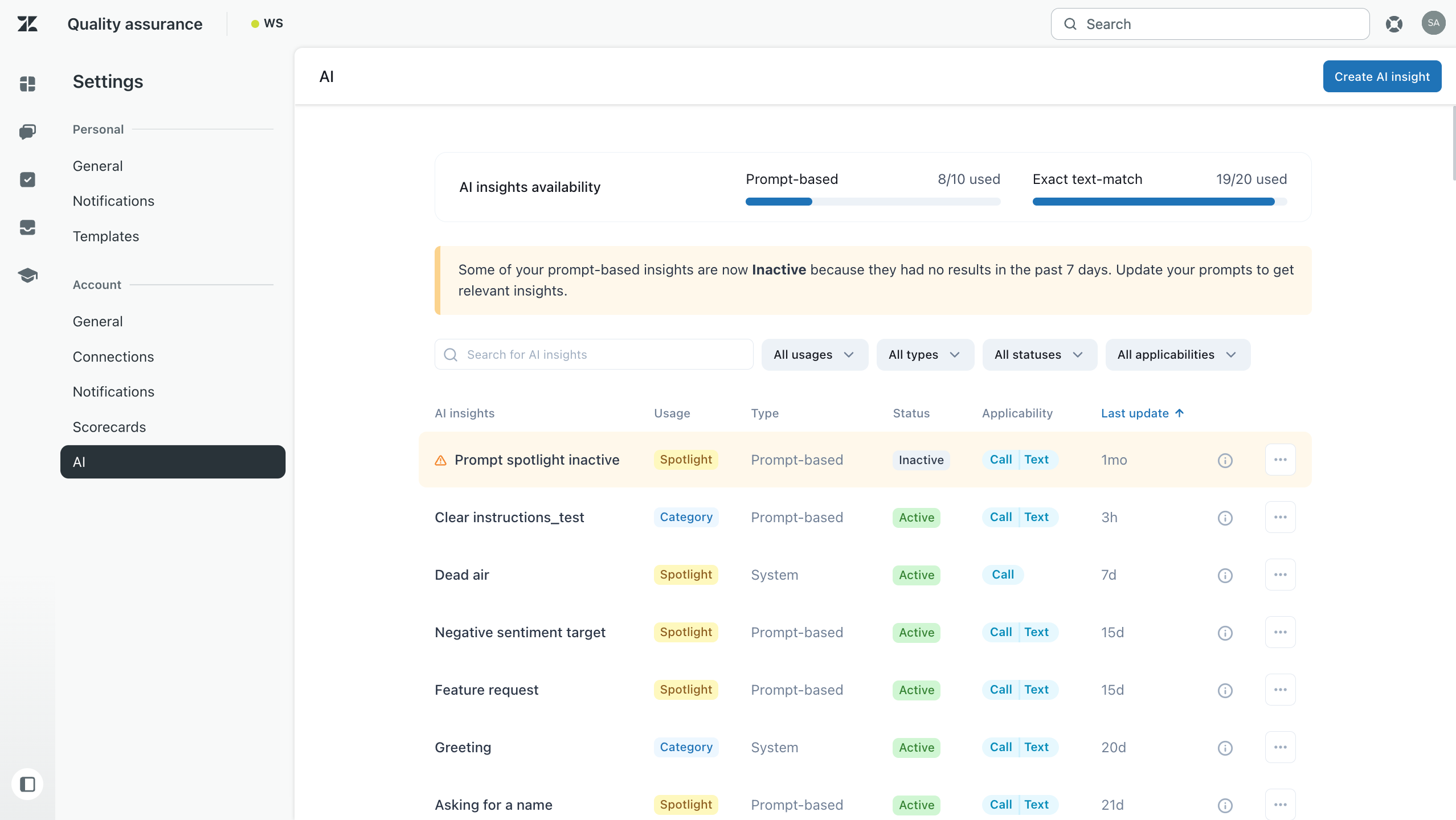
relevant insights before marking it as active again.Prompt-based AI insights can be accessed from the AI page in the account settings.
To ensure proper functionality for AI Insights in Zendesk QA, both the Automatic scoring with AutoQA and the LLM-based AutoQA account settings must be turned on.
If the AI suggestions toggle is also turned on in your account settings, the system can analyze your prompts to resolve ambiguity, vagueness, or poor formatting. It tries to refine your core intent by adding the following details:
- The main ask of your prompt
- What it is
- What it is not
- You prompt answer description
- An example of a negative prompt score
- An example of a positive prompt score
- What needs clarifying
- Your prompt answer options
Before sending data to any AI large language model (LLM), Zendesk QA automatically redacts personally identifiable information (PII) and payment card industry (PCI) data from call recording transcriptions, and summaries for all Insight prompts.
Admins and account managers can have up to 10 active AI prompt-based rating categories and AI prompt-based spotlight insights, and up to 20 exact text-match rating categories and spotlights per account.
The usage count is displayed at the top of the AI page. When you reach this limit, you must either mark one as inactive or delete it before you can create or activate more.
If a prompt-based category produces over 95% N/A (Not applicable) results for 7
consecutive days, it’s automatically marked as inactive and displays an
attention icon (). You must update your prompt to gather
relevant insights before marking it as active again.
Related resources
See the following articles for more information about the AI insights in Zendesk QA:
- Best practices for creating AI insights prompts in Zendesk QA
- Prompt templates for Zendesk QA AI insights
- Creating AI prompt-based rating categories
- Creating AI prompt-based spotlight insights
- Creating exact text-match AI insight rating categories
- Creating exact text-match AI insight spotlights
- Managing AI spotlight insights
- Viewing and managing rating categories for scorecards