Verified AI summary ◀▼
Use the access log to monitor agent activity, ensuring data privacy and security. Identify unauthorized access, track changes to user data, and prevent potential security risks by filtering access events. Secure API credentials, control access, and detect suspicious activities to maintain compliance and safeguard sensitive information. Leverage both the Admin Center and API workflows for comprehensive oversight.
As described in Using the access log to monitor agent activity, the access log enables monitoring of access events in your account related to tickets, user profiles, and searches. By providing detailed, filtered views of access events, admins and agents with permission can identify unauthorized activities and help ensure compliance with data privacy regulations.
Common use cases
This section includes example use cases to help you better understand how the access log can aid in detecting potential security risks. These use cases apply to both the Admin Center user interface and the API.
Each use case includes categories and summaries to filter the access log and find related access events. For example, in the use case Monitor changes to contact numbers to prevent abuse or fraud, filter by the Phone numbers Category and the recommended Summary items (such as Create Phone Number and Delete Phone Number) to surface the related access events.
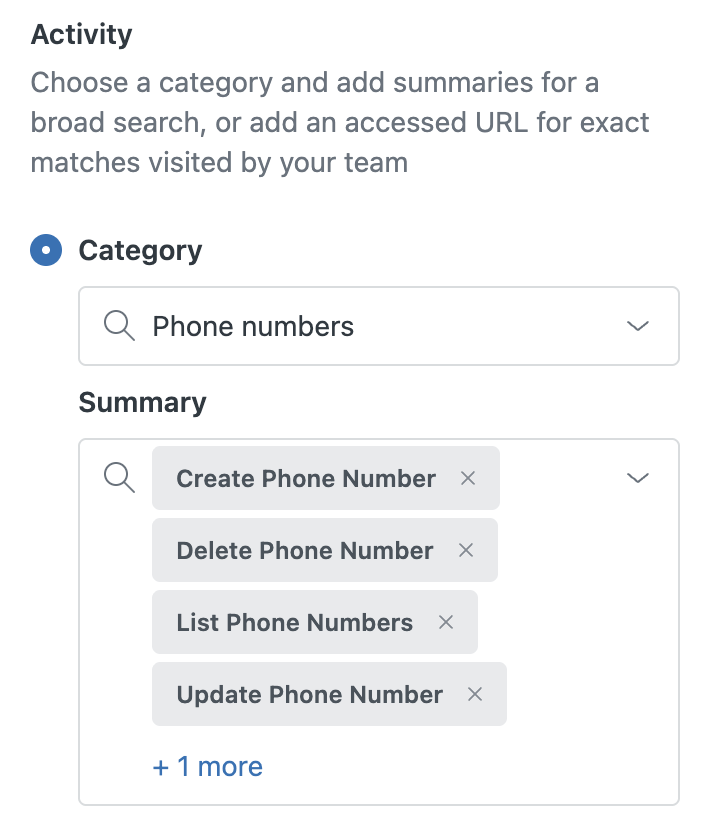
Expand the sections below to learn more about common use cases.
Monitor user data access and assess privacy risks
| Use case | Category filter | Summary filters |
|---|---|---|
| Monitor user profile views to detect unauthorized or excessive profile data access | Users |
|
| Profiles API |
|
|
| Monitor critical security settings and account configuration changes | Account settings |
|
| Staff |
|
|
| Track changes to authentication vectors indicating possible account compromise | User identities |
|
| Current account |
|
|
| Remote authentication |
|
|
| Monitor changes to contact numbers to prevent abuse or fraud | Phone numbers |
|
| Monitor custom object data and workflow rules to prevent data breaches | Custom objects |
|
| Custom object fields |
|
Secure API credentials and tokens
| Use case | Category filter | Summary filters |
|---|---|---|
| Secure API credentials and tokens to prevent unauthorized API access | OAuth tokens |
|
| OAuth clients |
|
|
| OAuth connections |
|
|
| Monitor API keys and basic authentication credentials management for abuse prevention | API key connections |
|
| Basic authentication connections |
|
Assess security risks for apps, integrations, and automations
| Use case | Category filter | Summary filters |
|---|---|---|
| Monitor app and integration lifecycle changes to help prevent security risks | Apps |
|
| Installations |
|
|
| Integrations |
|
|
| Prevent webhook management abuse, such as data exfiltration or automation-based attacks | Webhooks |
|
| Detect automation misuse to prevent privilege escalation or data leaks | Automations |
|
| Macros |
|
|
| Object triggers |
|
|
| Triggers |
|
Control access and prevent privilege escalation
| Use case | Category filter | Summary filters |
|---|---|---|
| Prevent unauthorized privilege escalation by tracking group and role changes | Group memberships |
|
| Custom roles |
|
Detect bulk actions that could signify malicious activity
| Use case | Category filter | Summary filter |
|---|---|---|
| Detect other high-impact mass operations that could signify malicious activity | Organization memberships | Bulk delete memberships |
| Organizations | Bulk delete organizations | |
| Sessions | Bulk delete sessions | |
| Tickets | Bulk delete tickets | |
| Users | Bulk delete users | |
| Views | Bulk delete views | |
| Workspaces | Bulk delete workspaces |
Example Admin Center workflows
Monitor user profile views to detect unauthorized or excessive access
Scenario: As an admin, you want to ensure agents can only view customer profiles within their groups.
- In Admin Center, click
 Account in the sidebar, then select Logs > Access log.
 - Click Filter.
- Apply either of the following activity filter combinations:
- Category: Users, Summary: Show user, List users
- Category: Profiles API, Summary: Get profile by identifier, Get profile by profile ID, Get profiles by user ID
- Click Apply filters.
- Review the list of events for unauthorized profile views.
Monitor critical security settings and account configuration changes
Scenario: As an admin, you want to monitor when other Zendesk admins change critical security and account settings to ensure your account remains secure and compliant.
- In Admin Center, click
Account in the sidebar, then select Logs > Access log.
- Click Filter.
- Apply either of the following activity filter combinations:
- Category: Account settings, Summary: Update account settings
- Category: Staff, Summary: Fetch staff users, Update staff user, Change password, Update email identity, Fetch 2FA recovery code, Delete 2FA configuration, Set password
- Click Apply filters.
- Review the list for security settings or account configuration updates that put your account at risk.
Example API workflows
Identify trends to help refine permissions
Scenario: Your company has a new customer service team, and you want to ensure its agents are viewing the correct data to comply with data privacy regulations. Your goal is to refine permissions for this group so agents have access only to the data they are permitted to see.
How to use the Access Log API to address the scenario:
- Identify an agent of the new team to use their activity as a reference point.
- Make an API call filtered by the agent's user ID, which reveals all of the
agent's events, including a record of the tickets viewed and searches, at
what time, and from which IP address.
For example, user_id 1213456789 viewed ticket number 937.
timestamp: "2023-02-16T19:00:00Z",
user_id: 1213456789,
ip_address: "00.00.000.00",
url: ""/api/v2/tickets/937?[...]
method: "GET",
status: 200
Also, user_id 1213456789 opened the profile belonging to user_id 9878654.
timestamp: “2023-02-16T19:00:00Z”, user_id: 1213456789, ip_address: “00.00.000.00”, url: “/api/v2/users/9878654?[...] method: “GET”, status: 304 - Use the data to determine whether the agent is accessing tickets assigned to
other agent groups or viewing profiles of customers assigned to other
agents.
You now have more data to help you set up the proper permissions for agents in the group.
Investigate suspicious activity
Scenario: You are notified that an agent is searching for customer credit card numbers. You'd like a complete record of the agent's activity so you can take the appropriate steps to investigate the issue.
How to use the Access Log API to address the scenario:
- Make an API call filtered by the agent's user ID.
- Evaluate the search records in the access log to identify repeated searches
for sensitive information.
For example, this agent is searching for "credit card."
timestamp: “2023-02-16T19:00:00Z”, user_id: 1213456789, ip_address: “00.00.000.00”, url: “/hc/api/v2/articles/search.json?[...]query=credit%20card”, method: “GET”, status: 200 - If applicable, use the access log to help trace which customers have been affected.