End-user presence detection can automatically determine whether an end user is still active in a messaging session on your website or mobile app. This can help businesses identify and prioritize tickets where users are still actively waiting in the queue versus those who have abandoned the conversation. By detecting when a user closes your website or disconnects from your app, agents can focus on engaged customers rather than abandoned conversations.
This article contains the following sections:
About end-user presence
Before turning on end-user presence detection, it’s important to understand how Zendesk determines an end user is still active on your website, and how the setting impacts your account in other areas.
This section includes the following topics:
Requirements and limitations
Note the following when signing up for the EAP:
- Accounts need to have messaging turned on.
- This feature works only for users initiating conversations via the Web Widget and mobile SDKs. It is not supported for social messaging channels.
Understanding how end-user presence is detected
End-user presence identifies whether a customer is still active on your website and mobile app.
Because it is not always possible to perfectly identify presence, Zendesk uses specific signals combined with a buffer to prevent false negatives.
For web messaging, the following signals indicate a user is no longer present:
- The end user closes the website.
- The end user closes the browser.
- The end user's internet connection is lost.
For your mobile SDK:
- If notifications are turned on, the end user’s presence is always detected.
- If the notifications are not turned on or implemented, the
end user is considered no longer present when the websocket
connection is terminated. This happens when:
- The end user backgrounds the app or quits the app.
- The conversation screen is closed.
End-user presence and messaging session states
The presence (or absence) of an end user in a messaging conversation impacts when a messaging conversation is considered active or inactive.
When the end-user presence feature is turned on, the session states behave as follows:
- Active: Messaging session is active if the ticket has received an end user response in the last 10 mins or within the auto release capacity timeframe, or the user presence is online. If any of the events goes false, the messaging session state will become inactive.
- Inactive: Messaging session is inactive if the ticket has not received an end user response in the last 10 mins or auto-release capacity expires or user presence is offline or ticket status is set to Pending, On hold or Solved, whichever happens soonest.
How end-user presence affects routing and capacity
End-user presence directly impacts how tickets are queued and how agent capacity is calculated in both messaging and omnichannel routing configurations.
Routing tickets to queues
-
Messaging routing: Only tickets with an active messaging session stay in the queue. Inactive or ended sessions are removed from the queue and can only be accessed through Views. See Routing messaging tickets and notifying agents for more information on messaging routing.
-
Omnichannel routing : If you are counting inactive conversations towards agent capacity, the queue includes both active and inactive tickets. Otherwise, inactive tickets are assigned directly to agents rather than staying in the queue. Essentially, there is no change in the expected behavior , except that user presence may move a greater percentage of your tickets to the inactive state sooner. See Understanding how omnichannel routing uses queues to route work to agents for more information on omnichannel queues.
Calculating agent capacity
-
Messaging routing: Agent capacity is released as soon as a messaging session becomes inactive or is ended.
-
Omnichannel routing: If you are counting inactive conversations towards agent capacity, the queue includes both active and inactive tickets. Otherwise, inactive tickets are assigned directly to agents rather than staying in the queue. See Managing your omnichannel routing configuration for more information.
-
Auto-release capacity: If you are automatically releasing agent capacity for inactive conversations, capacity is released when the session becomes inactive due to the end user leaving the website, or the auto release capacity timer elapses—whichever happens first. See Automatically releasing agent capacity for inactive messaging conversations for more information.
Turning on end-user presence
If you’re accepted into the EAP, you can turn on the end-user feature in your messaging settings.
To turn on end-user presence
- In Admin Center, click
 Channels in the sidebar, then select Messaging and social >
Messaging.
Channels in the sidebar, then select Messaging and social >
Messaging. - Click Messaging settings.
- Expand the Capacity release section.
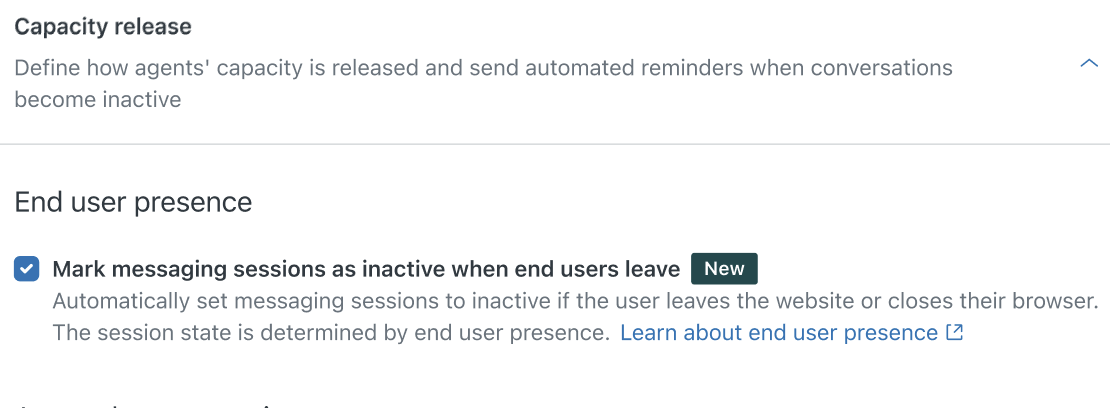
- Under End user presence, click Mark messaging sessions as inactive when end-users leave and opt into the terms and conditions.
- Again, click Mark messaging sessions as inactive when end-users leave and opt into the terms and conditions.
- Click Save.
Considering that the feature impacts routing and agents’ capacity, our recommendation is to turn on the feature in your sandbox first. Enable the feature on production/live accounts during low traffic periods, then turn the feature on in your production/live accounts during low traffic periods.