Generative procedures are what shape the responses of an AI agent with agentic AI. An alternative to scripted dialogues, procedures allow you to create flexible conversation flows that adapt to a customer’s responses during a conversation with an AI agent, while still aligning with your business policies.
This article contains the following topics:
Related articles:
About generative procedures for AI agents
A generative procedure determines the general flow that an AI agent follows during a conversation with a customer. You create a procedure by describing your business policies—or however you want the AI agent to handle a given support topic—and the system automatically generates a procedure map, showing you the logic the AI agent will follow during the conversation.
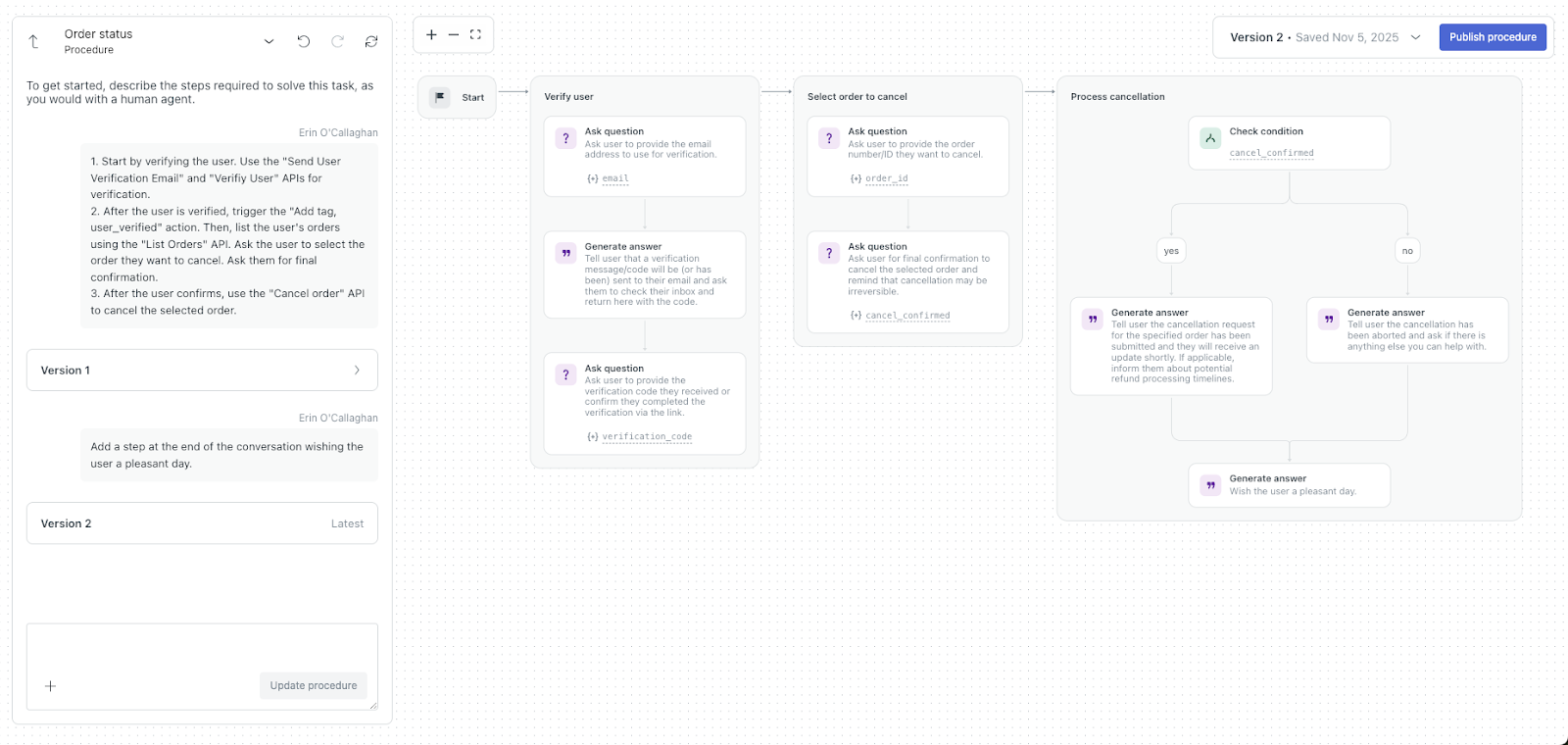
Each generative procedure is tied to a specific use case. When that use case is triggered during a conversation with a user, the AI agent follows the associated procedure to resolve the issue.
Generative procedures also allow for multilingual AI agents. You can write a procedure once, in a single language, and it can serve all the languages your AI agent supports.
The topics below cover more details about how generative procedures work:
What happens if the customer diverges from the expected path
Procedures are designed to be flexible. Even though a procedure has a logical flow to it, an AI agent still has the flexibility to determine the best way to resolve a customer’s issue in line with your business policies. The AI agent can use reasoning to jump to the parts of the procedure that make the most sense based on what the customer says.
If the customer diverges from the expected path, the AI agent can adapt while still trying to complete the procedure. Common examples of when this happens include:
- A customer can’t answer a question yet. For example, the AI agent asks for a tracking number and the customer replies: “Where do I find that?” In cases like these, the AI agent may provide guidance or look up relevant help content before returning to the procedure.
- A customer asks an unexpected, but related, question mid-procedure. The AI agent may pause the current step to address the question (often by searching for supporting information), then continue with the next step.
- The issue can’t be resolved with the available steps. If all reasonable options are exhausted, the procedure may end early. When this happens, the AI agent clearly indicates that the procedure has ended so the customer isn’t left waiting.
How questions and saved parameters work
Procedures rely on saved details, known as parameters, to avoid unnecessary back-and-forth and to support integrations. Here are the conversational behaviors you can expect from an AI agent in situations where parameters are involved:
- The AI agent may skip asking for information that’s already known. If a required detail is already available in the conversation, the AI agent may continue without asking again. For example, if the information was already provided by the customer or returned by an integration, the AI agent uses that information instead of requesting it again.
- The AI agent may ask again if it still needs a usable value. If a customer’s response is missing, unclear, or invalid for the current step, the AI agent may repeat the question or ask a clarifying follow-up question.
- Some procedures intentionally collect the same detail more than once. If a procedure is designed to confirm or re-collect a value later, the AI agent follows that structure even if the parameter already exists.
About the block types in generative procedures
When you create a generative procedure, the system generates a procedure map to visualize the steps the AI agent will take during a conversation with a customer. That procedure map is made up of blocks. Each block represents a different kind of step, such as messaging the customer, collecting details, making a decision, connecting to your systems, or handing off to another flow.
The image below shows an example of a procedure map and the blocks it contains:
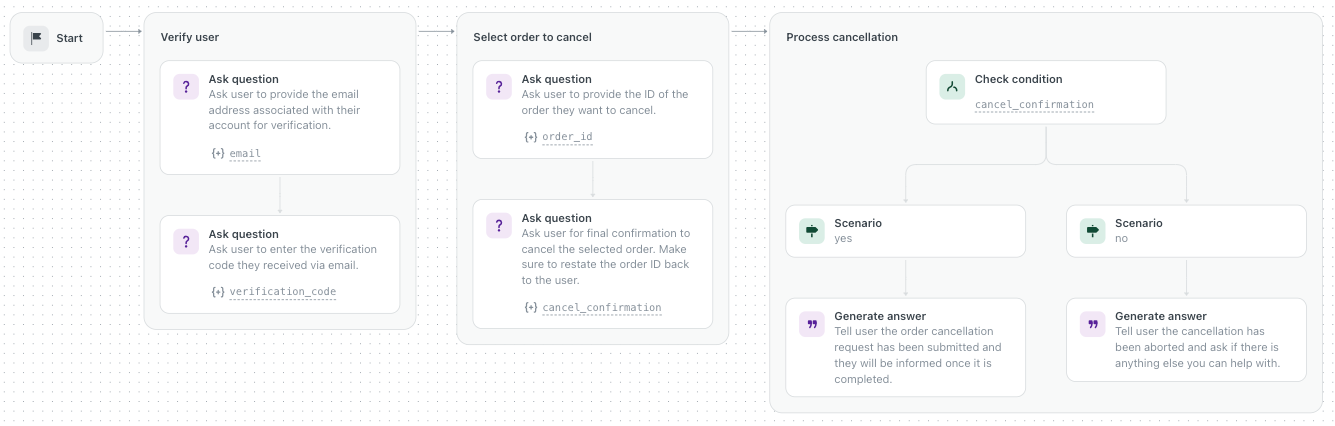
The table below describes the available procedure block types.
| Block type | Description |
| Generate answer | The AI agent sends information to the customer, such as a confirmation, status update, or explanation. After sending the message, it automatically continues to the next step in the procedure. |
| Ask question | The AI agent asks the customer a question to collect required information, such as an order number or email address. After asking, the procedure waits for the customer’s reply before continuing. If the reply is unclear or incomplete, the AI agent may ask again or ask a clarifying question. |
| Collect parameter | The AI agent saves a piece of information, called a parameter, into the conversation so it can be reused later in the procedure. This parameter is often based on a customer’s answer or a detail mentioned earlier in the conversation. This helps the AI agent remember important details and use them in later steps (for example, when running an integration). |
| Check condition | The AI agent checks a condition and then continues down the matching path. This is how procedures handle branching logic, like sending customers down different steps depending on their selection or situation. |
|
Run integration (API integration) |
The AI agent performs an action in a connected external system (for example, looking up an order, checking shipping status, or updating an address), then continues after the result of the action is returned. Before running the action, the AI agent checks whether any parameters are required, such as an order number or email address:
If an API integration can’t be completed, the AI agent follows the procedure’s defined fallback behavior when available. Otherwise, it continues with a next-best step (for example, asking a follow-up question or escalating), depending on how your experience is set up. |
|
Perform action (CRM action) |
The AI agent performs an action in your CRM system (for example, creating a ticket or updating a customer record), then continues after the result of the action is returned. Before running the action, the AI agent checks whether any parameters are required, such as an order number or email address:
|
| Search for knowledge | The AI agent searches your connected knowledge sources and responds based on what it finds. The procedure then continues. If the search result is unclear or missing information, the AI agent may ask a follow-up question or proceed with a fallback path, depending on how the procedure is set up. |
| Answer with knowledge | The AI agent generates an answer to the customer’s question using the knowledge it found while executing the Search for knowledge block. |
| Link to | The procedure hands off to another flow, such as a shared identity verification step, an escalation flow, or another use case. Once a Link to step runs, the current procedure ends and the linked flow takes over. |
| Escalate to | The conversation is handed off to a human agent or team. After escalation, the AI agent stops and the procedure ends. |