Multi-language support for voice AI agents allows an AI agent to handle phone calls in different languages, adapting its accent, vocabulary, and conversational style based on the language and regional variant you configure.
This article contains the following topics:
- About multi-language support for voice AI agents
- Adding supported languages to voice AI agents
- Choosing your voice settings
- Configuring a voice AI agent’s greeting and escalation messages
- Routing customers to the right language
- Supported languages and locales
Related article:
About multi-language support for voice AI agents
Multi-language support for voice AI agents offers the following key features:
- Native-sounding accents: Choose specific regional variants (for example, Mexican Spanish vs. European Spanish).
- Automatic language switching: Callers can request to switch languages mid-conversation.
- Flexible language routing: Route callers to the right language based on phone number, caller information, or customer preference.
- Regional vocabulary: The AI uses region-appropriate terms and expressions.
- Fully generative: There’s no need to translate your procedures or dialogues. The AI agent automatically handles all conversations in the configured language. You only need to configure the Welcome reply and Escalation reply for each language.
Customers can request to switch languages at any point during a conversation. The AI will automatically:
- Detect the language request.
- Check whether the language has been added and activated.
- Switch to the requested language, if supported.
The AI agent can also list all available languages if the customer asks which languages are supported. Examples of what customers might say:
- "Can we switch to French?"
- "Ich möchte auf Deutsch sprechen" (I want to speak in German)
- "What languages do you support?"
Adding supported languages to voice AI agents
For an AI agent to be able to converse with customers in a given language, you must perform the following tasks:
Optionally, you can also set a language as the AI agent’s default.
Choosing your voice settings
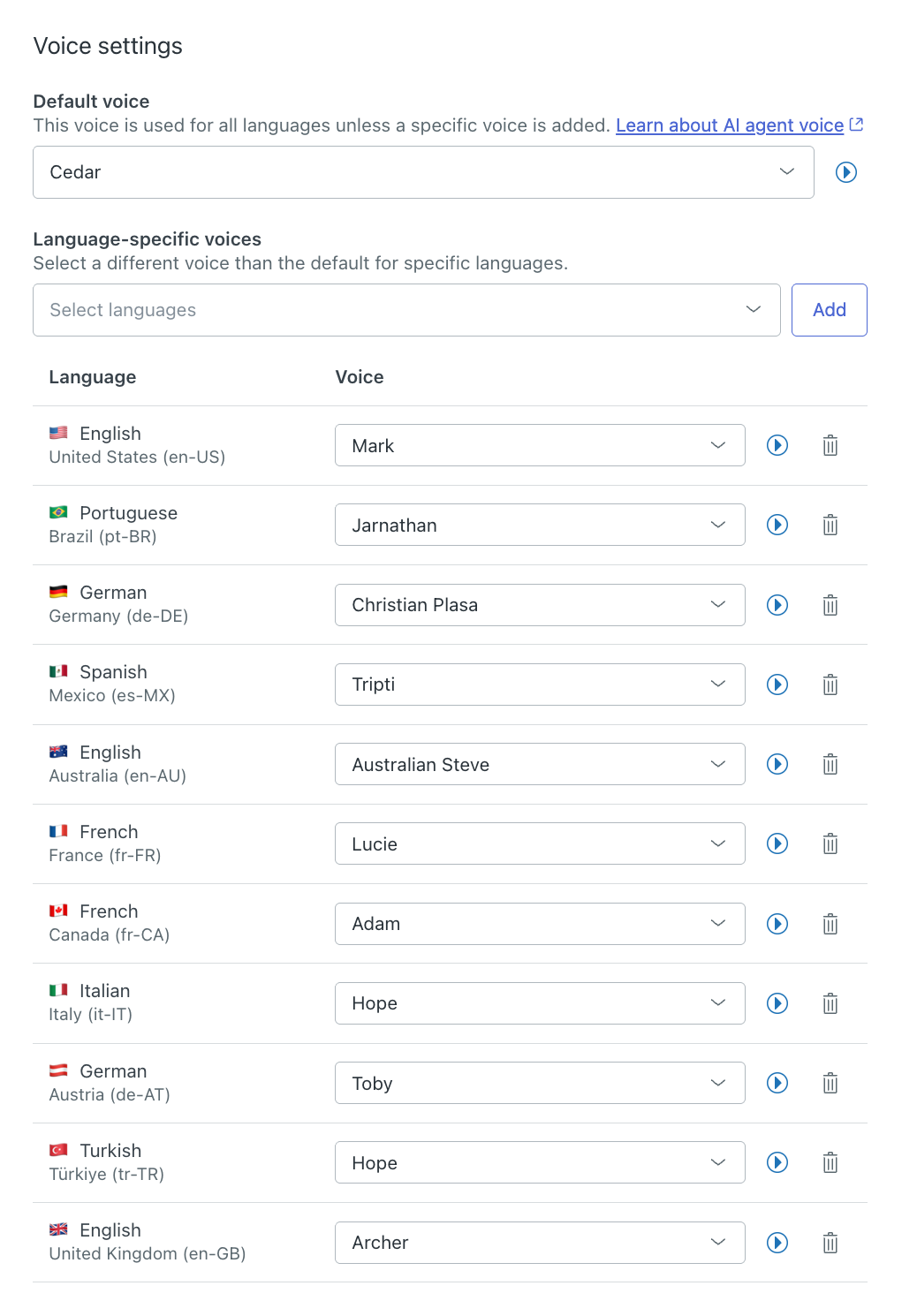
You can select a default voice as well as language-specific voices. You can change the default multilingual voice between female and male. You can also add a voice override for a specific locale with a high-fidelity voice for better accents.
To choose voice settings
-
Customize the agent's
identity.
The Voice settings fields allow you to select a voice for each supported language.
Configuring a voice AI agent’s greeting and escalation messages
After adding a language, you need to configure what the AI agent says when answering or escalating the call in that language. You do this by editing the following system replies:
- Welcome reply
- Escalation reply
For instructions, see Editing a system reply in an AI agent with agentic AI.
When configuring each system reply, write the AI agent’s message in the language you want to support. For example, if you want to support Spanish, your Welcome reply might look like this: "Hola, soy el asistente virtual. ¿En qué puedo ayudarte?"
Routing customers to the right language
When you have multiple languages configured, or multiple phone numbers connected to the same AI agent, you can:
Automatically routing customers to the appropriate language
You can automatically route customers to the appropriate language. You do this by creating an action that updates the conversation’s language, and then triggering that action based on one of the following criteria:
Creating an action that updates a conversation’s language
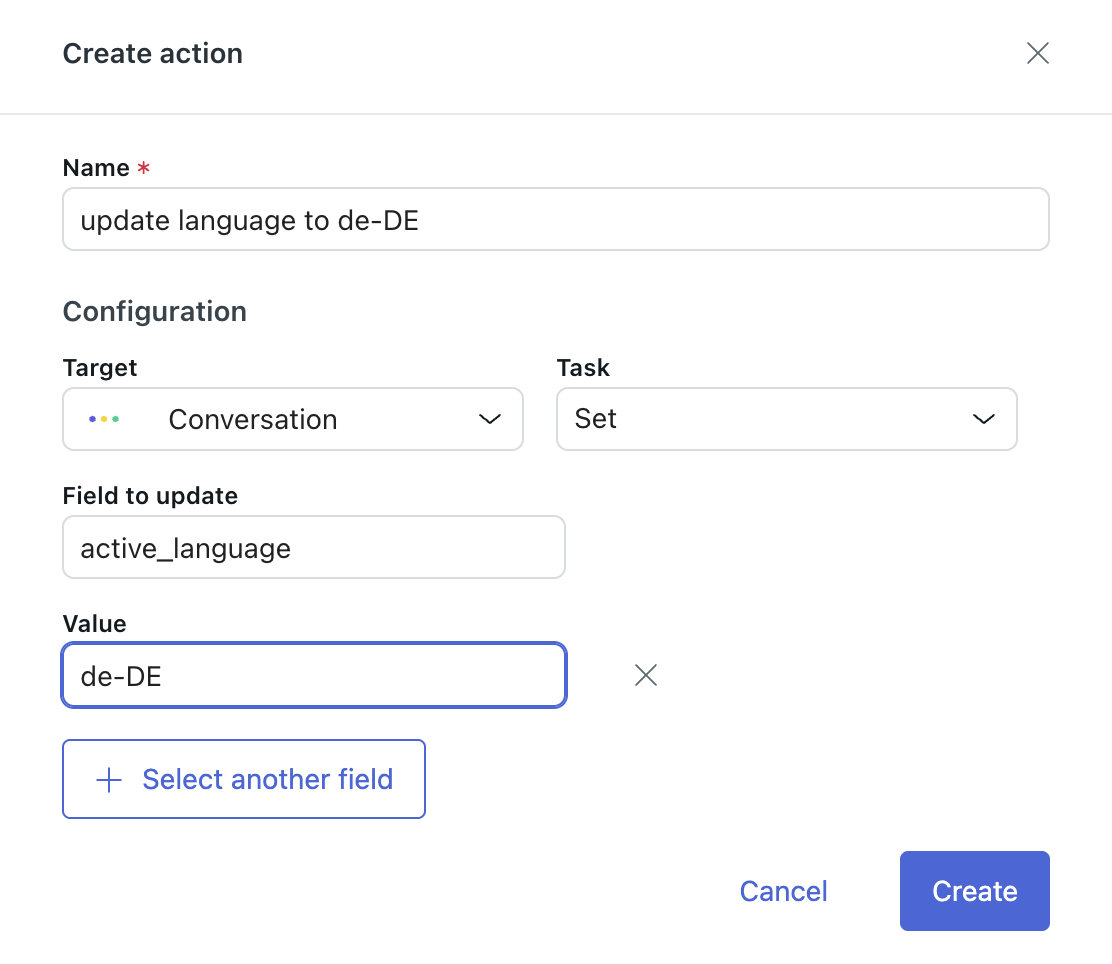
First, create an action that switches the conversation to a specific language. If you support many languages and want to be able to route calls to any of them, you need to create a separate action for each language.
To create an action to update conversation language
- In the AI agents workspace, select the AI agent you want to work with.
- Click
 Content in the sidebar, then select Actions.
 - Click Create action.
- In Name, enter a descriptive name for the action, such as Set language to German.
- In Target, select Conversation.
- In Task, select Set.
- In Field to update, enter active_language.
- In Value, enter the locale ID you created when adding the
language (for example, de-DE or german).
If you’re not sure, you can check the language code by opening the supported language for editing.
- Click Save.
Routing calls based on the phone number called
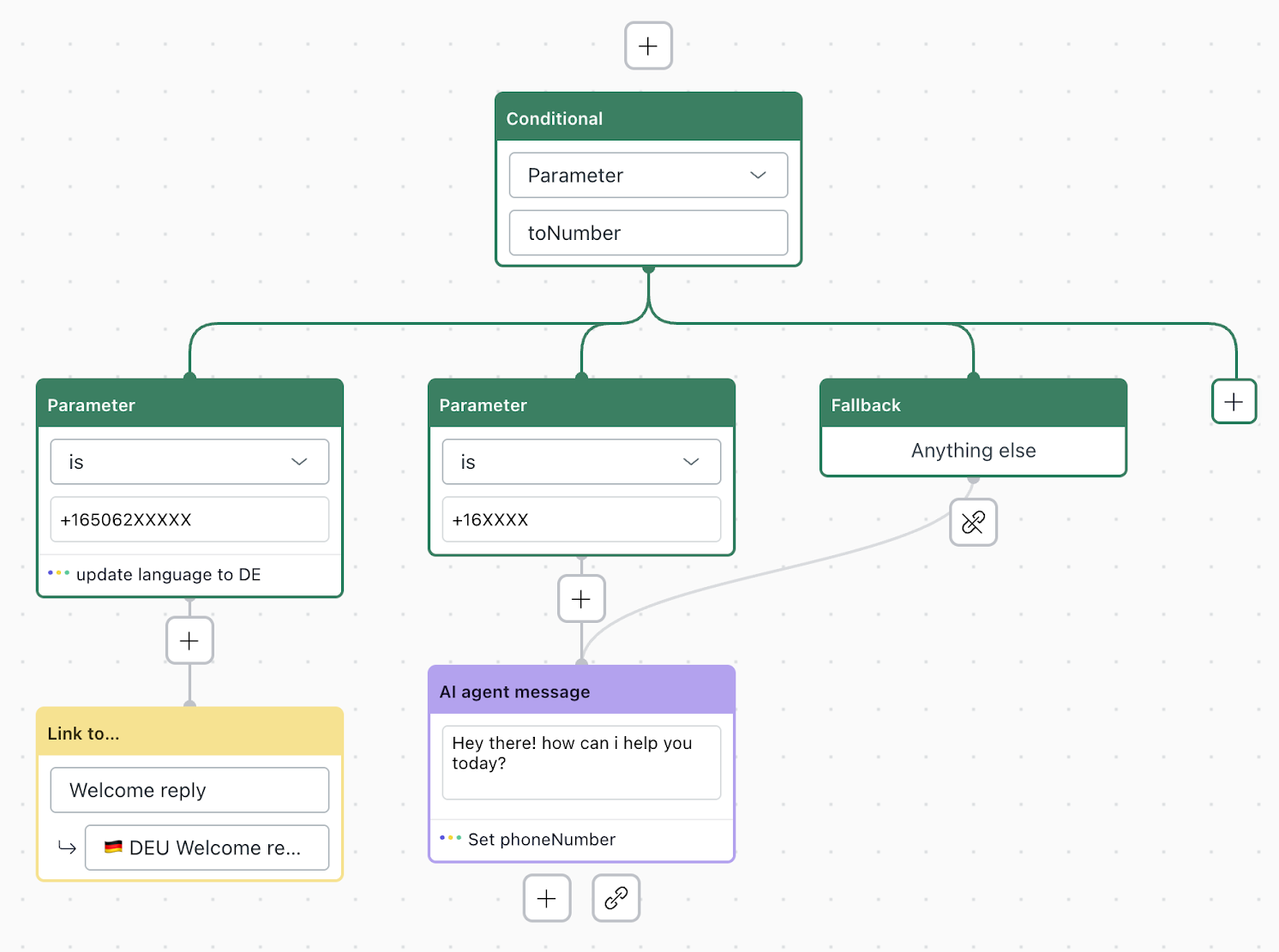
If your customers call different numbers for different languages (for example, one number for English support and another for German), you can route them based on which number they called.
To route calls based on the phone number called
-
Edit the system reply
called Welcome reply for the AI agent’s default
language.
For help working with the dialogue builder, see Creating conversation flows in the dialogue builder for AI agents.
- At the beginning of the dialogue, add a Conditional block
with the following details:
- First field: Parameter
- Second field: toNumber
- Update the child Parameter block with the following details:
- First field: is
- Second field: Enter the phone number the customer called.
- In the Details panel, click Add action and select the action you created above.
- Under the Parameter block, add a Link to block with the
following details:
- First field: Welcome reply
- Second field: Select the same language as the action.
- Click Publish.
Routing calls based on the customer’s phone number
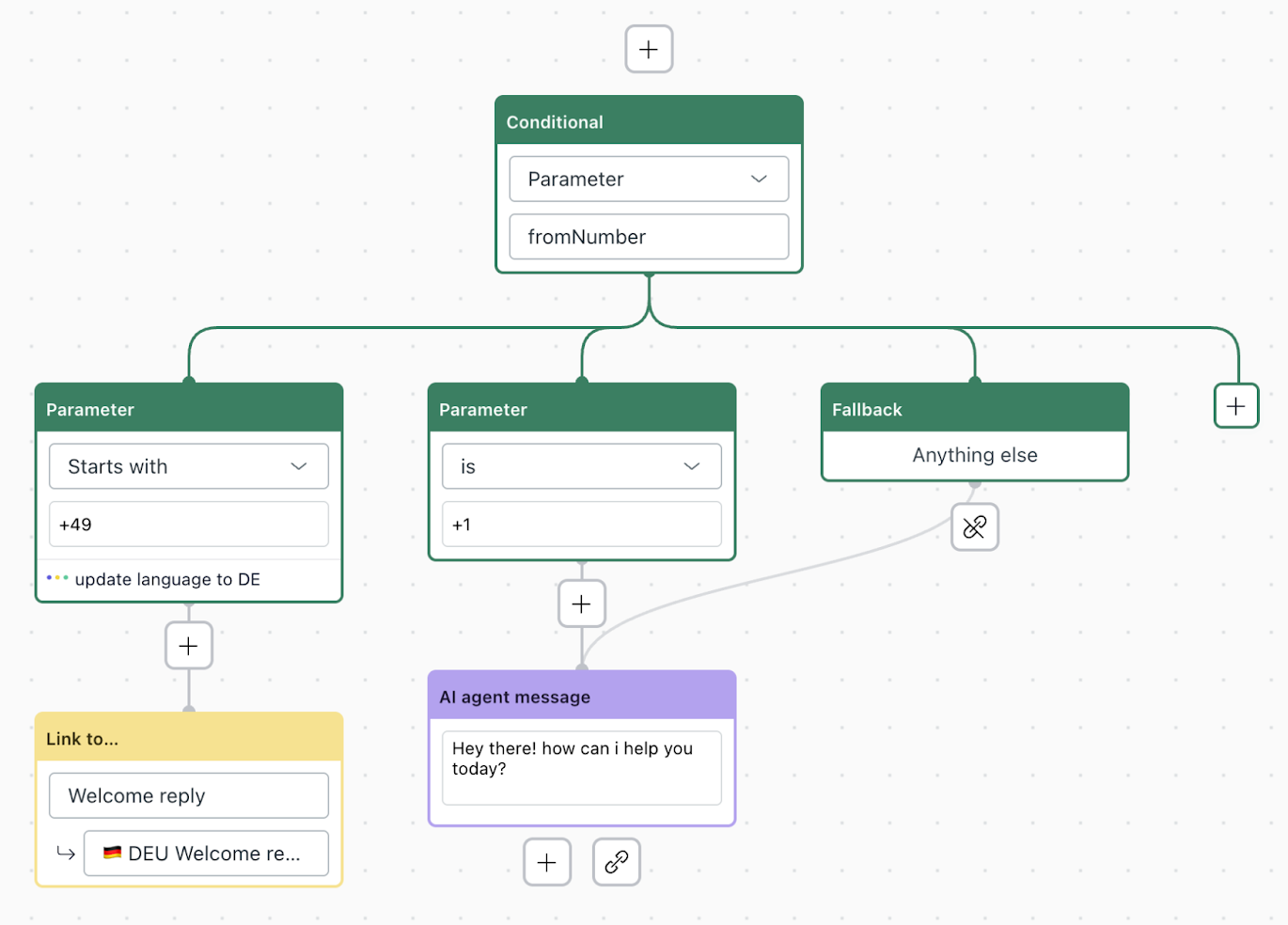
You can route calls based on the customer’s location, as detected by the country code in their phone number.
To route calls based on customer phone number
-
Edit the system reply
called Welcome reply for the AI agent’s default
language.
For help working with the dialogue builder, see Creating conversation flows in the dialogue builder for AI agents.
- At the beginning of the dialogue, add a Conditional block
with the following details:
- First field: Parameter
- Second field: fromNumber
- Update the child Parameter block with the following details:
- First field: is
- Second field: Enter the country code of the customer’s phone number (for example, +49).
- In the Details panel, click Add action and select the action you created above.
- Under the Parameter block, add a Link to block with the
following details:
- First field: Welcome reply
- Second field: Select the same language as the action.
- Click Publish.
Routing calls based on user data from your system
You can route calls based on user information in Zendesk or your back-office system that includes language preference.
To route calls based on user data
- Use the integration builder to create an API integration that fetches the user data you want to route calls based on.
-
Edit the system reply
called Welcome reply for the AI agent’s default
language.
For help working with the dialogue builder, see Creating conversation flows in the dialogue builder for AI agents.
- At the beginning of the dialogue, add an API integration block and select the integration you created.
- Select the appropriate child Scenario block and, depending on your
desired workflow, do one of the following:
- In the Details panel, click Add action and select the action you created above.
- Add and configure a Conditional block.
- Under the Scenario block, or else the Conditional block’s child
Parameter block, add a Link to block with the following
details:
- First field: Welcome reply
- Second field: Select the same language as the action.
- Click Publish.
Asking customers which language they prefer
You can let customers choose their language at the start of the call.
To ask customers which language they prefer
-
Edit the system reply called
Welcome reply for the AI agent’s default language.
For help working with the dialogue builder, see Creating conversation flows in the dialogue builder for AI agents.
- In the AI agent message block, add information that prompts the
customer to select a language.
For example: "For English, say 'English.' Para español, diga 'español.'"
The AI will automatically detect the language from the customer’s response and switch accordingly.Alternatively, you can create a generative procedure that prompts the customer to select a language.
Supported languages and locales
Voice AI agents support the following languages and regional variants. Specific AI agent tone and answer length settings are also noted where relevant.
| Language | Available locales | Status | Tone and answer length settings | |
| Recommended settings | Unsupported settings | |||
| English | en-US (American), en-AU (Australian), en-GB (British) | Available now | ||
| Arabic | ar-001 (Modern Standard), ar-EG (Egyptian), ar-SA (Saudi) | Professional + Short, Informal + Long | Enthusiastic + Short or Long | |
| Azerbaijani | az-AZ (Azerbaijani) | Professional + Short | Informal + Short or Long, Enthusiastic + Short or Long | |
| Bosnian | bs-BA (Bosnian) | Professional + Short or Long, Enthusiastic + Short or Long, Informal + Long | Informal + Short | |
| Bulgarian | bg-BG (Bulgarian) | Informal + Short or Long, Professional + Short, Enthusiastic + Long | Enthusiastic + Short, Professional + Long | |
| Catalan | ca-ES (Catalan) | Professional + Short or Long, Enthusiastic + Short or Long, Informal + Long | Informal + Short | |
| Chinese | zh-CN (Simplified), zh-TW (Traditional), zh-HK (Hong Kong) |
(Simplified) Professional + Short, Informal + Long (Traditional) Professional + Short or Long, Enthusiastic + Short or long, Informal + Long (Hong Kong) Professional + Short or Long, Enthusiastic + Short or Long, Informal + Long |
(Simplified) Enthusiastic + Short or Long (Traditional) Informal + Short (Hong Kong) Informal + Short |
|
| Czech | cs-CZ (Czech) | Professional + Short or Long, Enthusiastic + Short, Informal + Long | Informal + Short, Enthusiastic + Long | |
| Danish | da-DK (Danish) | Professional + Short or Long, Enthusiastic + Short or Long, Informal + Long | Informal + Short | |
| Dutch | nl-NL (Dutch), nl-BE (Belgian) | |||
| Estonian | et-EE (Estonian) | Enthusiastic + Short or Long, Professional + Long, Informal + Long | Professional + Short, Informal + Short | |
| French | fr-FR (Metropolitan), fr-CA (Canadian) | |||
| German | de-DE (German), de-CH (Swiss) | |||
| Hebrew | he-IL (Hebrew) | Professional + Short or Long, Informal + Short or Long, Enthusiastic + Short | Enthusiastic + Long | |
| Hindi | hi-IN (Hindi) | Professional + Short or Long, Informal + Long, Enthusiastic + Long | Informal + Short, Enthusiastic + Short | |
| Hungarian | hu-HU (Hungarian) | Informal + Long | Professional + Short or Long, Enthusiastic + Short or Long | |
| Indonesian | id-ID (Indonesian) | Professional + Short or Long, Informal + Short or Long, Enthusiastic + Short or Long | — | |
| Italian | it-IT (Italian) | Professional + Short or Long, Enthusiastic + Short or Long, Informal + Long | Informal + Short | |
| Japanese | ja-JP (Japanese) | Professional + Short or Long | Informal + Short or Long, Enthusiastic + Short or Long | |
| Kazakh | kk-KZ (Kazakh) | Enthusiastic + Short or Long, Professional + Short, Informal + Long | Professional + Long, Informal + Short | |
| Korean | ko-KR (Korean) | Informal + Short or Long, Enthusiastic + Short or Long, Professional + Long | Professional + Short | |
| Lithuanian | lt-LT (Lithuanian) | Professional + Short or Long, Informal + Short or Long, Enthusiastic + Long | Enthusiastic + Short | |
| Malay | ms-MY (Malay) | Professional + Short, Informal + Long, Enthusiastic + Long | Informal + Short, Enthusiastic + Short, Professional + Long | |
| Marathi | mr-IN (Marathi) | Professional + Short or Long | Informal + Short or Long, Enthusiastic + Short or Long | |
| Norwegian | nb-NO (Bokmål), nn-NO (Nynorsk) | Enthusiastic + Short or Long, Professional + Long, Informal + Long | Professional + Short, Informal + Short | |
| Persian | fa-IR (Iranian) | Professional + Short or Long, Enthusiastic + Short or Long, Informal + Long | Informal + Short | |
| Polish | pl-PL (Polish) | Professional + Short or Long, Informal + Long, Enthusiastic + Long | Informal + Short, Enthusiastic + Short | |
| Portuguese | pt-BR (Brazilian), pt-PT (European) | |||
| Romanian | ro-RO (Romanian) | Professional + Short or Long, Enthusiastic + Short or Long, Informal + Long | Informal + Short | |
| Russian | ru-RU (Russian) | Professional + Short or Long, Enthusiastic + Short | Informal + Short or Long, Enthusiastic + Long | |
| Slovak | sk-SK (Slovak) | Professional + Short, Informal + Long | Enthusiastic + Short or Long | |
| Slovenian | sl-SI (Slovenian) | Professional + Short or Long, Enthusiastic + Short or Long, Informal + Long | Informal + Short | |
| Spanish | es-ES (European), es-MX (Mexican) | |||
| Swahili | sw-KE (Kenyan), sw-TZ (Tanzanian) | Professional + Short or Long, Informal + Short or Long, Enthusiastic + Short or Long | — | |
| Swedish | sv-SE (Swedish) | Professional + Short or Long, Enthusiastic + Short or Long, Informal + Long | Informal + Short | |
| Tagalog | fil-PH (Filipino) | Professional + Long | Professional + Short, Informal + Short or Long, Enthusiastic + Short or Long | |
| Tamil | ta-IN (Indian), ta-LK (Sri Lankan) | Professional + Short or Long, Enthusiastic + Short or Long, Informal + Long | Informal + Short | |
| Turkish | tr-TR (Turkish) | Professional + Short or Long, Informal + Long, Enthusiastic + Long | Informal + Short, Enthusiastic + Short | |
| Ukrainian | uk-UA (Ukrainian) | Professional + Short or Long, Informal + Short or Long, Enthusiastic + Short or Long | — | |
| Urdu | ur-PK (Pakistani), ur-IN (Indian) | Professional + Short or Long, Enthusiastic + Short or Long, Informal + Long | Informal + Short | |
| Vietnamese | vi-VN (Vietnamese) | Professional + Long | Informal + Short or Long, Enthusiastic + Short or Long | |
| Welsh | cy-GB (Welsh) | Professional + Short or Long, Enthusiastic + Short or Long, Informal + Long | Informal + Short | |
| Afrikaans | af-ZA (South African) | Coming soon | ||
| Armenian | hy-AM (Armenian) | |||
| Belarusian | be-BY (Belarusian) | |||
| Croatian | hr-HR (Croatian) | |||
| Finnish | fi-FI (Finnish) | |||
| Galician | gl-ES (Galician) | |||
| Greek | el-GR (Greek) | |||
| Icelandic | is-IS (Icelandic) | |||
| Kannada | kn-IN (Kannada) | |||
| Latvian | lv-LV (Latvian) | |||
| Macedonian | mk-MK (Macedonian) | |||
| Maori | mi-NZ (Maori) | |||
| Nepali | ne-NP (Nepali) | |||
| Serbian | sr-RS (Serbian) | |||
| Thai | th-TH (Thai) | |||