- Configured actions: Actions that can be used to enrich the conversation experience, retrieve or send conversation details to your CRM platform, or improve your understanding of your customer conversations overall.
- API integrations: Connections to an API or other data source that are created in the integration builder, a powerful no-code tool that enables you to create API integrations without extended technical or programming skills.
- Action flows: User-defined automated sequences of steps that perform actions in Zendesk and external systems based on a defined event that initiates or triggers the workflow.
- Custom actions: Actions that allow you to update data outside of Zendesk using an API you specify.
This article contains the following topics:
Accessing actions in an AI agent
You can access an AI agent's actions in the sidebar.
To access actions in an AI agent
- In the AI agents workspace, select the AI agent you want to work with.
-
Click
 Actions
in the sidebar.
Actions
in the sidebar.
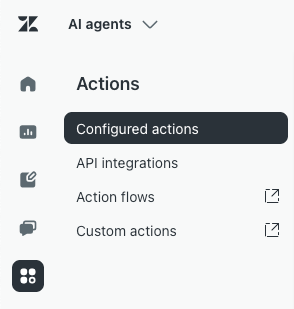
From here, you can create a configured action, API integration, action flow, or custom action.
About configured actions in AI agents
Configured actions can be used to enrich the conversation experience, retrieve or send conversation details to your CRM platform, or improve your understanding of your customer conversations overall. Configured actions can be applied at different points in the conversation journey, giving you flexibility to manage conversations, personalize responses, and interact efficiently with your CRM system.
When to use configured actions in an AI agent:
-
Use configured actions to update the parameters in the AI agent session, or else add labels to conversations for conversation design or reporting.
Where configured actions can be added:
-
Configured actions can be added at the AI agent level, the use case level, and the dialogue block level or in a procedure.
How to create a configured action:
How to add a configured action in an AI agent:
For more information, see the following resources:
About API integrations in AI agents
Previously, API integrations in AI agents were created through the integration builder, which provided a way to connect an AI agent to any API or data source without extended technical or programming skills.
When to use API integrations in the integration builder in an AI agent:
- Going forward, you should create API integrations through custom actions instead, as these serve the same function as API integrations created through the integration builder. However, the API integrations menu option remains available in the AI agents workspace for customers who need to maintain API integrations they've already created.
About action flows in AI agents
Action flows are user-defined automated sequences of steps that perform actions in Zendesk and external systems based on a defined event that initiates or triggers the workflow.
When to use action flows in an AI agent:
-
Use action flows when you need to integrate with an external system and multiple steps are necessary either due to data transformation needs or because multiple external systems are involved.
Where action flows can be added in an AI agent:
-
Action flows can be added at the dialogue block level or in a procedure.
How to create an action flow:
-
Creating action flows to automate processes across Zendesk and external systems
When creating an action flow for an AI agent, keep the following in mind:
- Unlike actions flows you may create in other contexts, action flows in AI agents do not consume action credits.
- Outputs of an action flow aren't available to test in the dialogue builder.
- If you create an action flow with branching conditions, you must pass a parameter at the end of the flow so the AI agent knows what to do with the flow's output (because it has only Success and Fallback scenarios).
How to add an action flow in an AI agent:
-
Add an Integration or action flow block in the dialogue builder, or insert a reference to the custom action in the procedure builder.
For more information, see the following resources:
About custom actions in AI agents
Custom actions allow you to update data outside of Zendesk using an API you specify.
When to use custom actions in an AI agent:
-
Use custom actions as the default way of integrating with an external system, if they don't already exist as standard actions in action flows. Simple requests that fetch or update data through a single endpoint should use a custom action.
Where custom actions can be added in an AI agent:
-
Custom actions can be added at the dialogue block level or in a procedure.
How to create a custom action:
How to add a custom action in an AI agent:
- Add an Integration or action flow block in the dialogue builder, or insert a reference to the custom action in the procedure builder.
For more information, see the following resources: