Summary: ◀▼
You can enable redaction suggestions to automatically highlight and redact personally identifiable information (PII) in ticket comments and PDF attachments. This feature supports multiple PII types and languages, helps protect sensitive data, and allows custom detection using RegEx patterns. Admins control which PII types to detect and when agents see suggestions. Automatic redaction triggers can also be set up to remove PII without agent action.
The redaction suggestions feature, part of the Advanced Data Privacy and Protection add-on, automatically highlights certain types of personally identifiable information (PII) within ticket comments for admins and agents with permission. Agents can then click the highlighted PII and quickly redact it. This helps keep confidential information out of Zendesk.
PDF attachments are also highlighted when PII is detected anywhere within the document. However, the entire attachment is marked rather than specific instances of PII within it. You can redact the entire PDF attachment, but individual pieces of content inside the document cannot be redacted separately.
When the redaction suggestions feature is turned on, admins can optionally create triggers to redact sensitive information automatically for PII in ticket comments, eliminating the need for agent intervention.
Redaction suggestions work for multiple languages. See Zendesk language support by product.
This article contains the following topics:
- Understanding redaction suggestions
- Turning on and configuring redaction suggestions
- Creating custom redaction suggestions using RegEx patterns
Related articles:
Understanding redaction suggestions
The redaction suggestions feature is similar to the ticket redaction feature. However, redaction suggestions proactively identify PII rather than rely on the agent to identify PII that needs to be redacted.
The redaction suggestions feature automatically identifies the following types of PII in ticket comments and PDF attachments:
- First name or surname
- Email address
- Address
- Credit or debit card number (including last four digits only)
- International bank account number (IBAN)
- Password
- Social Security Number (SSN)
- Bank account number
- Date of birth
- Driver’s license
- IP address
- Phone number
Identified PII is highlighted in orange. Admins and agents with the redact ticket content permission can see the highlighting and redact the information. Light agents can't see highlighted redaction suggestions.

The ticket context is important to redaction suggestions. For example, say that a date of birth is mentioned in a ticket. There must be context that the date is a date of birth, such as “DOB: 01/26/1990” or “My birthday is Jan 26, 1990”. If just a date is entered without context, then it won’t be highlighted as a redaction suggestion.
Redaction suggestions in ticket comments work on:
- Public comments
- Internal notes
- Content in archived or closed tickets for email, API, and webform channels
- Social messaging channels enabled through Sunshine Conversations
- Ended messaging conversations from the Agent Workspace
- AI-generated call summaries and transcripts
Redaction suggestions in PDF attachments work on:
- The Agent Workspace ticket interface
- API
- SMS
- Web form
- Submit a request/ticket form
If you redact a Zendesk message or a message created via the Sunshine Conversations SDK, the Support ticket interface shows the redacted areas of the messaging conversation within the context of the unredacted content. From the customer side, the entire message is deleted.
Redaction events are noted in a ticket’s event log so customers can be aware data has been deleted. In addition, when you redact ticket content, a redacted_content tag is automatically added to the ticket. When you redact ticket content, this causes an update to be made on the ticket using the same channel associated with the redacted content (for example, redacting a WhatsApp comment from a ticket). This behavior can cause triggers to fire if your trigger conditions are set to look for updates on a specific channel.
If you redact content on a ticket with an AI-generated summary, the summary can be removed from the ticket by refreshing the summary or closing and reopening the Agent Workspace tab. The summary is immediately removed from Zendesk's systems when a redaction is performed on a ticket, but the summary continues to appear in the browser until the page is reloaded.
Redaction suggestion limitations
Redaction suggestions don’t work on:
- Ticket subjects
- Messages stored in the Answer Bot service
- Channel framework-enabled tickets
- Ticket comments created from Mobile SDK, including those submitted through Zendesk's native support apps
- Tickets created from Slack Business Connect
- Slack side conversations
- Call summaries and transcriptions in Contact Center
- Content in archived or closed tickets for messaging channels
Additional limitations include:
- When you redact a ticket comment sent from an email channel, Zendesk does not redact the content of the original email in the email provider's channel (such as Gmail or Yahoo). Only the text hosted in Zendesk is redacted.
- When redacting a ticket, the underlying conversation is not edited on the social messaging platform and third-party integrations. It is redacted only within Zendesk-controlled systems. This also means that an end user, depending on how they communicate with your agent, may still see unredacted content themselves when accessing a message through different channels (for example, in Facebook Messenger).
- Redaction of messages exchanged between Answer Bot and end users is not supported.
- If triggers are configured before redaction, redacted content may persist in the channels launched by these triggers (for example, email conversations).
- Only PII detected in ticket comments can be configured for redaction with triggers. Attachments with PII detected are not yet supported with trigger redaction.
Turning on and configuring redaction suggestions
Admins can turn redaction suggestions on or off in Admin Center. By default, this feature is turned off. Admins can also configure which types of PII the feature should detect, as well as whether detected PII is highlighted in tickets for agents to see. When PII is selected, it will be detected in both ticket comments and PDF attachments. For example, if social security number is selected, any ticket comments and PDF attachments with a social security number will be highlighted.
PII is detected only after you turn on redaction suggestions for that specific PII type. PII cannot be detected retroactively. For example, an email address in a ticket comment would be detected only after you’ve already turned on PII detection for email addresses. Any email addresses included in comments that happened before you activated the setting would not be detected.
To turn on and configure redaction suggestions
- In Admin Center, click
 Account in the sidebar, then select Security > Redaction suggestions.
 - Under Choose which types of PII to suggest for redaction, select the types of PII you want redaction suggestions to automatically detect. The options are:
- Under Select when agents should see suggestions, select one of the
following options:
- Show suggestions in ticket comment and redaction editor. Agents will see highlighted PII when they’re working in tickets and when they open the redaction editor.
- Show suggestions in redaction editor only. Agents will see highlighted PII only when they open the redaction editor.
- Click Save.
Creating custom redaction suggestions using RegEx patterns
Zendesk includes built-in redaction suggestions for standard PII types, but some companies also need to protect unique, company-specific sensitive data. By creating custom redaction suggestions using regular expression (RegEx) patterns, admins can help Zendesk detect these values automatically and surface them as redaction suggestions in the Agent Workspace, where agents can review and redact them manually. If you use triggers to redact detected PII automatically, PII identified through custom redaction suggestions is also redacted. This provides a flexible way to protect sensitive information.
For example, you can create custom redaction suggestions when your organization needs to detect information like the following:
- Domain-specific identifiers
- Internal account or wallet IDs
- Medical or patient numbers
- Employee IDs
- Other structured values that are unique to your business
Up to ten custom redaction suggestions can be created. For more information about regular expressions, see Regular Expressions Language - Quick Reference on the Microsoft website. Zendesk uses Python to process regular expressions, which might vary slightly from other language implementations. For differences, see Using Regular Expressions with Python on the regular-expressions.info website.
To create a custom redaction suggestion
- In Admin Center, click
Account in the sidebar, then select Security > Redaction suggestions.
- Click Create.
- Add a name and description for the redaction suggestion.
- In the RegEx pattern field, define the regular expression pattern you want to
detect within a ticket conversation.
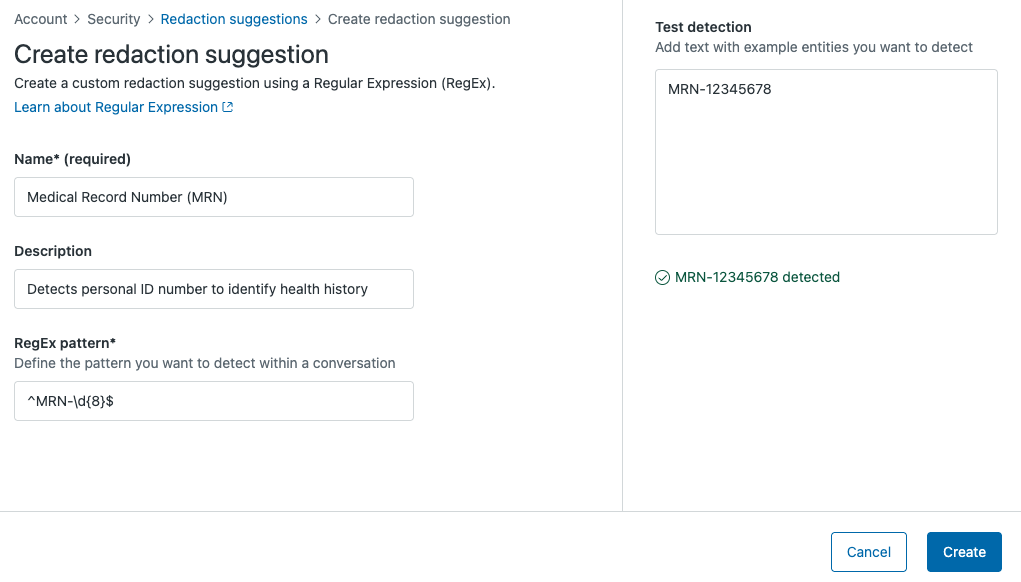
- In the Test detection field, add text with example PII that the redaction
suggestion should identify.
If Zendesk detects the PII, you've entered the correct RegEx pattern. If it isn't detected, revisit the RegEx pattern to make corrections.
- Click Create.
Turning off redaction suggestions
When you turn off redaction suggestions, PII is no longer highlighted in tickets.
To turn off redaction suggestions
- In Admin Center, click
Account in the sidebar, then select Security > Redaction suggestions.
- Under Choose which types of PII to suggest for redaction, deselect All types to clear all selections.
- Click Save.