Summary: ◀▼
Auto assist is an AI-powered assistant that helps you solve tickets with suggested replies, actions, and agent instructions based on procedures, help center articles, similar solved tickets, and other connected knowledge sources. Agents review and approve suggestions before sending them, which can reduce repetitive work, improve consistency, and help you close more tickets.
Auto assist is an AI-powered assistant for your agents. Using large language model (LLM) technology, auto assist understands the contents of submitted tickets and makes suggestions to your agents on how to solve them.
With auto assist, agents spend less time on repetitive tickets, solve tickets in a more consistent way, and ultimately close more tickets.
Watch the demo video below to see auto assist in action, or read on for more information about auto assist.
Zendesk agent copilot featuring auto assist (4:43)
This article contains the following topics:
- Understanding auto assist and how it works
- Understanding auto assist sources for suggestions
- Understanding auto assist suggestions
Related articles
Understanding auto assist and how it works
Auto assist is an AI-powered tool that proactively makes suggestions to your agents to help them handle tickets. These suggestions appear in the ticket interface in place of the composer and require agent approval before being sent to a customer. Customers aren't aware of auto assist during their interactions with agents, and agents are always in control of the replies they send to customers.

When using auto assist, agents don’t have to compose replies or execute actions themselves. Instead, agents review and approve the replies or actions suggested by auto assist. To learn more about the agent experience with auto assist, see Using auto assist to solve tickets.
Understanding auto assist sources for suggestions
While auto assist can make suggestions on any topic based on the sources listed below, it's essential to use procedures to achieve the best performance. When relevant help center articles are available, they're also used along with procedure content to generate suggestions. This can include public help center articles and internal help center articles that you've made available to auto assist through user segments. If there are no relevant procedures or help center articles available, then similar solved tickets are used.
See Managing sources for auto assist to configure access to auto assist sources.
Auto assist can suggest replies on any topic based on the following sources:
-
Procedures: Auto assist may suggest replies, actions, macros, and instructions based on manually created or AI-generated procedures. Your procedures can directly link to actions, action flows, macros, instructions, articles, and also reference certain ticket fields. Auto assist uses this procedure content, along with its built-in LLM training, to generate suggestions. You don’t need to map specific procedures to specific topics or other ticket metadata. Auto assist understands the content of a customer’s request out of the box and can map it to an existing procedure. See Understanding procedures to learn more.
-
Help center articles: Auto assist can use help center articles as a source for text replies. This includes public help center articles and internal help center articles that you've made available to auto assist through user segments.
-
Public help center articles are available to auto assist by default if they belong to the “Visible to everyone” user segment and your help center doesn't require sign-in.
-
If your help center requires sign-in, or if articles are restricted by user segments other than “Visible to everyone”, you must make the relevant user segments available to auto assist before it can use those articles. This also includes articles in the "Visible to everyone" user segment if your help center requires sign-in.
-
Only articles with a brand and language matching the ticket brand and language are used for reply generation. For example, if the brand on a ticket is Acme, then only articles with the Acme brand are considered.
-
Public help center articles that match the brand and language of the ticket can't be excluded from auto assist.
-
-
Similar solved tickets: Auto assist may use similar solved tickets as an additional source for text replies when relevant procedures or help center articles aren’t available. Referencing similar solved tickets helps auto assist improve its suggestions by incorporating real-world resolutions that capture how agents and customers communicate and solve issues. Only similar solved tickets with a brand matching the ticket brand are used for reply generation.
-
Additional knowledge sources: In addition to procedures, help center articles, and similar solved tickets, auto assist can use other knowledge sources. These include external knowledge connections, such as Confluence, and web crawler content. To use these sources with auto assist, you must activate them from the Auto assist page in Admin Center. These sources can be used to generate text replies only, and can’t be referenced in procedures.
User segment permissions for internal content in auto assist
Internal content includes help center articles and connected external content sources that are available through selected user segments. When you select user segments for auto assist, it can use content available to those user segments to generate text replies.
User segments define access to help center content for end users and agents. Auto assist can use content from the user segments you select regardless of which user segments the agent or end user belongs to.
The underlying source content remains restricted by its own permissions. However, auto assist may generate text replies based on that content for agents and end users who don’t belong to the related user segment.
Understanding auto assist suggestions
When making suggestions, auto assist takes into account the sources listed above and all public ticket comments in the conversation, including previously generated comments approved by the agent. Suggestions are made in response to only end-user comments, not agent comments.
Auto assist makes the following types of suggestions:
| Suggestion type | Description |
|---|---|
| Replies for the agent to make |
Text replies may include suggestions such as explaining a business policy to a customer, or helping the customer troubleshoot a problem with a product. Replies suggested by auto assist are automatically adapted to the conversation's tone and writing style to minimize the time agents spend editing responses. |
| Actions for the agent to take |
Auto assist may make suggestions for the agent to perform certain actions. For example, checking the status of a current order in Shopify, querying and modifying your own internal business systems, or performing third-party actions via API. Actions are suggested by auto assist only if they're defined in your procedures. The one exception to this is that auto assist may suggest setting a ticket status to Solved, even if this action isn't included in your procedures. Some actions, such as checking an order status, may be performed automatically by auto assist if the action was pre-approved by you or another admin in a procedure. Actions that are performed automatically are logged in the ticket's events and in the conversation log so that the agent is aware. For more information, see Understanding pre-approved actions. |
| Instructions for the agent to follow |
Auto assist suggests instructions to agents based on the flow of their conversation. Instructions are steps that agents should perform manually. For example, your procedures might include instructions for checking your internal stock management system if auto assist can't access it. Instructions for agents are suggested by auto assist only if they're defined in your procedures. |
Auto assist suggestions appear in tickets in the Agent Workspace interface in place of the composer. If you have permission, you can view the source auto assist used to generate the suggestion. See Viewing sources for auto assist suggestions to learn more.
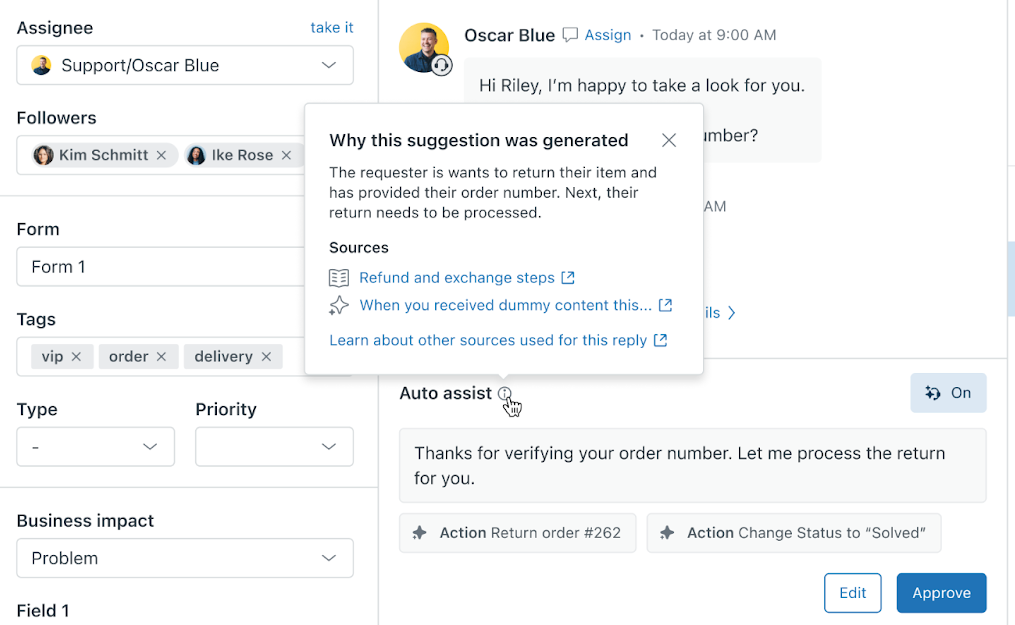
If you don't have permission to view an auto assist suggestion's source, see Understanding auto assist sources for suggestions.