| Announced on | Rollout starts | Rollout ends |
| February 13, 2026 | February 11, 2026 | February 12, 2026 |
We’ve streamlined the process for integrating an advanced AI agent with the email channel. As part of this change, you no longer need to create an authorized user to send responses from an advanced email AI agent, meaning an agent seat is no longer consumed.
This announcement answers the following questions:
What’s changing?
The connection between an advanced AI agent and the email channel is now based on subdomain. This means you can connect an advanced AI agent only to the production or sandbox subdomain of the environment it was created in. When you connect an advanced AI agent to email, the subdomain is automatically restricted to the production or sandbox environment.
Additionally, you no longer need to create an authorized user to send responses from an advanced email AI agent. Going forward, advanced email AI agents use an internal system user to send emails in response to customers. This means that no agent seat needs to be utilized for an advanced email AI agent.
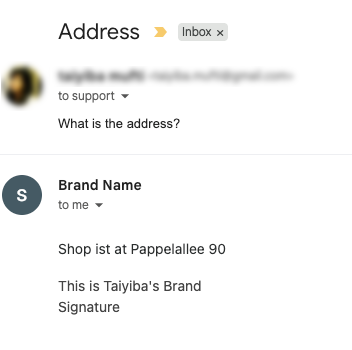
Customers continue to receive the AI agent’s email response from the brand name and support address you’ve selected in Admin Center. However, in the Agent Workspace, the ticket shows the AI agent’s response as coming from the system user.
 |
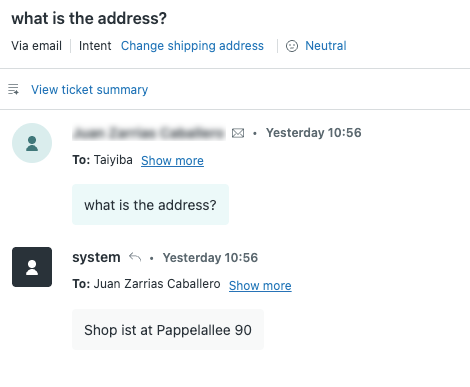 |
| What the customer sees in an email | What an agent or admin sees in the ticket |
Why is Zendesk making this change?
Advanced AI agents are a native part of Zendesk and should have out-of-the-box setup. This is the first step in simplifying the process and making it automatic in the future.
What do I need to do?
Triggers created by Zendesk as part of the advanced email AI agent connection process work automatically.
However, if you previously created or edited any triggers that relied on an authorized user sending replies on behalf of the AI agent, you must update those triggers to ensure your workflows continue to operate as expected. For help, see Removing the authorized user condition.
If you previously created an authorized user and were using it only for the advanced email agent, you can remove it to reclaim an agent seat in your account or else utilize the authorized user in a different capacity, as needed.
If you have feedback or questions related to this announcement, visit our community forum where we collect and manage customer product feedback. For general assistance with your Zendesk products, contact Zendesk customer support.