Verified AI summary ◀▼
Access the AI agents - Essential dashboard to track key metrics like conversation volume, automated resolutions, and escalations. Analyze customer satisfaction and identify trends with detailed reports. Understand which content your AI agents use most to generate answers, helping you optimize support operations and improve customer interactions.
Zendesk analytics features a prebuilt dashboard tab to help you monitor activity from AI agents - Essential. This tab empowers you to monitor key performance metrics of your AI agents, including customer satisfaction and the content AI agents reference to generate answers, all in one place.
This article contains the following topics:
Accessing the AI agents - Essential dashboard
Use the following procedure to access the AI agents - Essential dashboard.
To access the AI agents - Essential dashboard
- In analytics, click the Dashboard icon (
 ) in the left sidebar.
- From the list of dashboards, click the Zendesk AI: AI agents dashboard.
- Click the AI agents - Essential tab.
Understanding the AI agents - Essential dashboard reports
The AI Agents - Essential dashboard gives valuable insights to monitor your AI agents. By exploring the headline metrics and detailed reports, you can quickly answer important questions, such as:
- How many conversations are my AI agents handling?
- What proportion of conversations are resolved automatically instead of escalated to a human agent?
- How many conversations neither resolve nor escalate, indicating potential drop-offs or unresolved queries?
- Are customers satisfied with the AI agents' responses?
- Which content sources are AI agents relying on most when generating answers?
- Are there trends or seasonal patterns in AI agent performance over the past year?
AI agents - Essential dashboard headline metrics
This dashboard displays the following headline metrics (KPIs) for the time range and filters you specify:
- Conversations: The total number of conversations that occurred in your essential AI agents.
- Automated resolutions: The number of conversations that resulted in automated resolutions.
- Escalations: The number of conversations that resulted in escalations to human agents.
- Dropped conversations: The number of conversations that resulted in neither automated resolutions nor escalations.

AI agents - Essential dashboard reports
This dashboard includes the following reports for the time range and filters you specify:
-
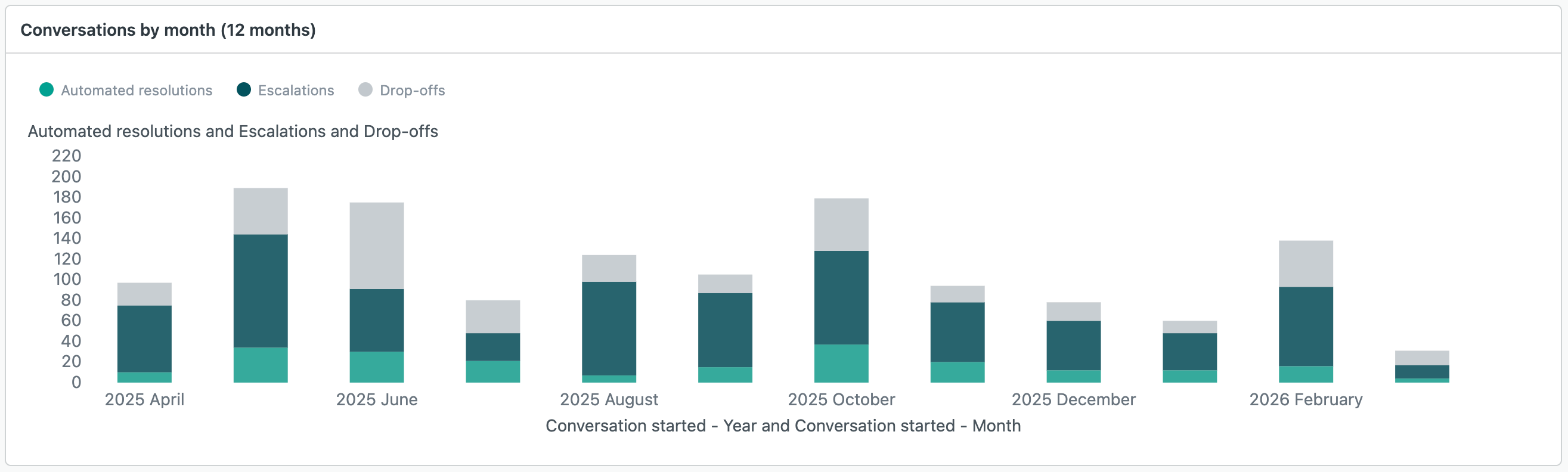
Conversations by month (12 months): A month-by-month view
of automated resolutions, escalations, and dropped conversations to help you
identify trends.
-
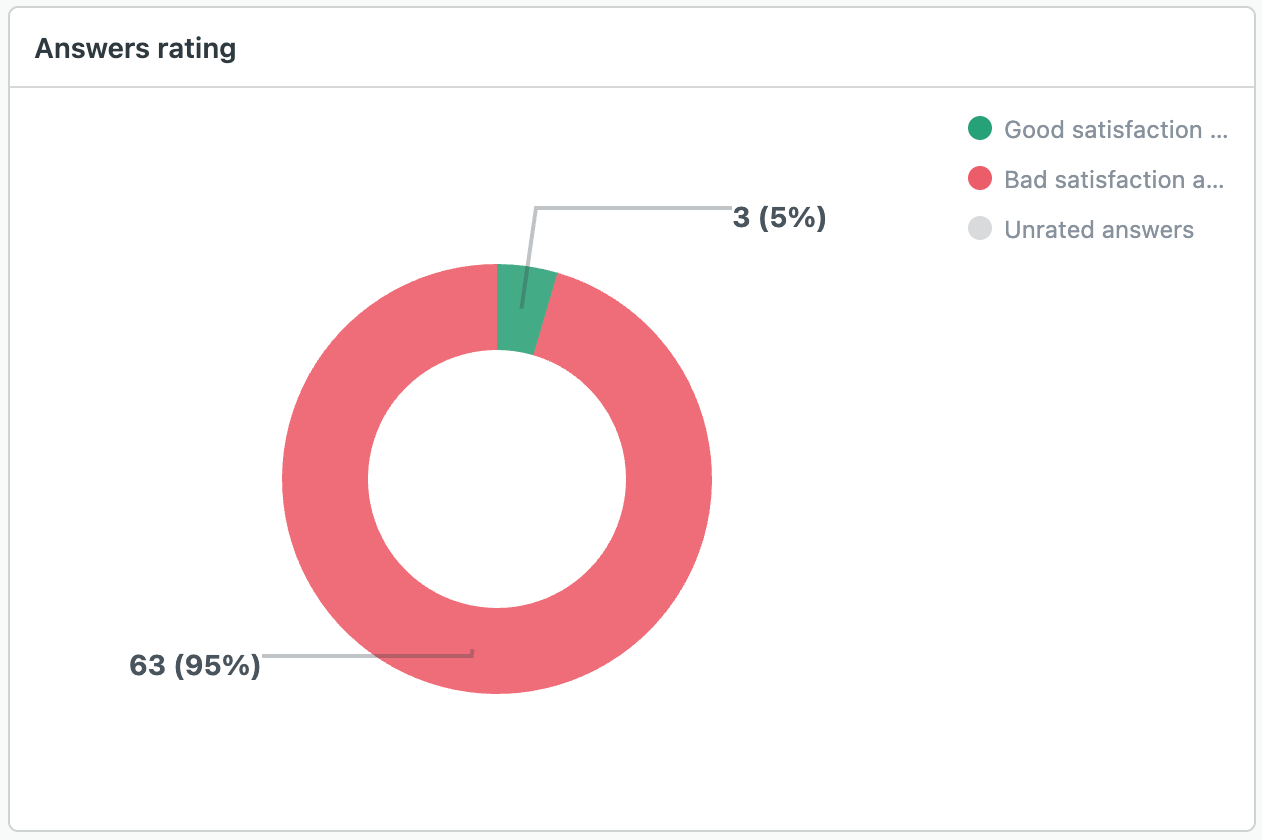
Answers rating: Displays good and bad satisfaction for
answers, helping you measure customer satisfaction with AI agents -
Essential.
-
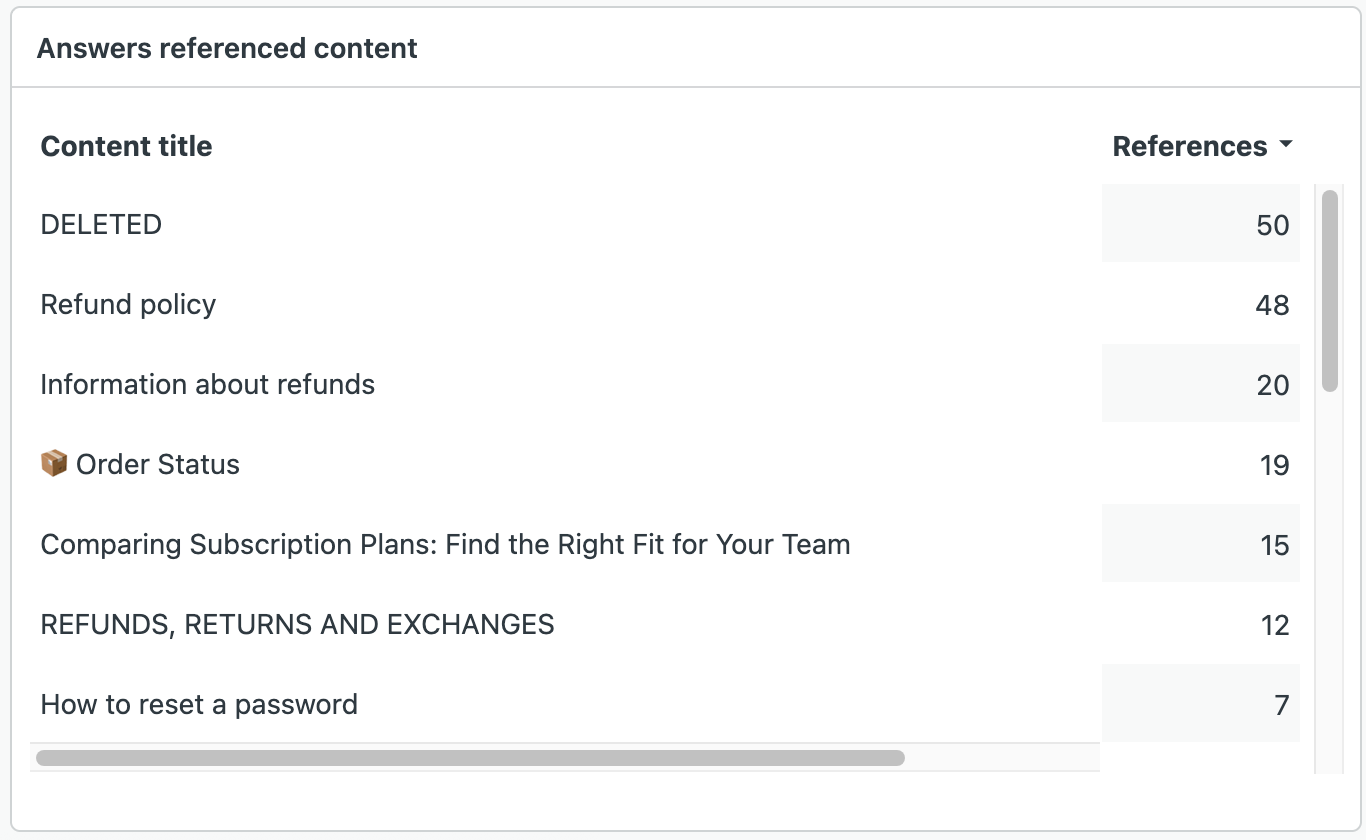
Answers referenced content (top 20): Lists the content most
frequently used to create answers, giving you a clear view of the topics
most asked in AI agent conversations.
Article Q&A
Click to view
How do I access the AI agents - Essential dashboard?
In Analytics, click the Dashboard icon in the left sidebar, select the Zendesk AI: AI agents dashboard, then click the AI agents - Essential tab.
What can I learn from the AI agents - Essential dashboard's headline metrics?
For the selected time range and filters, it shows total conversations, automated resolutions, escalations to human agents, and dropped conversations—those resulting in neither an automated resolution nor an escalation.
How can I use the dashboard to assess customer satisfaction and the content my AI agents use?
The Answers rating report displays good and bad satisfaction ratings for answers. The Answers referenced content (top 20) report lists the content most frequently used to generate answers.
How can I review trends in AI agent performance over time?
The Conversations by month (12 months) report shows monthly automated resolutions, escalations, and dropped conversations, helping you identify trends.
Is AI agents - Essential still supported, and what should I use instead?
The article says AI agents - Essential became legacy functionality on May 11, 2026, and is scheduled for removal in 2027. It points to an announcement for important dates and migration guidance, and to Creating an AI agent to automatically resolve customer issues for current functionality.