| Announced on | Rollout on |
| March 9, 2026 | March 9, 2026 |
We’re introducing the ability to configure a specific user to be used as the sender of any AI agent email responses. This change affects only the user shown in the ticket view in the Agent Workspace.
This announcement answers the following questions:
What’s changing?
We recently announced a change that streamlined the integration process and introduced a system user for advanced AI agents on the email channel. That change removed the need to use an agent seat to authorize your AI agent’s email responses. However, it also meant that responses to customer emails were sent from the system user when viewed in tickets.
Now, you have the option to configure a specific user to be used as the sender of any AI agent email responses, or else use the system user instead. Which option is right for you depends on your setup. For guidance, see Configuring the sender of advanced AI agent email responses.
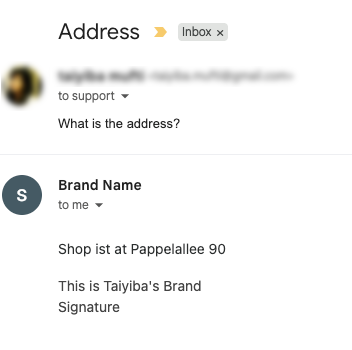
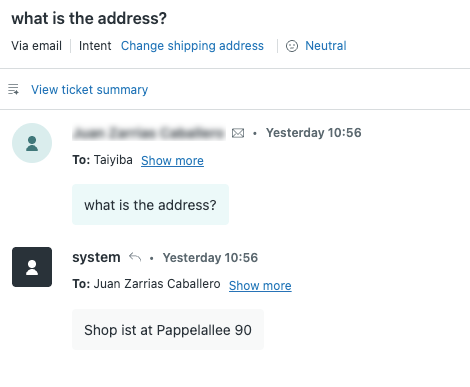
Customers continue to receive the AI agent’s email response in their inbox from the brand name and support address you’ve selected in Admin Center. However, in the Agent Workspace, the ticket shows the AI agent’s response as coming from the system user (by default) or else the sender you configure.
 |
 |
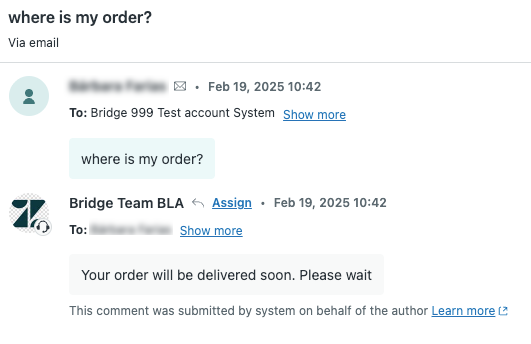 |
| What the customer sees in an email | If you use the default system user: What an agent or admin sees in the ticket | If you configure the sender: An example of what an agent or admin sees in the ticket |
Why is Zendesk making this change?
We realize that being able to choose your branding is important, which is why we’ve introduced the option to configure the sender of AI agent email responses in tickets.
What do I need to do?
If you’re currently using the system user introduced by the previous change, and you don’t want to configure the email sender as seen in tickets, no action is required.
If you’re currently using an authorized user that was configured before the previously announced change, that user is still used as the email sender. However, you now have the ability to change this user if desired.
If you want to configure a different user to be used as the email sender in tickets, see Configuring the sender of advanced AI agent email responses. Note that references to the user in any dependent triggers would require updating as well.
If you have feedback or questions related to this announcement, visit our community forum where we collect and manage customer product feedback. For general assistance with your Zendesk products, contact Zendesk customer support.