Summary: ◀▼
You can create reports to track how tickets are created and updated across various channels like email, chat, social media, and API. This helps you understand customer interactions and manage support requests from multiple sources, including messaging apps, phone calls, and web forms. Reporting on ticket and update channels provides insights into the origins and handling of support tickets for better team management.
In Explore, you can create reports based on the channel by which a ticket was created or updated. Channels are the means by which your customers create support requests and how you engage with them.
Use this article to learn how to report on channels in Explore. To learn more about channels in general, see About Zendesk channels.
This article contains the following topics:
Viewing ticket channels in Explore
You can create a report to see which channels have been used to create or update tickets and the number of tickets assigned to each channel.
To view your ticket channels
- In Explore, create a report in the Support - Updates history dataset.
- In the Metrics panel, add the Tickets updated metric.
- In the Rows panel, add the following attributes:
- Ticket channel: The channel by which a ticket was created.
- Update channel: The channel by which a ticket was updated.
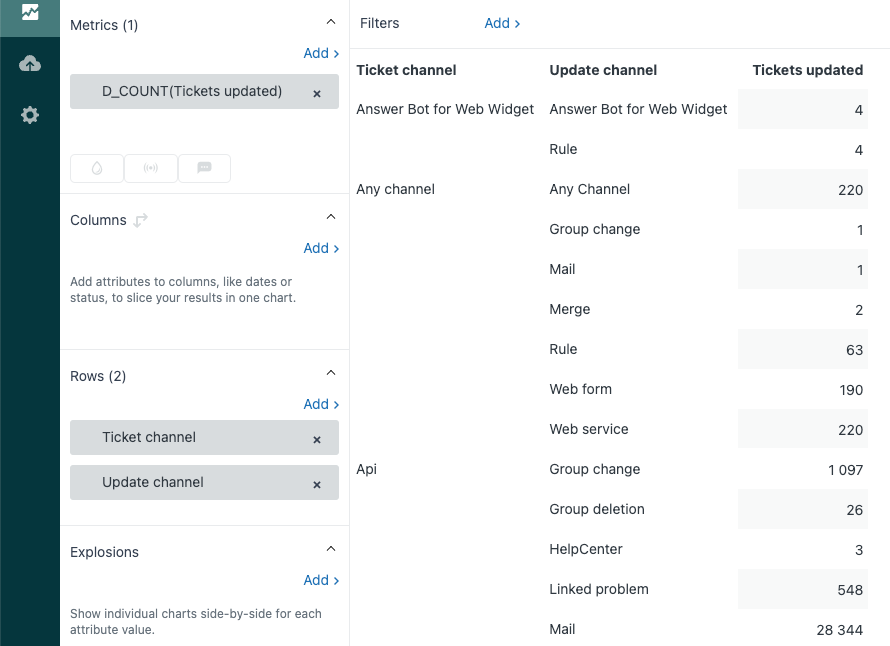
You'll see a table that looks similar to the example below. The specific channels you see will depend on the channels you have installed. For example, if you haven't set up Facebook integration with Zendesk Support, you won't see the Facebook channel.
Ticket channel attribute values
The following values are available with the Ticket channel attribute.
| Channel name | Description |
| Answer Bot for Web Widget | Tickets created from Answer Bot's Article Recommendations feature in the Web Widget (Classic) that led to a ticket being solved. |
| Any channel | Tickets created from third-party Zendesk integrations. |
| Api | Tickets generated or updated from the Zendesk API, for
example:
Corresponds to the Web service (API) channel in About Zendesk channels. |
| Chat | Tickets created from a Zendesk Chat session. |
| Tickets created from an email request. | |
| Tickets created from Facebook posts and messages. Corresponds to the Facebook message and Facebook post channels in About Zendesk channels. |
|
| Forum | Tickets created from a community post. Corresponds to the Forum topic channel in About Zendesk channels. |
| Help Center | Tickets created from a community post in the help center. Corresponds to the Help center post channel in About Zendesk channels. |
| Messaging | Tickets created from a web messaging conversation. For more information, see About messaging. |
| Mobile | Tickets created from a Zendesk mobile app. |
| Mobile SDK | Tickets created from a custom app using the Zendesk Mobile SDK. |
| rule | Tickets created, updated, or assigned through a system process governed by Zendesk’s inborn rules (such as ticket assignments, status changes, or mandatory fields). |
| Sample ticket | Typically refers to sample tickets included with new accounts and some new features. |
| Side conversation | Tickets or communications within a ticket that originate from, or is associated with, a side conversation. |
| SMS | Tickets created from a text message. Corresponds to the Text channel in About Zendesk channels. |
| System | Tickets created by Zendesk Support. Examples include tickets created by importing from another application. |
| Tickets created from an X Corp (formerly Twitter) mention, DM, or
like. Corresponds to the Twitter, Twitter DM, and Twitter Like channels in About Zendesk channels. |
|
| Voice | Tickets created from Zendesk Talk calls and voicemails. Corresponds to the Phone call (incoming), Phone call (outgoing), and Voicemail channels in About Zendesk channels. |
| Web | Tickets created from a Support web form, the Support agent
interface (created by an agent), or the Web Widget. For the Ticket channel attribute in the Support datasets, follow-up tickets are also shown in this channel regardless of how they are created. (The Update channel attribute in the Updates history dataset can return a value of Closed ticket.) Corresponds to the Web form and Web Widget channels in About Zendesk channels. |
|
If you're using the Zendesk Agent Workspace and add a social
messaging channel, these appear as ticket channels you can use in
your Explore reports. If you're not using the agent workspace, you can use tags associated with each channel in your reports. For help, see Monitoring your social media channels. Corresponds to the Social messaging channel in About Zendesk channels. |
Update channel attribute values
The following values are available with the Update channel attribute.
| Channel name | Description |
| Answer Bot for Web Widget | Tickets updated by Answer Bot's Article Recommendations feature in the Web Widget (Classic). |
| Any Channel | Tickets updated by third-party Zendesk integrations. |
| API Phone call inbound | Tickets updated by |
| Batch | Tickets updated by a system automation that auto-closes tickets. |
| Chat | Tickets updated by a Zendesk Chat session. |
| Chat Transcript | Tickets created from a live chat conversation where the transcript (full record of the chat) is included in the ticket. |
| Closed Ticket | Tickets updated by replying to closed tickets, also known as
follow-up tickets. This channel value can be returned in Explore only for the Update channel attribute in the Updates history dataset. (The Ticket channel attribute in the Support datasets returns a value of Web for all follow-up tickets.) |
| Facebook Message | Tickets updated by Facebook messages. Corresponds to the Facebook message channels in About Zendesk channels. |
| Facebook Post | Tickets updated by Facebook posts. Corresponds to the Facebook post channels in About Zendesk channels. |
| Group change | Tickets that were reassigned from one group to another. |
| Group deletion | Tickets updated as a result of their group being deleted from your Zendesk account. |
| HelpCenter | Tickets updated by a community post in the help center. Corresponds to the Help center post channel in About Zendesk channels. |
| Linked problem | Tickets (typically of Type “Incident”) that are associated or linked to a “Problem” ticket. |
| Tickets updated by an email request. | |
| Merge | Tickets that have been closed and combined into another ticket through the merge process. |
| Mobile | Tickets updated by a Zendesk mobile app. |
| Mobile SDK | Tickets updated by a custom app using the Zendesk Mobile SDK. |
| Native Messaging | Tickets created through Zendesk messaging including the messaging Web Widget, mobile SDKs, AI agents, and bot or API integrations. |
| Phone call inbound | Tickets updated by incoming phone calls using Zendesk Voice. |
| Phone call outbound | Tickets updated by outgoing phone calls using Zendesk Voice. |
| Rule | Tickets updated by a system process governed by inborn rules (such as ticket assignments, status changes, or mandatory fields). |
| Sample Interactive Ticket | Typically refers to sample tickets included with new accounts to showcase AI features. |
| Sample Ticket | Typically refers to sample tickets included with new accounts and some new features. |
| Satisfaction prediction | Tickets that have been evaluated by Zendesk’s machine learning model to predict the likelihood of receiving a good or bad customer satisfaction (CSAT) rating. |
| Side Conversation | Tickets or communications within a ticket that originate from, or is associated with, a side conversation. |
| SLA | Tickets matched by an active SLA policy. Only tickets that meet the conditions you set within your SLA rules will have an active SLA and be tracked accordingly. |
| Sms | Tickets updated by a text message. Corresponds to the Text channel in About Zendesk channels. |
| Sunshine Conversations Facebook Messenger | Tickets created from a conversation that originated on Facebook Messenger, integrated into Zendesk via the Sunshine Conversations (SunCo) platform. |
| Ticket Sharing | Tickets created or updated through the ticket sharing feature, which allows tickets to be shared and synchronized between different Zendesk Support accounts |
| Tickets updated by a Twitter mention or like. Corresponds to the Twitter and Twitter Like channels in About Zendesk channels. |
|
| Twitter DM | Tickets updated by an X Corp (formerly Twitter) DM. Corresponds to the Twitter DM channels in About Zendesk channels. |
| User change | Tickets with a significant change related to the user associated with the ticket; most commonly, a change in the ticket’s requester (the person who submitted the ticket) or another update to the user profile linked to the ticket. |
| Voicemail | Tickets created when a Talk voicemail is left. |
| Web form | Tickets updated by a Support web form or the Support agent
interface (created by an agent). Corresponds to the Web form channel in About Zendesk channels. |
| Web service | Tickets created or updated through the Zendesk API. This includes tickets generated by any integration, app, or external system that connects to Zendesk using the API, such as custom automations, webhooks, or third-party tools. |
| Web Widget | Tickets updated by the Web Widget. Corresponds to the Web Widget channel in About Zendesk channels. |