| Announced on | GA rollout starts | GA rollout ends |
| October 20, 2025 | Week of March 16, 2026 | April 16, 2026 |
Zendesk is announcing improvements and updates to ticket translation in the Zendesk Agent Workspace. We’re adding AI translation support for outgoing messages on all async ticket conversation channels, including email, web form, and API. We're also consolidating the translation engine used for both incoming and outgoing messages on async ticket conversation channels.
The article includes these sections:
- What is changing?
- Why is Zendesk making this change?
- What do I need to do?
- Are there any limitations?
- How do I provide feedback?
What is changing?
Previously, when an admin activated conversion translation, incoming messages on email channels were translated, but outgoing email messages were not. Now, incoming and outgoing translations will be supported for all async ticket conversation channels, including email, web form, and API.
For more information about translating ticket conversations, see these articles: Understanding conversation translation and Translating conversations.
This release also includes the following updates:
- Translated messages include icons to indicate the messages were translated by AI.
- Translation events are stored in the ticket's event log.
- When an agent chooses to translate a ticket, their preference to translate persists when the ticket is closed, then reopened. They don't have to keep clicking Translate when they reopen the same ticket.
-
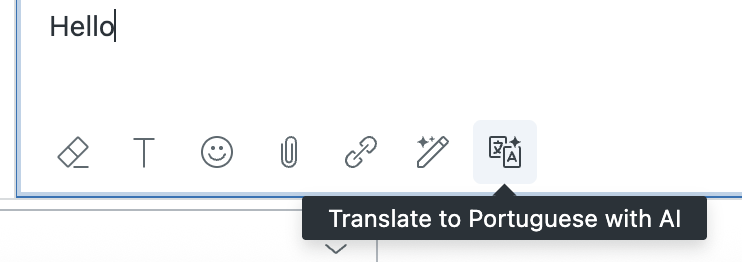
To preview a translated message before sending, click the Translate button in the ticket composer.
Why is Zendesk making this change?
We understand how important it is to communicate clearly with customers everywhere. That’s why we are providing multilingual translation support to cover all channels at Zendesk, so you can:
- Connect instantly with customers in their preferred language.
- Deliver faster personalized support.
- Improve customer satisfaction and loyalty worldwide.
- Empower your support team to work efficiently without language barriers.
- Expand your business globally with confidence.
With multilingual support, serving your diverse customer base becomes effortless, helping you build stronger, lasting relationships across the globe.
What do I need to do?
To activate automatic translation on outgoing async messages, Zendesk admins can turn it on from the Ticket settings page in Admin Center.
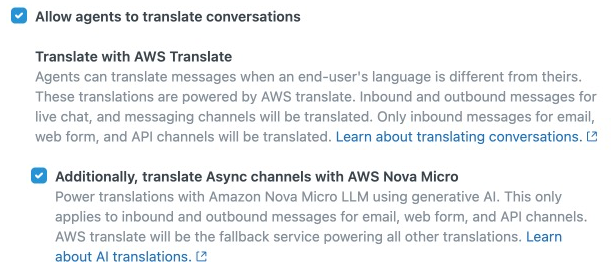
To turn on translations
-
In Admin Center, click
 Objects and rules in the sidebar, then select Tickets > Settings.
- Click Comment options for agents to expand it.
- Select Allow agents to translate conversations, then select Additionally, translate Async channels with AWS Nova Micro.
- Click Save.
Once the setting is activated, where applicable your agents will see a Translate button in the ticket header for async conversation channels. When they click the button, their outgoing messages are automatically translated.
Are there any limitations?
Translations limitations for async channels include:
- Translation results can be unexpected at times.
- Translations will work with a subset of use cases for all incoming and outgoing email triggers. We plan to expand this going forward.
- Rich text in the message might be lost or tweaked during translations.
- If the translation fails when an agent sends an outgoing email, the email will still be sent in the original language after five minutes.
- Translation glossaries and excluded terms for translations are scheduled for a future release.
- Messages containing Personally Identifiable Information (PII) or sensitive data are not translated due to data protection and content filtering restrictions.
How do I provide feedback?
If you have feedback or questions related to this announcement, visit our community forum where we collect and manage customer product feedback. For general assistance with your Zendesk products, contact Zendesk Customer Support.