Summary: ◀▼
You get a monthly allowance of Copilot AI features like generative writing tools and ticket summaries, based on your number of agents. Usage is pooled across your team, with a max limit of 500 uses per month. Monitor usage in Admin Center and upgrade to the full Copilot add-on or start a trial if you reach your limit or want more features.
To help you understand the benefits of Copilot and get familiar with how it works, all Zendesk Suite and Support Professional and above plans include access to certain Copilot generative AI features. These features are provided with a monthly usage allowance at no additional cost.
This article describes the Copilot features available to you, your monthly allowance, how to monitor your account's usage, and how to upgrade to the full Copilot add-on or start a 30-day trial.
This article includes the following sections:
- Understanding Copilot AI features
- Understanding monthly Copilot allowance usage
- Monitoring AI usage in your account
- Upgrading to the full Copilot add-on
Understanding Copilot AI features
The features listed in the table below are included as part of your monthly Copilot usage allowance at no extra cost.
| Feature | Description |
|---|---|
| Generative AI writing tools |
The generative AI writing tools are available within the ticket interface and help agents enhance the content of ticket comments. By default, writing tools are turned on and all groups have access. See Turning on the enhance writing generative AI feature to learn more and manage access. |
| AI-generated ticket summaries |
Ticket summaries provide a concise recap of tickets' public comments and internal notes. See Turning on and configuring AI-generated ticket summaries to learn more and manage access. |
Understanding monthly Copilot allowance usage
Select Copilot AI features are included with a monthly allowance on all Suite and Support Professional plans and above at no additional cost. If you have the Copilot add-on, you'll continue to have unlimited usage.
Your allowance and usage works as follows:
- Defining Copilot feature allowance: Your allowance includes a combined total of five uses per agent, per month. Usage is pooled across all agents in your instance, so team members can share the monthly allowance as needed.
- Calculating allowance: Your allowance is calculated as the number of agents multiplied by 5 uses per agent, per month. For example, if you have 10 agents, your team will have 50 uses available each month. However, your account has a maximum limit of 500 uses per month, even if your team has more than 100 agents.
-
Counting a use: A use is counted each time:
- An agent uses a writing tool, not just when the generated content is sent
- An agent manually generates a ticket summary
- Adding agent seats: If you add more agent seats during the month, then your monthly allowance is instantly updated. For example, if you add 10 additional agents then your account receives 50 more uses.
-
Reaching monthly allowance: When you reach your monthly allowance, access
to Copilot features is paused until your next billing cycle. Note: Your monthly allowance doesn't allow for overage, so you won't incur any overage charges.
You'll see notifications in Admin Center when you're nearing your monthly allowance and when you've reached it. Agents are notified in the ticket interface. To continue using Copilot features after reaching your allowance, you can upgrade anytime to the full Copilot add-on.
Monitoring AI usage in your account
You can monitor your Copilot usage to determine how close you are to your monthly allowance.
-
In Admin Center, click
 Account in the sidebar, then select Usage > Summary.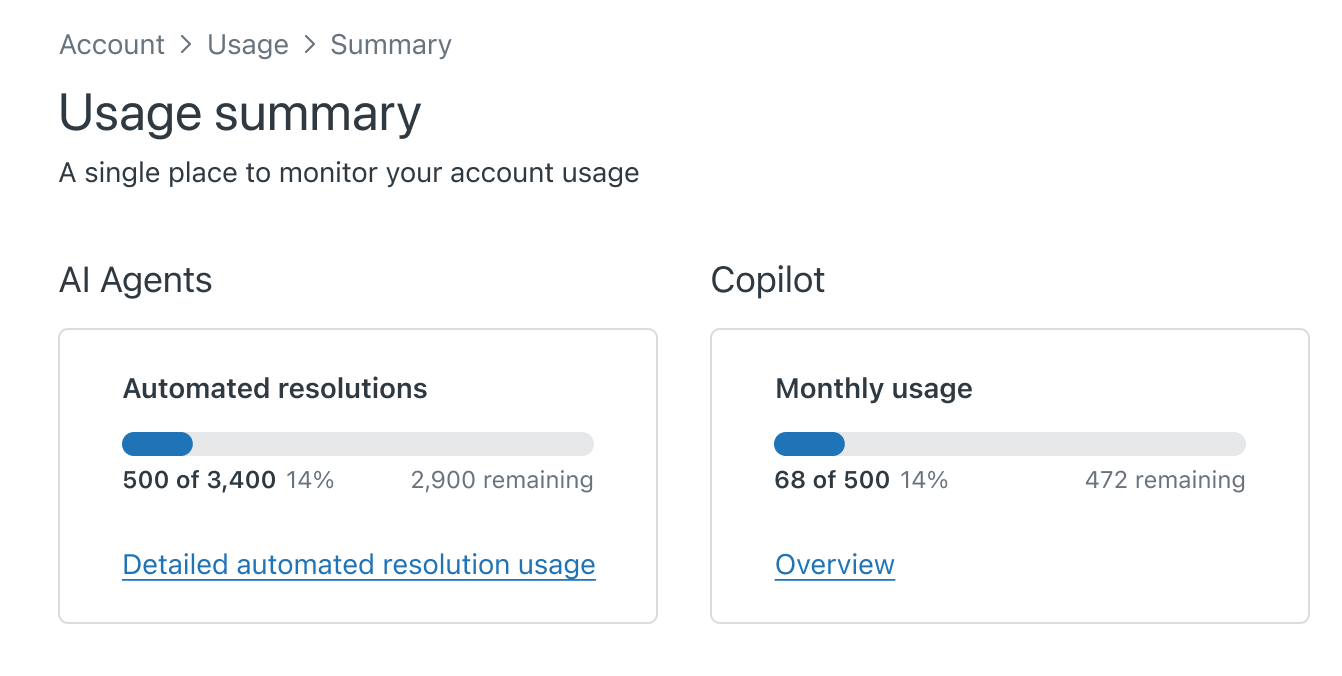
The Copilot Monthly usage box displays the number of AI feature uses in your account this month, and the number remaining.
- To learn more about Copilot features, click Overview.
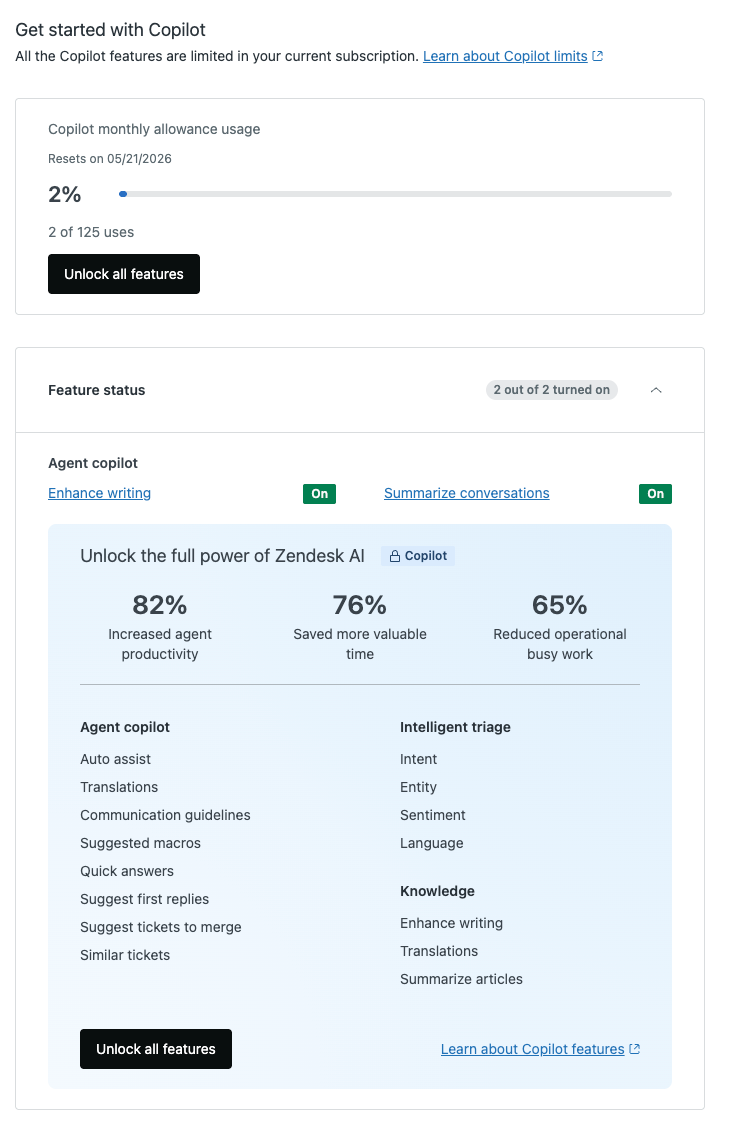
If you're a billing admin, you can also start a trial or buy the Copilot add-on from this page.
Upgrading to the full Copilot add-on
When the monthly allowance is reached, access to the features is paused until the next billing cycle. You may find that you're frequently reaching your monthly allowance or that you’re curious about additional Copilot features. In this case, you can:
- Start a 30-day free trial of the Copilot add-on from the Copilot Overview page or Launchpad.
- Purchase the Copilot add-on directly from your account. See Instantly buying the Copilot add-on.