| Announced on | Rollout starts | Rollout ends |
| June 25, 2026 | July 1, 2026 | Q4 2026 |
Some important changes are coming to how knowledge sources and search rules work in AI agents. These changes affect only customers who bought the AI agents - Advanced add-on before March 10, 2026. Customers who got started with AI agents after that date already have knowledge sources and search rules that work in the current paradigm.
On March 10, 2026, Zendesk implemented some infrastructure changes that affected newly implementing customers only. Starting July 1, 2026, we’re implementing these same infrastructure changes for existing customers. This migration to the new infrastructure will take place over a period of time, until the end of 2026.
This announcement answers the following questions:
- What’s the impact on my account?
- What’s changing?
- Why is Zendesk making this change?
- What do I need to do?
- How do I know when I’ll be migrated?
What’s the impact on my account?
Your account will be migrated during a period of low activity, as determined by an analysis of your account’s historic activity. During the migration, you can expect a downtime within the AI agents workspace only of up to two minutes. For one hour prior to the migration, you won’t be able to update your knowledge sources or search rules.
During the two-minute downtime, AI agent channels will experience the following effects:
-
Messaging: Ongoing messaging conversations may be interrupted, and new messages won’t be sent or received.
- In in-progress conversations, customers will see a message with a retry button.
- When the migration is complete, service will automatically resume and conversations can continue as normal.
- Messages sent on social channels will be delivered after the interruption.
-
Email: For emails sent by customers during the migration window, tickets are created but no AI agent response is sent.
- For the tickets created during the migration, you can view them and respond to them separately.
-
Voice: Active voice calls will be interrupted with a message informing the customer of needed maintenance, and the call ends.
- Because a new ticket is created when a call starts, this information will be available in your account after the migration is complete.
- After the migration, customers can start calls again.
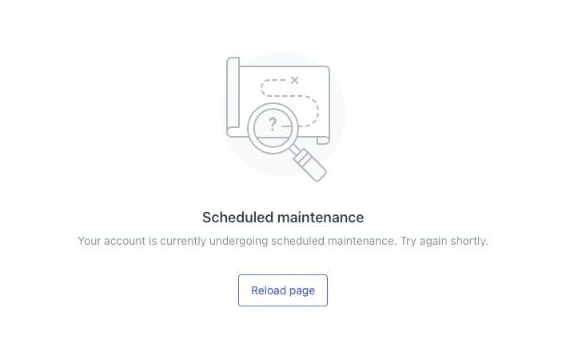
Additionally, during the downtime, admins will see the following message when attempting to access any page in the AI agents workspace:
What’s changing?
Beyond the temporary effects during the downtime window, the ongoing noticeable effects of these infrastructure changes have to do with the way knowledge sources and search rules work in AI agents. This sections below walk through these effects specifically:
- Zendesk help center connections consolidated and locale-scoping added to search rules
- Zendesk help center as a knowledge source respects viewing permissions
- Existing CSV imports work, but new imports cannot be added yet
- Connecting to different Zendesk help centers is now possible
- Zendesk web crawler replaces the previous web crawler
- More built-in connectors to external content sources are available
Zendesk help center connections consolidated and locale-scoping added to search rules
If you previously imported the same Zendesk help center as a knowledge source multiple times (each with a different locale specified), we’ll consolidate that into a single knowledge source—the Zendesk help center belonging to the same brand as the AI agent. We’ll then update your search rules to preserve the functionality that you originally configured. This might mean that we add, update, or merge locale filters in your existing search rules. In cases where a search rule previously had URLs under the Match ANY conditions evaluator at the search rule level, they will be moved to the Includes any evaluator at the parameter level.
If you previously imported a Zendesk help center from another account (such as importing your production help center into your sandbox account), we’ll recreate these connections using the Zendesk knowledge connector.
Optional context on why this locale-scoping is necessary: In the new infrastructure, a brand contains a single help center that can serve articles in multiple locales. In the previous infrastructure, individual knowledge sources were locale-scoped by design. Each knowledge source connection pointed to a single locale's article set, identified by the locale included in the URL (for example, subdomain.zendesk.com/hc/en-us). As a result, a customer with a help center available in three locales (for example, en-us, ro, and da) may have configured only two knowledge base connections (en-us and ro), intentionally excluding the third. When migrating, all knowledge source connections for the same Zendesk help center are consolidated into a single connection for the brand associated with the AI agent. Without the explicit locale scoping we perform as part of the migration, the knowledge source connection in the new infrastructure would return articles from all three locales, including da, which the customer never configured.
Zendesk help center as a knowledge source respects viewing permissions
In the infrastructure prior to March 10, articles you’d imported into an AI agent from a Zendesk help center were either public or private to everyone.
Going forward, Zendesk help centers connected as a knowledge source in AI agents respect article view permissions. You can restrict articles to specific user segments, so certain articles appear only to groups you define, such as premium customers or specific regions. You can also create internal-only articles that only signed-in team members see. You no longer need to create search rules for these scenarios.
For more information, see Using restricted help center content in AI agent responses.
If you want to keep articles hidden from both customers and internal employees but still available to an AI agent, use the Zendesk connector. When your account moves to the new infrastructure, the Zendesk connector is set up for you automatically, so this content keeps working in your AI agent with no action needed from you. If you want your AI agent to respect article view permissions instead, connect your help center as a knowledge source and remove the Zendesk connector at any time.
Existing CSV imports work, but new imports cannot be added yet
If you’ve already imported a CSV file as a knowledge source, your AI agent will continue to be able to leverage that information. Your existing CSV content is migrated automatically to the new infrastructure and remains fully retrievable by your AI agents, with no action required on your part.
However, you cannot yet add new CSV content in the AI agents workspace. This includes uploading new versions of an existing CSV. To address this, we're building a native, self-service CSV importer, which we plan to announce in the future. In the meantime, if you need to import new CSV content, contact Zendesk customer support.
Connecting to different Zendesk help centers is now possible
As previously announced, you can connect additional Zendesk instances to your primary Zendesk instance to make its help center content available as a knowledge source. This means you can connect a sandbox environment AI agent to your production environment help center, for example.
For more information, see Connecting Zendesk as an external knowledge source.
Zendesk web crawler replaces the previous web crawler
The Zendesk web crawler is replacing the previous version of the web crawler. The Zendesk web crawler supports a great majority of usage scenarios, including automatic link discovery and dynamically rendered content. After it’s set up, the crawler runs on a daily basis to ensure that data is always fresh.
If you’ve already imported content using the previous version of the web crawler as a knowledge source, your AI agent will continue to be able to leverage that information.
For customers who need additional controls over their web crawler setup, we’re planning the following future improvements:
- Custom URL filters (include/exclude URL)
- Increase number of base URLs
- Residential proxy
- Locale filtering and records multiplication
- Custom HTML settings (remove/keep HTML elements)
- Custom crawl scheduler
- Click elements (including dynamic wait, sticky container, wait for selector, and soft wait for selector)
- Support subdomains and other domains
More built-in connectors to external content sources are available
In the new infrastructure, Zendesk offers a wide array of connectors to external knowledge sources, including Google Docs, Sharepoint, Confluence and more. For the current full list, see Viewing all available Knowledge connectors.
Note that native connectors to Salesforce and Freshdesk are not currently available, but are planned for the future. In the meantime, if you need to import new content from these sources, contact Zendesk customer support.
We’re committed to continuing to increase the external content connector offering for our customers.
Why is Zendesk making this change?
Zendesk is making this change to simplify setup of search rules and knowledge sources. Specifically, our goals with this change are:
- Everything works out of the box. In the new infrastructure, your search rules, article view permissions, and knowledge sources are configured to work immediately. You don't need to set up CRM integrations or manage API tokens to get started. Permissions work right away without waiting hours for content to be re-indexed or processed.
- Merging Zendesk knowledge connections and search rules preserves what you've built. If you've tuned search rules for each language, we want those rules to work the same way after migration. We handle the merging, but you'll want to validate it works as expected.
- User segments give you visibility control. You can now segment your audience and show different articles to different customer groups in AI agent responses, giving you more flexibility in how you organize your help center.
- More ways to bring in your content. Your knowledge can live anywhere: a Zendesk help center, an external system, a website, or a CSV file. Many sources connect natively today, including help centers, sandboxes, web-crawled websites, and external systems like Google Docs, SharePoint, and Confluence. Others are on the way, including native Salesforce and Freshdesk connectors and a self-service CSV importer. Until then, our team can help you bring in CSV and other content directly.
What do I need to do?
We're handling the technical migration, so you don’t need to do anything to request the kickoff of the process. If you had the same Zendesk help center connected multiple times, the connections are automatically consolidated and the search rules are updated so that your single knowledge source serves all languages correctly. Your article visibility settings move over, and any previously imported CSV content becomes available with user segment controls.
We test everything before it goes to you, but migration is still a big change. That's why we want you to validate that things work the way you expect. Specifically, you should perform the following tasks:
- Review your article visibility strategy. Think about whether user segments make sense for your help center. If you want to restrict articles to specific customer groups or create internal-only content, now's the time to plan that out. You don't have to implement it right away, but it's worth considering.
- Check your CSV content. Your existing CSV content is automatically carried over as part of the migration. After the migration, confirm your AI agent still retrieves this content as expected. If you need to add new CSV content before the self-service CSV importer is released, contact Zendesk customer support.
Finally, here are some additional resources that might be helpful as you acclimate to the new infrastructure:
- Connecting knowledge sources to power generative replies in AI agents
- Configuring search rules for knowledge sources for AI agents
How do I know when I’ll be migrated?
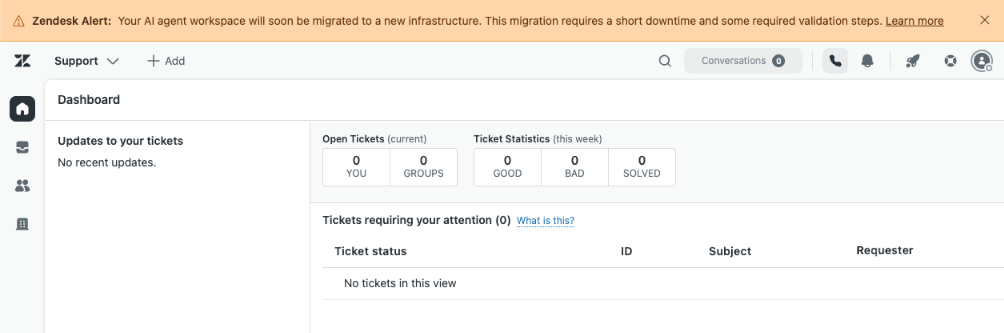
The migration period runs from July 1 to the end of 2026. Your account will be scheduled for migration at some point during this time. Prior to your account’s migration, admins and account owners will see an in-product message that appears at the top of the page.
Additionally, you can verify whether your account is on the previous infrastructure or the new infrastructure by checking the URL when you access the AI agent workspace. If the URL includes:
- *.ultimate.ai, you’re on the old infrastructure.
- <subdomain>.zendesk.com, you’re on the new infrastructure.
If you have feedback or questions related to this announcement, visit our community forum where we collect and manage customer product feedback. For general assistance with your Zendesk products, contact Zendesk customer support.