Verified AI summary ◀▼
Assignments in QA help you manage and review support interactions by setting up recurring tasks for reviewers. You can create assignments, configure reviewers and reviewees, set conditions, and define goals. This feature allows you to tailor the review process to your needs, ensuring quality assurance and performance tracking. You can also convert conversation views into assignments for streamlined management.
Workspace assignments and assignment cycles play a crucial role in evaluating and improving performance by providing a structured framework for measuring outcomes against established goals. Set up automatic assignment of conversations based on specific conditions to compare and review performance for agents. Reviewers are tasked with reviewing conversations and scoring agent performance.
By analyzing the data generated from these assignments, you gain valuable insights into your agents’ strengths and areas for improvement, which can lead to enhanced productivity and better alignment with organizational goals. This approach fosters a culture of accountability and continuous improvement within your teams.
This article contains the following topics:
Related articles
Creating agent QA assignments
Admins, workspace managers, and leads can set up agent QA assignments. See Understanding roles and permissions in Zendesk QA.
To create a new agent QA assignment
- In Quality assurance, click your profile icon in the top-right corner, then select Users, bots, and workspaces.
- Choose your workspace, then click Assignments.
- Click Create assignment.
- Select the Agent QA assignment type.
- On the General tab, enter an Assignment name.
- Under Cycle settings, select how frequently the assignment cycle repeats: Never,
Daily, Weekly, Bi-weekly, or Monthly.Note: When the new cycle begins, Zendesk QA fetches all applicable conversations and then doesn't fetch or refresh them again until the next cycle.
- Select a Start date and time.
For monthly assignments, also specify the recurrence and whether you want them to start on the same day every month or on specific dates, for example, the first day of the month or every fourth Thursday.
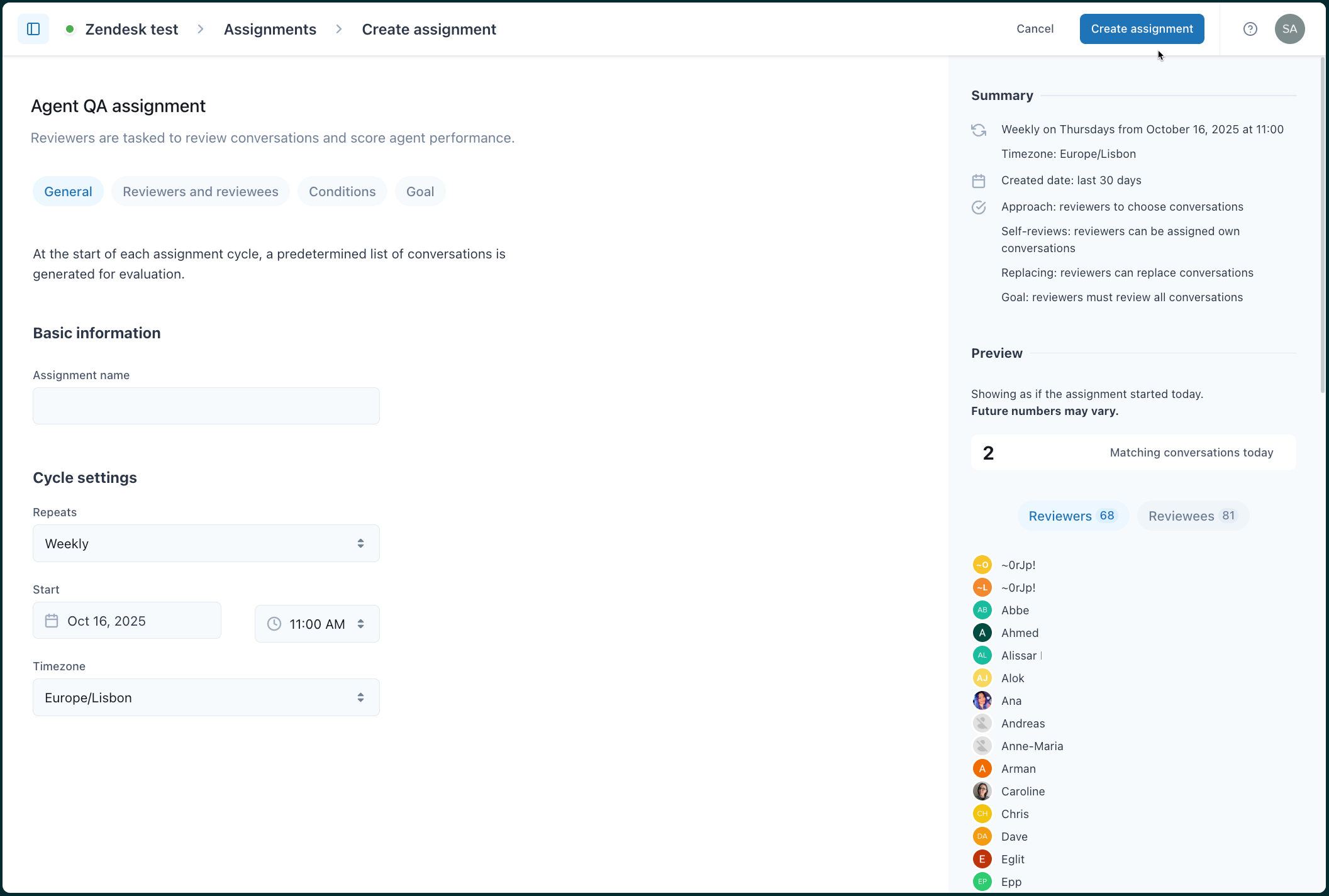
- Select the Timezone.
- Configure the assignment's reviewers and reviewees.
- Configure the assignment's conditions.
- Configure the assignment's goal.
- Click Create assignment.
Configuring agent QA assignment reviewers and reviewees
Use the Reviewers and reviewees tab to select who will be reviewed and who will act as the reviewer in your assignment.
When selecting who’ll review conversations, you can select all workspace users except agents, a group or selection of groups, a user, or a selection of users. You can also exclude users from reviewing and from being reviewed in conversations.
- Create a new agent QA assignment or edit an existing agent QA assignment.
- Click the Reviewers and reviewees tab.
- Under Reviewers, select who'll be doing the reviews from the following
options:
- All workspace users except agents (default)
- A group or a selection of groups
- A user, or a selection of users
- (Optional) If you select all workspace users except agents or a group or list of groups, you can also select the groups and users who shouldn't be reviewers for this assignment under Exclude reviewers.
- Under Reviewees, select who's being reviewed: Users or
Bots.

- Under Who will be reviewed?, select which users or bots should be
reviewed.
You can select all workspace users, a group or selection of groups, a user or selection of users, all bots, or only a selection of bots.
- (Optional) Under Exclude reviewees, select the groups, users, or bots who shouldn’t be reviewed in this assignment.
- (Optional) If you’re reviewing users and not bots with this assignment, also select
which type of user to include as a reviewee.
You can select from the following options:
- Workspace default. This is currently the most active agent in the workspace.
- Participant. When this option is selected, each conversation assignee and all conversation participants can be chosen as reviewees.
-
Assignee. When this option is selected, only the conversation assignee can be selected as reviewee.
- Click Create assignment if you’re creating a new assignment, or click Publish changes if you’re editing an existing assignment.
Configuring the conditions for the agent QA assignment
An assignment’s conditions describe the characteristics a conversation must meet to be assigned to a reviewer. For example, the conversations you want reviewed under the terms of an assignment might be summarized as “conversations with more than three replies in the previous 30 days.”
Assignment conditions in Zendesk QA are the same as the conversation filter types.
- Create a new agent QA assignment or edit an existing agent QA assignment.
- Click the Conditions tab.
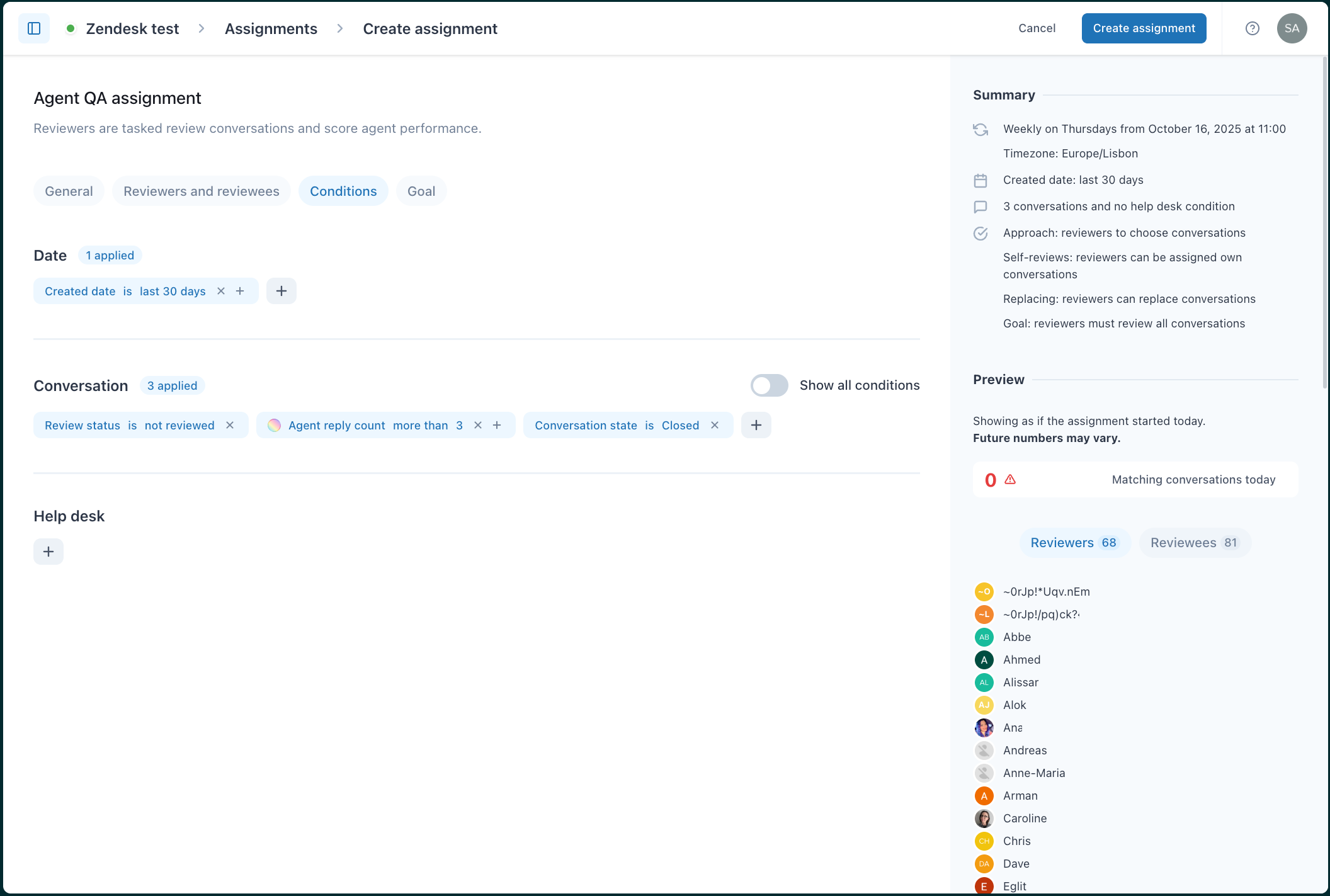
- Under Date, Conversation, or Help desk, click the add icon
(
 ) to add at least one condition to the
assignment.
) to add at least one condition to the
assignment.Turn on Show all conditions to display all available filters. You can either use the search box to find the filter type you want to create or scroll through the list until you find it. See Understanding conversation filter types in Zendesk QA.
- Click Create assignment if you’re creating a new assignment, or click Publish changes if you’re editing an existing assignment.
Configuring the agent QA assignment goal
The assignment goal is highly configurable. If you already have a QA approach, you can reflect the current process in these settings for how reviewers review conversations and score agent performance.
- Create a new agent QA assignment or edit an existing agent QA assignment.
- Click the Goal tab.
- Under Assignment approach, select how conversations in a shared pool are
assigned to reviewers from the following two options:
- Reviewers can choose conversations from the shared pool
- Reviewers are assigned conversations from the shared pool
- Under Review goal, select one of three options:
- Reviewers must collectively review a set number of conversations. You can set an exact number or a percentage of conversations that reviewers need to cover.
- Each reviewer must do a set number of reviews. Specify the individual goal for each reviewer.
- Each reviewee must have a minimum number of their total conversations reviewed. Define the reviewee-based objective by setting a specific number or percentage of conversations that must be rated for each reviewee.
- (Optional) Under Advanced settings, you can configure the following settings
by clicking the toggles to the on position:

- Specify minimum reviews for each reviewee: Turn this option on to ensure that a minimum number of reviews per reviewee are covered.
-
Allow reviewers to be assigned their own conversations for review: Turn
this option on to allow reviewers to complete self-reviews.Note: Agents don't have access to assignments.
- Allow replacing conversations (Reviewer role and above): In some cases, reviewers might want to skip a conversation in an assignment. Turn this option on if you want reviewers to be able to choose a different conversation to review instead of the one provided from the list.
- Click Create assignment if you’re creating a new assignment, or click Publish changes if you’re editing an existing assignment.
Turning a conversation filter into an agent QA assignment
Another way to create an assignment is by turning a conversation filter into an assignment.
- In Quality assurance, click
 Conversations in the sidebar.
 - Click Public filters or Private filters to display a list of your public or private filters.
-
Create a new filter or click the options menu (
 ) next to the filter you want to turn into an
assignment and select Edit.
) next to the filter you want to turn into an
assignment and select Edit. - At the bottom of the page, click Turn into an assignment.

- Select Agent QA.
- Click Create assignment .
The assignment is automatically added to your Tasks list.