| Announced on | Phase 1 rollout | Phase 2 rollout |
| February 26, 2026 | March 10, 2026 - March 31, 2026 | April 7, 2026 - April 14, 2026 |
Starting March 10, 2026, to better protect our customers, Zendesk will begin rolling out a new workflow requiring anonymous end users submitting requests through the help center to verify their email address.
This new workflow helps establish that the person submitting a request actually owns the email address they provided, which is an important signal of legitimacy. Verifying ownership ensures the requester can receive updates about the ticket, and adds friction against automated and spammy submissions so agents spend less time triaging noise.
This announcement includes the following topics:
- What's changing?
- Why is Zendesk making this change?
- When is Zendesk making this change?
- What do I need to do?
- Frequently asked questions
What's changing?
Zendesk is rolling out a new workflow to prevent spam attacks for our customers and their users. This new workflow will require anonymous (not signed‑in) end users who submit requests through your help center to verify their email address before an active ticket is created.
Submissions from anonymous end users will create a suspended ticket and send a verification email to the email address entered by the requester. Suspended tickets created from anonymous requests will receive their own unique suspension cause called Anonymous requests.
The ticket remains in a suspended state until:
- The end user clicks the verification link in that email (which recovers the suspended ticket).
- Or, an agent manually recovers the suspended ticket on the end user’s behalf by going to Views (
 ), selecting the Suspended tickets view, selecting the ticket(s) to recover, and then clicking Recover.
Suspended tickets are retained so agents can review and recover legitimate requests while keeping unverified or abusive submissions out of the active ticket queue.
The verification flow is separate and different from requiring users to sign in. With this change, users will not be required to sign in or create an account; they only need to click the link in the verification email.
This verification step uses the existing email verification message and link. If you’ve already customized your verification email template, it will be used for the verification email sent after an anonymous request.
This workflow applies to anonymous requests created through:
- Web form
If you’re using autoreplies to recommend articles (legacy) or AI agents to create replies based on help center content, it will no longer show for anonymous requests. - API requests to /api/v2/requests
- Web Widget (Classic)’s contact form
- Support SDK
It does not apply to:
- End users submitting requests while they’re signed in
- Agents creating tickets
- Requests created by sending an email to your support email address
- Requests created through Messaging channels
- API requests to /api/v2/tickets
- Tickets created as a result of a phone call
- Anonymous requests created without an email address
Why is Zendesk making this change?
Spam attacks are growing more frequent and more intense. Bad actors are using increasingly sophisticated tools to exploit open systems, harass users, and clog support queues. By verifying users at the source, you ensure your security and productivity.
These improvements increase the reliability of inbound requests, protect agent time, and improve the end‑user experience by making sure genuine requests are delivered and followed up on.
When is Zendesk making this change?
These changes will be released by Pod using the schedule below. If you need help finding your Pod, see What is a Pod?
Phase 1 rollout:
- March 10, 2026, 10am PST: Pod 26 (complete)
- March 19, 2026, 10am PST: All pods receive a new setting in Admin Center to turn off verification of anonymous requests
- March 24, 2026, 10am PST: Pods 13, 15, 17, 18, 19, 31
- March 31, 2026, 10am PST: Pods 20, 23, 25, 27, 28, 29, 30
Phase 2 rollout:
- Apr 7, 2026 - Apr 14, 2026, 10am PST: A small subset of customers
Final rollout:
- May 7, 2026, 10am PST: Customers who have previously requested an extension.
What do I need to do?
If you would like to use this new workflow, you don’t have to do anything. The workflow to verify anonymous requests will be turned on for your account, according to the rollout schedule.
If you don’t want to verify anonymous requests, you can turn it off starting March 19th when the new setting becomes available. Turning it off during the rollout prevents your account from receiving this change and preserves the existing workflow for anonymous requests (suspended tickets won't be created). See How to turn off verification for anonymous requests, below.
To get the most value from this feature, you should consider:
- Notifying your agents and admins about the new suspended ticket flow for anonymous requests, and ensure they know how to recover suspended tickets from the suspended tickets view.
- Reviewing your current workflow for handling suspended tickets to confirm you have a process in place to recover legitimate tickets when appropriate, and consider turning on suspended ticket notifications.
- Reviewing any internal runbooks that describe how anonymous requests are processed.
- Updating any help center articles or other public documentation that addresses your end users and how they submit requests.
If you have previously requested an extension to delay the rollout to May 7th, Zendesk will continue to honor that deferral and will be contacting you to confirm your submission. If you don’t turn off the setting for verification of anonymous requests before May 7th, it will default to be turned on.
How to turn off verification for anonymous requests
If you don’t want submissions from anonymous users to create a suspended ticket, follow the steps below to opt out. You can turn it on later to adopt the new workflow.
- In Admin Center, click People in the sidebar, then select Configuration > End users.
- In the Anybody can submit tickets section, clear the Verify anonymous requests checkbox.
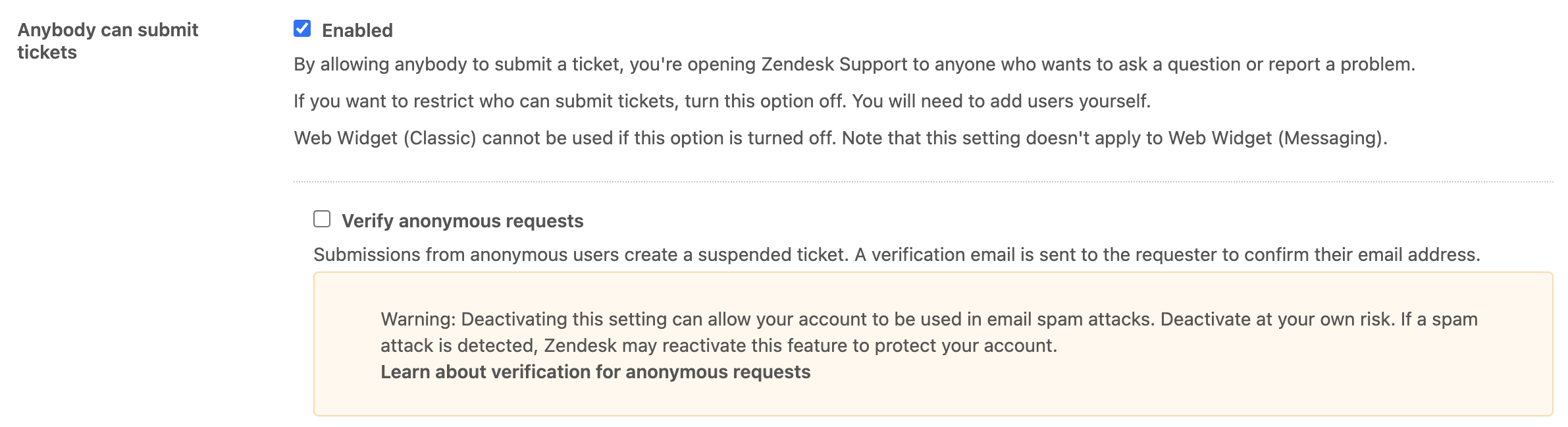
- Click Save tab.
Frequently asked questions
What’s the background and context for this change?
This change addresses an active abuse risk targeting our customers, their end users, and anyone with a valid email address. Repeated spam attacks have been exploiting anonymous request paths by submitting arbitrary email addresses and generating immense volumes of unwanted tickets and outbound notifications. Tactical measures like rate limits and detections help, but email verification is a targeted, more reliable control that materially reduces this attack surface.
What’s the verification email, and what does it say?
We’re reusing the existing verification email for this workflow. It’s not possible to customize it per brand. It does support dynamic content. It’s a one-time link that will expire either after it’s clicked or when the ticket has been recovered, whichever comes first. It will be sent from the default support address for the brand that the user submitted the request to.
Subject: Please verify your email address
Body (default): We need to verify that you are the owner of this email address. Please follow the link below to verify.
What if the end user already exists and their email address is already verified?
Verification is performed per each anonymous request; even if the email is verified and belongs to an existing user, the verification email will be sent for every anonymous request.
Is it not possible to use captcha or some kind of bot protection instead?
Customers are already protected by our Bot management layer. More information can be found in the CAPTCHA FAQ.
What is the end-user experience like for the web form?
- Click Submit a request in an open help center without being signed in.
- Fill out the form and click Submit.
A notification appears, communicating that the request has not yet been submitted. A verification email is also sent.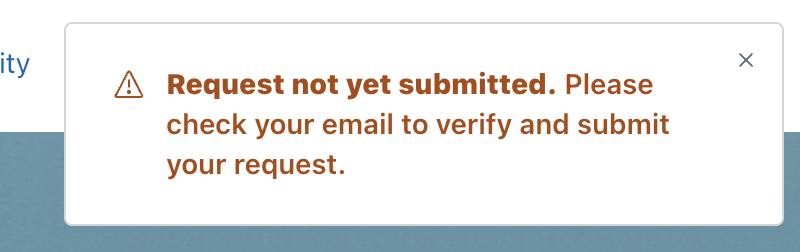
- Click the one-time link in the verification email.
A landing page with a success message appears.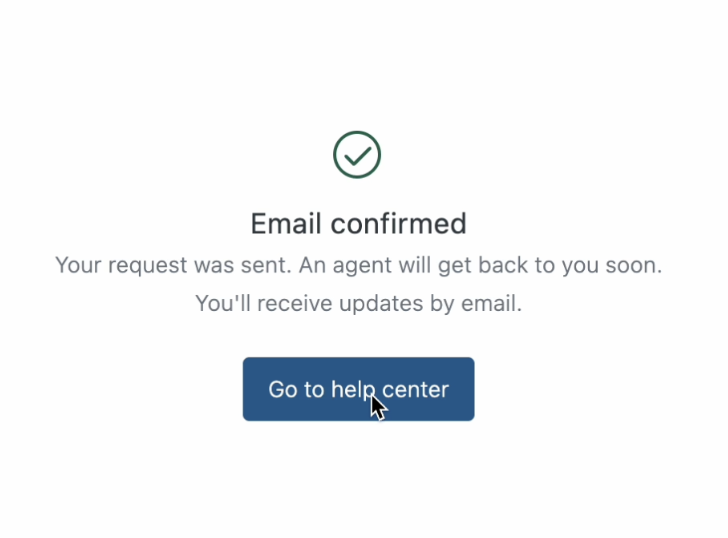
What happens when an “Anonymous request” suspended ticket is recovered?
When the ticket is recovered from suspension, it goes through all the same processes as a ticket creation. All the data from the form is preserved (fields, attachments, etc.) in the resulting ticket, and triggers are executed, including notifications.
Will autoreplies work after the suspended ticket is recovered?
Your autoreplies will still work once the ticket is recovered from suspended. This can happen automatically when the user clicks the verification link, or it can happen when an agent manually recovers a ticket.
Will triggers fire on the suspended tickets?
Triggers don’t fire on suspended tickets. Any triggers that you have configured will fire once the ticket is recovered, either by the user clicking the link in the verification email or manually by an agent.
What does "Zendesk may reactivate this feature to protect your account" mean, and how would that work?
The exact reactivation process is actively being worked on. Once finalized and approved for public disclosure, we will update this FAQ with the full details.
What more can I do to prepare?
- Customize the verification email so that it follows your brand and communication guidelines.
- Consider requiring end users to sign in to submit a request, which provides the strongest protection against unwanted anonymous requests.
- Add a banner or other UI change to your help center to notify your end users of the new workflow.
If you have feedback or questions related to this announcement, visit our community forum where we collect and manage customer product feedback. For general assistance with your Zendesk products, contact Zendesk Customer Support.