Zendesk measures your usage of AI agents by calculating the number of automated resolutions your account consumes each billing period. All Zendesk Suite and Support plans include a baseline number of automated resolutions based on your plan type. You can purchase additional resolutions, configure your account to pause AI agent features when you reach your resolution limit, or pay overage charges to keep your AI agent working.
This article describes how to manage your account’s available automated resolutions and what happens when you reach or exceed the number of automated resolutions available on your account. You can also monitor automated resolution usage on your account.
This article contains the following topics:
Related articles:
Avoiding automated resolution overage
You can configure your account to avoid automated resolution overage by increasing the number of automated resolutions available or updating your automated resolution usage settings to pause all AI agent capabilities when your automated resolution limit is reached.
If you want to ensure your account isn't consuming any automated resolutions, you can remove all capabilities related to AI agents. See Turning off automated resolution features.This section includes the following topics:
Maintaining or pausing functionality when you reach your automated resolution limit
To update your automated resolution overage setting
- In Admin Center, click
 Account in the sidebar, then select Usage > Overage.
 - Select your automated resolution overage option:
- Maintain functionality and allow overage (default setting), which lets AI agents continue to serve customers after you exceed your account’s baseline or purchased automated resolutions. When you select this option, your account will be charged for pay-as-you-go automated resolutions when you reach your automated resolution limit.
- Pause functionality and don’t allow overage, which pauses AI agent functionality, preventing overage charges. When you select this option, any capabilities that require automated resolutions will no longer function when you reach your automated resolution limit, and more support requests will be routed to live agents.
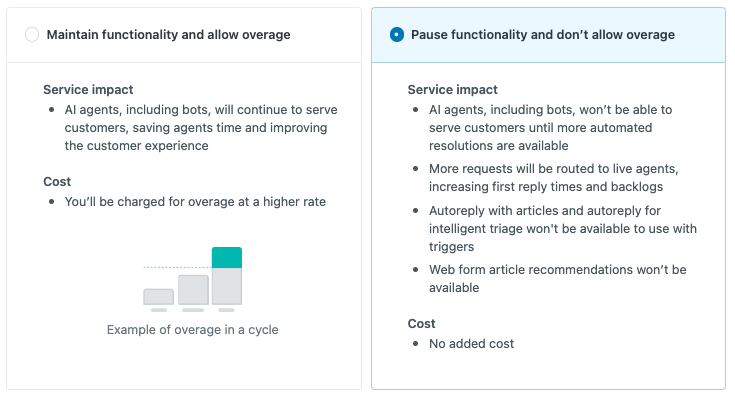
- Click Save.
Adding automated resolutions to your subscription
You can purchase additional automated resolutions for your account. Increasing your account's available automated resolutions extends your AI agent's functionality. You will still be subject to overage charges or capability interruption, based on your overage setting.
Purchasing additional automated resolutions adds a recurring order to your subscription. Automated resolutions do not roll over to the next billing period. To decrease or remove the additional automated resolutions from your subscription, contact Zendesk Customer Support.
To add automated resolutions to your subscription
- In Admin Center, click
Account in the sidebar, then select Billing > Subscription.
- Click the More products tab.
- Under Automated resolutions, use the slider to select the number of
automated resolutions you want to add to your account and click Add
to subscription.

- Confirm the order, then click Update subscription.
The automated resolutions are immediately available on your account. The order is added to your next billing invoice.
If you’ve purchased automated resolutions for your account and find you need more, you can increase the number of additional resolutions included in your recurring order.
To increase your additional automated resolutions
- In Admin Center, click
Account in the sidebar, then select Billing > Subscription.
- Click the More products tab.
- Under Automated resolutions, use the slider to adjust the number of
automated resolutions on your account and click Update
subscription.

The additional automated resolutions are immediately available on your account. The increase is reflected on your next billing invoice.
Understanding what happens when you reach your automated resolution limit
You can determine how your account is impacted when you exhaust your available automated resolutions. You can choose to automatically pause features that require automated resolutions, or to pay for overages as you go.
This section includes the following topics:
Automatically pausing AI agent features
If you choose to pause AI agent functionality to avoid overage charges, any AI agent capabilities you have configured will automatically stop functioning when you reach your automated resolution limit. Your capability configurations are not altered when paused and will automatically resume functioning when automated resolutions are again available for your account.
For legacy AI agents functionality, impacted capabilities might vary. See Understanding paused capabilities for legacy AI agents functionality.
Understanding paused capabilities for legacy AI agents functionality (legacy)
If you pause AI agent functionality to avoid overage charges, impacted AI agent capabilities depend on your legacy AI agents version:
-
AI agents - Essential for messaging
AI agent capabilities, including standard responses, generative replies and personas, and answers created in bot builder (legacy accounts only), are paused on all channels. When paused, your AI agent will respond only with the default messaging response, which can be configured to transfer conversations to human agents. Active AI agent conversations may be interrupted.
All proactive messages configured to respond with an AI agent are paused. When automated resolutions are available for your account again, you’ll need to manually reactivate them on the Proactive messaging admin page.
-
AI agents - Essential for email
Articles are not suggested in email notifications. In emails, the autoreply with articles action will pause, but the rest of the actions within the trigger will continue to run.
-
AI agents - Essential for web forms
Articles are not suggested in web form notifications. In web forms, articles will no longer be recommended after the customer has submitted the web form.
-
Article recommendations (Web Widget Classic)
Web Widget Classic will stop suggesting articles in response to customer messages. Customers can still access other features configured for the channel, such as submitting a form or initiating a voice chat.
Accruing overage charges
If you do not pause AI agent capabilities, you may exceed your allotted number of automated resolutions (including both the default resolutions included with your plan and any additional purchased resolutions).
When this happens, your AI agent capabilities will continue functioning as designed, and you will be billed for each automated resolution consumed over your allotted amount.
For more information, see the AI agents section in the plan comparison table on the Zendesk pricing page.